About Match Pictures To Words
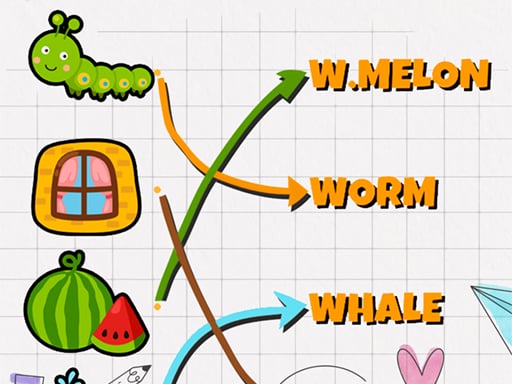
Match Pictures To Words is a straightforward educational puzzle game designed to connect visual items with their corresponding written names. Players drag illustrations directly onto target words across two distinct difficulty modes, receiving immediate visual confirmation for every successful pair.
In Match Pictures To Words, players explore a user-friendly interface accompanied by kid-friendly background music and audio effects. The game revolves around identifying visual cues and connecting them with corresponding written terms on the screen. Whenever an illustration is dropped onto the correct label, a positive confirmation message appears, while mismatched attempts trigger an error alert.
The experience offers two dedicated formats tailored to different play styles. Easy mode allows players to navigate back and forth at their own pace without time pressure or penalties, making it accessible for early learners. Normal mode introduces a challenge by providing three lives, where mistakes deplete your life pool until a game over occurs.
Your goal
The primary objective is to correctly pair every featured picture with its corresponding written word. In Easy mode, your goal is to practice freely and complete pairs without penalties, while Normal mode challenges you to clear each puzzle while preserving your three available lives.
How to play Match Pictures To Words
1. Select either Easy mode for relaxed practice or Normal mode for a three-life challenge.
2. Examine the displayed pictures and scan the available word labels across the screen.
3. Click on a picture with your mouse and drag it toward the matching word.
4. Drop the picture onto the target text to see if a success or error notification appears.
5. Continue pairing all items while monitoring your remaining lives if playing on Normal mode.
Controls and device support
Left Mouse Button (Click and Drag): Select a picture and drag it over the corresponding word label
- Controls: Mouse or touch
- Device support: Browser
- Game frame: 1280 x 800
Rules to keep in mind
- Dropping a picture over the correct matching word triggers a well done confirmation message.
- Placing an image over an incorrect word displays an error message.
- In Normal mode, players start with three lives, and incorrect matches lead to a game over when all lives are lost.
- Easy mode allows free navigation back and forth across tasks without life limitations.
What makes the challenge interesting
Gameplay centers on visual vocabulary reinforcement and accurate mouse coordination. Because the game provides immediate visual feedback through success and error messages, players can quickly confirm associations. The distinction between Easy and Normal modes shifts the experience from relaxed vocabulary building to a careful puzzle where each mistaken drag reduces one of your three allotted lives.
Tips for Match Pictures To Words
- Start in Easy mode to become familiar with the picture set and vocabulary before testing your skills under Normal mode restrictions.
- Double-check the spelling of the target word before dropping your picture to avoid losing one of your three lives in Normal mode.
- Pair the most obvious illustrations first to reduce the pool of remaining words for harder or unfamiliar items.
The skills behind the game
As part of the puzzle and educational categories, Match Pictures To Words emphasizes early language learning, letter recognition, and association skills. It combines interactive drag-and-drop mechanics with family-friendly audio to create a gentle learning environment suitable for young players and puzzle fans.
Who will enjoy this game
Whether you want to match pictures to words for practice or play a match pictures to words game with structured lives, the title delivers an accessible puzzle game online. Its simple controls and clear visual prompts make word matching straightforward and engaging.
Frequently asked questions
What is the difference between Easy and Normal mode? Easy mode lets you move freely back and forth without stress, while Normal mode provides three lives and ends in a game over if all lives run out.
How do you match pictures to their words? Click on a picture using your mouse, drag it directly over the corresponding text label, and release it to submit your answer.
What happens when you make a mistake? The game displays an error message. In Normal mode, incorrect placements also deduct from your pool of three lives.
Something not right?
Tell us if the game does not load, the information is wrong or the content needs review.
Report a problem ›