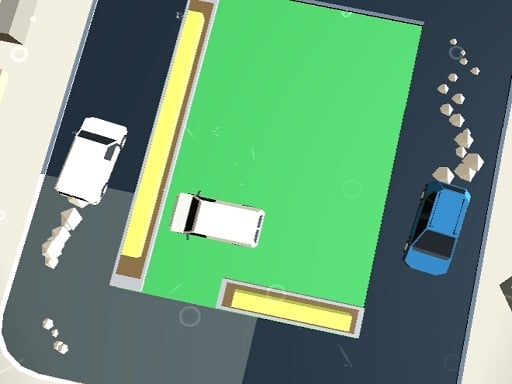
About Swipe To Park The Cars
Swipe To Park The Cars is a 2D skill-based parking game where players maneuver a fleet of colorful vehicles into matching designated bays. Built for straightforward browser sessions on desktop and mobile devices, the game challenges you to assess crowded layouts, negotiate tight gaps, and steer each car cleanly to its assigned space.
In Swipe To Park The Cars, the playing area presents a bird's-eye view of structured parking scenarios filled with obstacles, perimeter boundaries, and assigned stalls. Rather than handling full vehicle physics like manual gear changes or steering wheels, you guide each car using directional swiping and pointer interactions.
Every layout tests your visual planning and spatial awareness. You must observe the entire lot, identify the correct spots for each distinct vehicle, and execute your movements cleanly. As parking arrangements grow more crowded, the paths narrow, requiring players to stay alert and avoid accidental entanglements between moving vehicles and stationary boundaries.
Your goal
The primary objective in Swipe To Park The Cars is to guide every vehicle in your fleet safely into its designated parking spot without colliding into barriers or other cars. Completing each scenario demands finding efficient travel corridors, sequencing car dispatches properly, and maintaining consistent movement precision.
How to play Swipe To Park The Cars
1. Examine the layout to identify where every car is currently located and locate their target parking bays.
2. Plan a sequence of movements so earlier cars do not block the travel routes needed by subsequent vehicles.
3. Click or touch and drag in the desired direction to swipe a car toward open driving lanes.
4. Steer through narrow passages and tight corners while avoiding contact with curbs or nearby vehicles.
5. Settle each vehicle squarely inside its assigned bay to complete the parking setup.
Controls and device support
The game utilizes intuitive mouse click-and-drag or touchscreen swipe inputs to steer vehicles across the parking lot.
- Controls: Mouse or touch
- Device support: Desktop + mobile
- Game frame: 800 x 600
Rules to keep in mind
- Each car in the fleet must reach and settle inside its designated parking spot.
- Vehicles are steered along paths using swipe inputs and directional pointer drags.
- Navigating tight spaces and crowded lots requires avoiding obstacles and maintaining vehicle clearance.
What makes the challenge interesting
Swipe To Park The Cars emphasizes route visualization, directional precision, and timing. The central challenge revolves around spatial puzzle-solving rather than realistic driving simulation. Players must evaluate the geometry of the entire lot before initiating a move, checking whether driving one car ahead will create a roadblock for another.
The core tradeoff in each scenario lies between rapid execution and careful path verification. Swiping quickly can save time, but hurried inputs in congested sections increase the chance of clipping tight borders or misdirecting a car into a dead end.
Tips for Swipe To Park The Cars
- Survey the entire board before swiping your first car to identify which parking bays have the most restricted entry corridors.
- Move vehicles located deepest inside bottlenecks first, freeing up vital central lanes for easier maneuvering later in the round.
- Make short, deliberate swipe gestures instead of long frantic drags to retain better steering control through narrow passages.
- Avoid rushing adjacent cars into the same intersection simultaneously, as crowded crossings easily lead to obstructed trajectories.
Stages and progression
The game advances by introducing increasingly complex parking scenarios. Initial stages offer open layouts with straightforward paths to each parking stall, allowing players to build familiarity with swipe sensitivity and vehicle motion.
Subsequent levels introduce denser arrangements, tighter gaps between structures, and larger fleets of colorful cars sharing limited driving lanes. Overcoming advanced boards requires steady patience, refined spatial planning, and deliberate execution.
Playing on different devices
Swipe To Park The Cars runs inside modern web browsers across desktop computers, tablets, and smartphones. On touch-enabled devices like mobile phones and iPads, direct finger swipes offer natural, responsive steering. On desktop setups, clicking and dragging with a mouse provides clear directional guidance across the 800x600 display canvas.
The skills behind the game
While listed under the action category, Swipe To Park The Cars blends quick-response navigation with spatial logic puzzles. Parking games test a player's ability to gauge clearances, manage tight angles, and execute smooth trajectories within confined boundaries.
By shifting the focus away from traditional high-speed racing toward careful vehicle placement, the title offers accessible mental coordination challenges that appeal to fans of casual vehicular puzzles and precision skill games.
Who will enjoy this game
Players looking for a lightweight car parking game online will find an approachable balance of route planning and tactile control in Swipe To Park The Cars. The pick-up-and-play format works well for short practice breaks, helping players sharpen their spatial assessment skills and swipe accuracy.
Because it runs directly in standard web browsers without extra installations, the game provides immediate access for anyone seeking a casual action and parking challenge on either desktop or mobile screens.
Frequently asked questions
What kind of game is Swipe To Park The Cars? It is a 2D casual parking and skill game where players guide multiple vehicles into assigned parking spots across crowded lots using swipe controls.
How do you control vehicles in the game? You control the cars by clicking and dragging with a mouse on desktop or swiping your finger on touchscreen mobile devices.
Can you play Swipe To Park The Cars on mobile devices? Yes, the HTML5 build is compatible with mobile browsers, supporting direct touch controls on Android and iOS devices.
Something not right?
Tell us if the game does not load, the information is wrong or the content needs review.
Report a problem ›