Official listing
Game description
Physics based puzzle game. Rotate the screen to get the ball to the exit. Don't touch the spike and don't fall down. Test your skills with 15 unique levels.
Puzzles game
Push Tiny Ball is a physics-based puzzle platform game where your objective is to guide a small ball safely to the exit. Instead of directly steering the ball, you rotate the entire screen environment using keyboard arrow keys, mouse controls, or touch inputs to let gravity navigate the stage across 15 unique levels.
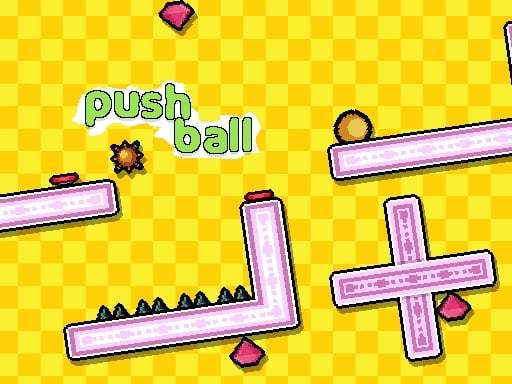
Choose Play now to load the game.
Official listing
Physics based puzzle game. Rotate the screen to get the ball to the exit. Don't touch the spike and don't fall down. Test your skills with 15 unique levels.
From the game listing
game is played with the arrow keys of the keyboard or with the mouse or touch screen
Open this card to load the gameplay video.
Push Tiny Ball is a physics-based puzzle platform game where your objective is to guide a small ball safely to the exit. Instead of directly steering the ball, you rotate the entire screen environment using keyboard arrow keys, mouse controls, or touch inputs to let gravity navigate the stage across 15 unique levels.
In Push Tiny Ball, players encounter a single-player casual puzzle challenge that combines physics movement and platform obstacles. Each stage presents an enclosed layout where the tiny ball must reach the designated exit. By turning the playing area, you harness gravity and momentum to roll the ball along platforms and clear open pathways.
Precision is essential throughout the experience. You must carefully monitor the layout to avoid hazardous spikes that destroy the ball on contact and prevent the ball from falling off the edge. With 15 unique levels designed to test your spatial skills, every rotation demands steady timing and deliberate path planning.
The core objective in Push Tiny Ball is to safely maneuver the ball into the exit portal of every stage without touching any spikes or falling into open gaps. Completing each challenge requires you to study the maze layout, anticipate how gravity will move the ball upon rotation, and successfully clear all 15 unique puzzle levels.
1. Observe the starting position of the ball, the location of the exit, and the placement of hazardous spikes.
2. Use the keyboard arrow keys, mouse clicks, or touch screen controls to rotate the game screen in either direction.
3. Allow physics and gravity to roll the ball along platforms toward the target path.
4. Keep the ball away from dangerous spikes and prevent it from falling down out of bounds.
5. Deliver the ball directly into the exit point to complete the stage and advance through the 15 levels.
Arrow Keys: Rotate the screen
Mouse: Rotate the screen
Touch Screen: Rotate the screen
The gameplay of Push Tiny Ball revolves around physics-driven environmental manipulation rather than direct character control. By rotating the screen, you alter the gravitational orientation of the entire level. This mechanic forces you to anticipate the rolling speed and bounce of the ball as it interacts with platforms. Because sharp spikes and open drops punish sudden or excessive turns, success relies on measured adjustments. Mastering small, incremental screen rotations enables you to maintain steady control, negotiate narrow corridors, and navigate the ball safely through all 15 unique puzzle layouts.
Push Tiny Ball features 15 unique levels of increasing puzzle complexity, challenging players to test and refine their physics navigation skills with new obstacle arrangements on every stage.
As a casual physics puzzle and platform title, Push Tiny Ball builds upon the classic puzzle tradition of manipulating the game world rather than directly moving the avatar. By engaging single-player mechanics centered on gravity and spatial awareness, the game offers accessible yet demanding logic challenges suitable for casual web browser sessions.
Players searching for push tiny ball or looking to enjoy a casual push tiny ball game will discover straightforward mechanics centered on screen rotation. If you enjoy playing a physics puzzle game online, this title provides 15 levels of platform navigation that emphasize hazard avoidance and spatial coordination directly within the browser.
How many levels are available in Push Tiny Ball? Push Tiny Ball includes 15 unique levels, each presenting distinct platform layouts and obstacle arrangements designed to test your physics puzzle solving skills.
What controls can I use to rotate the screen? You can play the game by rotating the screen with keyboard arrow keys, mouse controls, or touch screen input depending on your device.
What hazards must you avoid during gameplay? You must avoid touching any spikes placed across the layout and prevent the ball from falling down through open gaps before reaching the exit.
Tell us if the game does not load, the information is wrong or the content needs review.
Report a problemExplore popular games by category, shared tags and site-wide activity.


















