Official listing
Game description
Shooter training
Shooting game
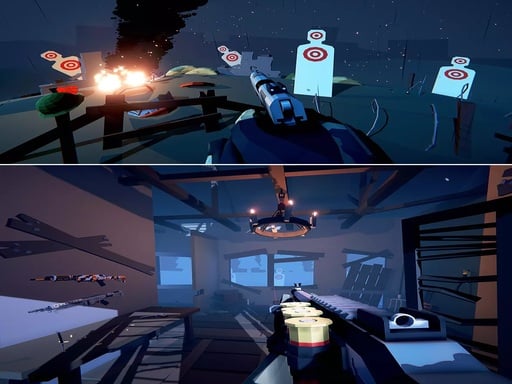
Private War Training is a straightforward browser-based shooting drill designed to help players practice basic shooter handling and target tracking. Presented in a dedicated arcade format, the challenge centers on coordinating fluid physical movement alongside precise mouse aiming. Whether you are warming up before jumping into competitive matches or simply testing your reflexes in an accessible web arena, this practice module focuses on the essential fundamentals of digital marksmanship.
Choose Play now to load the game.
Official listing
Shooter training
From the game listing
WASD and mouse controller
Open this card to load the gameplay video.
Private War Training is a straightforward browser-based shooting drill designed to help players practice basic shooter handling and target tracking. Presented in a dedicated arcade format, the challenge centers on coordinating fluid physical movement alongside precise mouse aiming. Whether you are warming up before jumping into competitive matches or simply testing your reflexes in an accessible web arena, this practice module focuses on the essential fundamentals of digital marksmanship.
Private War Training delivers an immediate, combat-themed practice exercise centered entirely on essential shooter mechanics. The title strips away complex menus and narrative campaigns, placing your focus squarely on active shooter drills where reaction time and physical mouse control take center stage.
Using a familiar desktop setup, players maneuver across the training space using directional keys while managing camera orientation and target tracking with the mouse cursor. The arcade pacing demands steady focus, making each round an opportunity to test hand-eye coordination under continuous combat pressure. By offering a lightweight environment rendered at an 800 by 600 viewport, the game serves as a rapid combat drill that launches quickly in any desktop browser.
Your objective in Private War Training is to execute accurate target engagements while maintaining clean spatial control. Rather than navigating broad strategic systems, success here hinges on refining your visual reflexes, steadily tracking incoming targets, and eliminating threats efficiently. Strive to shorten your acquisition time on each target and keep your defensive movement active to withstand escalating arcade pressure throughout your training session.
1. Launch Private War Training directly within your desktop web browser window to load the combat practice arena.
2. Place your left hand over the WASD cluster on your keyboard and grip your mouse firmly with your dominant hand.
3. Scan the screen to locate pop-up targets or opposing threats appearing within the training zone.
4. Use WASD movement to adjust your position, keeping clear lines of sight while dodging incoming danger.
5. Direct your mouse crosshair smoothly onto the center of each threat to register clean hits during the drill.
6. Maintain your firing cadence and maneuver continually to stay alert as the arcade pace accelerates.
Official game instructions specify using WASD keys for movement along with mouse control for aiming and shooting interactions.
The core gameplay of Private War Training revolves around the classic tension between mobility and precision marksmanship. In fast-paced arcade shooting, standing completely stationary makes tracking crosshairs simpler, but remaining still also turns you into an easy mark for incoming hazards. Surviving the drill requires learning how to strafe and reposition using keyboard inputs without compromising the steadiness of your mouse tracking.
Developing this two-handed rhythm is the central skill appeal of the game. Your non-dominant hand maintains constant defensive awareness through directional maneuvering, while your aiming hand focuses on smooth micro-adjustments and snappy target transitions. Balancing these simultaneous motor demands creates an engaging practice loop that directly mirrors standard desktop action mechanics.
Private War Training is formatted primarily for desktop play with a fixed display canvas of 800 by 600 pixels. Because the control scheme explicitly requires both WASD keyboard keys and an active mouse pointer, a physical keyboard and mouse setup is necessary to experience the intended gameplay. Touchscreen devices lack native hardware mapping for simultaneous directional keying and cursor aiming unless external peripherals are connected.
Within the broader realm of browser-based action, the shooting genre represents one of the most reliable tests of physical player coordination. In arcade shooters, the emphasis rarely lingers on complex tactical planning or extensive inventory management; instead, the player is challenged to read incoming visual cues, orient their position instantly, and deliver prompt, accurate shots.
By adopting this tradition, Private War Training emphasizes immediate feedback and fast iteration. Arcade shooting entries serve as excellent reflex builders because they isolate the core motor skills that underpin larger competitive combat titles: steady hand positioning, spatial awareness under fire, and swift target acquisition.
Players looking for a quick shooting game online often want instant access to target practice without lengthy tutorials, account registrations, or large software installations. Private War Training addresses that exact desire by loading straight into a self-contained training arena where you can immediately put your reflexes to the test.
Whether you specifically searched for the Private War Training game to warm up your mouse hand or simply wanted a responsive web-based marksmanship exercise, the title provides an uncluttered session. It works well as a short five-minute dexterity drill between daily tasks or as an introductory gateway to standard mouse-and-keyboard combat mechanics.
DOOM: DOOM popularized the high-tempo first-person shooter template where players must continuously maneuver and shoot under relentless enemy pressure. While DOOM is a fully realized narrative franchise featuring complex labyrinthine levels and diverse demonic arsenals, Private War Training focuses on a lightweight browser drill highlighting the same core discipline of coordinating directional navigation with rapid target engagement.
What kind of game is Private War Training? Private War Training is an arcade-style online shooting drill focused on fundamental shooter coordination, testing your ability to navigate hostile encounters using standard desktop controls.
How do you control movement and aiming in the game? The game uses a classic desktop control layout where the WASD keyboard keys handle character movement and directional repositioning, while your mouse controls aiming and target engagement.
Can I play this shooting game on a mobile phone? The game is configured for an 800 by 600 window and relies on physical WASD and mouse inputs, making a standard computer or laptop with physical peripherals the optimal setup.
Tell us if the game does not load, the information is wrong or the content needs review.
Report a problemExplore popular games by category, shared tags and site-wide activity.