Play now

Arcade game

Pop the Balloons Game

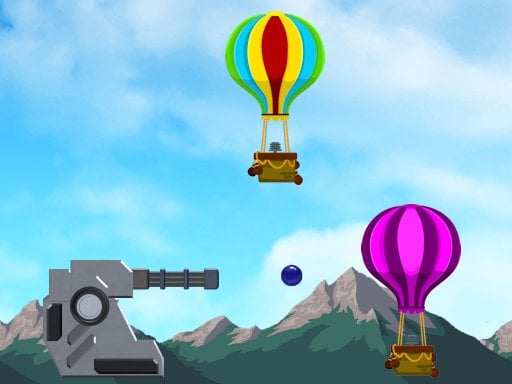
Use the cannon to aim and shoot to pop the balloons. This game has two parts. In the first part you are training to use the cannon and youll need to pop a series of randomly placed balloons. In the second part of the game youll...

More Arcade
ArcadePop the Balloons Game

Choose Play now to load the game.

Open source

Official listing

Game description

Use the cannon to aim and shoot to pop the balloons. This game has two parts. In the first part you are training to use the cannon and youll need to pop a series of randomly placed balloons. In the second part of the game youll also use the cannon, but youll be shooting hot air balloons instead of regular balloons. The second part of the game has unlimited cannon balls. If more than 5 hot air balloons get past you its game over.

From the game listing

Instructions and controls

Touch the game screen to aim and shoot with the cannon Touch the game screen longer to gain more power Shoot as many balloons as you can If you are on a desktop aim and shoot using the mouse Hold down the left mouse to gain more power in your shots

Watch before you play

How to play Pop the Balloons Game

See the official game walkthrough for the objective, controls and useful gameplay ideas.

Video guide

About Pop the Balloons Game

Use the cannon to aim and shoot to pop the balloons. This game has two parts. In the first part you are training to use the cannon and youll need to pop a series of randomly placed balloons. In the second part of the game youll...

Pop the Balloons Game is listed in the Arcade games collection. The listing also includes the Mobile and Shooting tags, which help connect it with nearby game pages.

How to play Pop the Balloons Game

Touch the game screen to aim and shoot with the cannon Touch the game screen longer to gain more power Shoot as many balloons as you can If you are on a desktop aim and shoot using the mouse Hold down the left mouse to gain more power in your shots

Controls and device support

The listing currently identifies Desktop + mobile support, mouse or touch controls and a 1280 x 720 game frame. These details come from the supplied game information and may change when the source listing is updated.

  • Controls: Mouse or touch
  • Device support: Desktop + mobile
  • Game frame: 1280 x 720

Something not right?

Tell us if the game does not load, the information is wrong or the content needs review.

Report a problem