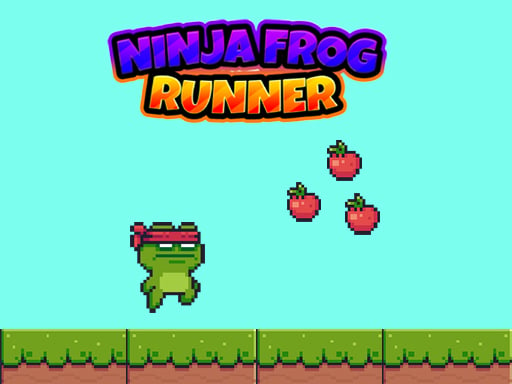
About Ninja Frog Runner
Ninja Frog Runner is a 2D side-scrolling platform runner where you control an agile amphibian traversing hazard-laden courses. As you run through each environment, you must navigate around dangerous obstacles, avoid roaming enemies, and collect available power-ups. Success relies on precise horizontal positioning and well-timed single and double jumps to maintain momentum across every stretch of terrain.
In Ninja Frog Runner, players guide a nimble character through two-dimensional landscapes filled with active hazards and enemy encounters. The core loop centers on forward movement, spatial awareness, and aerial navigation. While running across platforms, you will encounter ground-based and aerial threats that require swift evasive action. Mastering both horizontal pacing and vertical clearance is essential for maintaining a clean run.
The adventure incorporates collectible power-ups alongside its standard running and jumping mechanics. Spotting these items early allows you to plan your jump trajectories without putting your runner in direct path of incoming enemies or sudden drop-offs. By combining steady keyboard directional control with reactive double jumps, you can maneuver smoothly through dense obstacle patterns.
Your goal
The primary objective in Ninja Frog Runner is to navigate safely across courses while avoiding contact with hazards and hostile enemies. Your goal is to keep the ninja frog moving forward, clear tricky gaps with deliberate jump timing, and grab helpful power-ups along your route. Improving your run involves reading upcoming terrain faster and executing clean aerial recoveries whenever unexpected obstacles appear.
How to play Ninja Frog Runner
1. Press the Right arrow key to move your ninja frog forward through the 2D stage.
2. Use the Left arrow key to step backward if you need to reposition or pause before a hazard.
3. Press the Up arrow key once to jump over ground obstacles and small gaps.
4. Tap the Up arrow key a second time while airborne to execute a higher double jump over wide hazards or enemies.
5. Steer toward floating power-ups as you leap across platforms to assist your ongoing run.
Controls and device support
Ninja Frog Runner uses directional arrow keys for all character movement: press Left arrow to move backward, Right arrow to move forward, Up arrow to perform a standard jump, and tap Up arrow twice to activate a double jump.
- Controls: Keyboard
- Device support: Browser
- Game frame: 1920 x 1080
Rules to keep in mind
- Direct contact with course obstacles and active enemies should be avoided to keep your run alive.
- A standard jump is triggered with a single Up arrow press, while a double jump requires two consecutive presses of the Up key.
- Power-ups placed throughout the course can be collected as you navigate the environment.
What makes the challenge interesting
The defining skill in Ninja Frog Runner is managing aerial momentum through the double jump mechanic. Standard platform jumps cover modest heights, but challenging sections with tall obstacles or enemy patrols demand immediate secondary elevation. The key tradeoff lies in deciding when to trigger that second leap: jumping immediately after the first input gives maximum vertical height, whereas delaying the second press extends horizontal reach across wider chasms.
Because the game allows both forward and backward adjustments, players are not locked into forced, uncontrolled sprint speeds. Recognizing when to ease off the forward arrow allows you to survey enemy movements and time your leaps with greater consistency rather than rushing blindly into incoming hazards.
Tips for Ninja Frog Runner
- Reserve your double jump until you confirm the landing area. Triggering the second leap too quickly can cause you to overshoot safe ground and land directly on an enemy.
- Use the Left arrow key to tap backward when approaching clustered hazards. Taking a momentary pause lets you synchronize your forward leap with moving obstacles.
- Prioritize a safe platform landing over chasing risky power-ups. Grabbing an item is rarely worthwhile if the trajectory drops your frog onto a perilous obstacle.
- Maintain a steady rhythm with the Up arrow key. Rushing double-tap inputs can exhaust your aerial mobility before you clear wide environmental pits.
Stages and progression
Progress in Ninja Frog Runner develops through pattern familiarity and improved reaction timing across challenging obstacle courses. As you run further, hazards and enemy placements require quicker decision-making between basic leaps and extended double jumps. Building a consistent practice routine around steady forward pacing helps players clear increasingly demanding platform sections without taking avoidable damage.
The skills behind the game
In the world of 2D platforming and single-player adventure games, precision movement is the cornerstone of engaging gameplay. Games in this genre challenge players to read environmental cues, assess gap distances, and react quickly to mobile threats. Ninja Frog Runner exemplifies this tradition by centering its core mechanics on reliable keyboard inputs, clear directional steering, and multi-tier jumping maneuvers.
Who will enjoy this game
Players looking for a quick, responsive ninja frog runner game can practice fundamental platforming skills such as mid-air jump adjustments and hazard avoidance. As a browser-based adventure game online, it offers an accessible pick-up-and-play format suitable for casual reflexes training, short practice sessions, and fans of classic side-scrolling obstacle courses.
Frequently asked questions
How do you perform a double jump in Ninja Frog Runner? To perform a double jump, press the Up arrow key to execute a standard jump, then press the Up arrow key a second time while your frog is still airborne.
Can you move backward in the game? Yes, pressing the Left arrow key allows your character to move backward, giving you space to reposition before attempting difficult obstacle leaps.
Are there items to pick up while running? Yes, the environments feature power-ups scattered along the path that you can collect while jumping and running through each stage.
Something not right?
Tell us if the game does not load, the information is wrong or the content needs review.
Report a problem ›