About Monster DIY Create
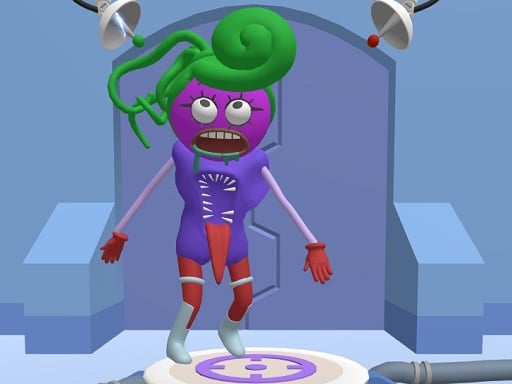
Monster DIY Create is a colorful 2D customization game where you build eccentric creatures from head to toe. Drawing inspiration from popular internet creature designs like Skibidii, Grimacee, and Poppi Playtime, the title lets players mix and match various facial features and body parts to invent unique monstrous personalities.
In Monster DIY Create, the core experience revolves around imaginative monster styling. Instead of dodging obstacles or racing against an aggressive timer, you explore a workshop filled with different anatomical parts and accessories. The game provides elements inspired by trending characters, allowing you to combine quirky heads, peculiar eyes, and distinct limbs into an original avatar.
The loop focuses on creative experimentation: selecting an item category, testing out different components, and watching the creature take form on screen. Special exclusive parts can be unlocked as you play, expanding your decorative palette. Once you assemble a monster that matches your creative vision, the game encourages sharing the resulting design with friends.
Your goal
The main goal is to craft a fully customized creature by testing various body parts and accessories from head to toe. Players aim to assemble harmonious or hilariously mismatched monster designs, unlock special exclusive items, and complete memorable looks ready to display or share.
How to play Monster DIY Create
1. Launch the game in your browser using mouse clicks on desktop or tap inputs on your touchscreen device.
2. Browse the available monster base models and facial templates, including elements inspired by Skibidii, Grimacee, and Poppi Playtime.
3. Click or tap to mix and match individual components, swapping features from head to toe to build your desired look.
4. Look out for unlockable special parts that add exclusive styling options to your creature.
5. Finalize your design and share your custom monster creation with friends.
Controls and device support
The official instructions indicate simple mouse click or tap interaction to navigate menus, select monster elements, and assemble creature parts.
- Controls: Mouse or touch
- Device support: Desktop + mobile
- Game frame: 800 x 600
What makes the challenge interesting
Monster DIY Create emphasizes aesthetic expression over fast reflexes. The primary engagement comes from visual experimentation: deciding whether to build a coherent homage to a known character like Grimacee or combine wildly clashing elements from different creature tropes. Because there are no rapid inputs or sudden hazards, the pace is entirely dictated by your design choices.
The central tradeoff involves cohesion versus sheer novelty. A design built strictly around one character theme offers recognizable charm, while cross-matching unusual heads, eyes, and limbs yields bizarre, comedic silhouettes. Exploring exclusive unlockable components provides an incentive to revisit the builder and refresh previous monster concepts.
Tips for Monster DIY Create
- Start by establishing the head and facial expression first. This sets a clear emotional tone for the monster before you pick out matching or contrasting body parts.
- Experiment with deliberate contrasts, such as pairing an intimidating mouth with comedic eyes, to make your creature stand out rather than looking generic.
- Check all selection categories thoroughly so you do not overlook newly unlocked exclusive parts that could complete your theme.
- Take a moment to review the creature as a complete silhouette from head to toe before finishing, ensuring every selected piece aligns with your overall concept.
Stages and progression
Progression in Monster DIY Create centers on unlocking special exclusive parts that broaden your wardrobe of monstrous components. Rather than advancing through high-pressure combat stages, players expand their creative toolbox over time. To get the most from the game, try planning themed sessions—such as designing a series of spooky figures followed by comical ones—integrating newly unlocked items as they become available.
Playing on different devices
Running in standard 800 x 600 resolution, the game functions smoothly across desktop browsers and mobile touch displays, including Android, iPad, and iPhone devices. Desktop players can precisely click tiny menu icons using a mouse, while mobile players benefit from intuitive direct taps to swap creature parts on the go.
The skills behind the game
While categorized under action, Monster DIY Create delivers a casual dress-up and avatar creator experience. Character customization titles attract players who enjoy visual creativity, styling freedom, and meme culture over intense physical coordination. In browser environments, these games provide immediate gratification by giving players instant access to expressive design tools without complex onboarding or lengthy tutorials.
Who will enjoy this game
Players looking for a fun monster diy create game often seek lighthearted dress up experiences where they can experiment with bizarre aesthetics. Monster DIY Create serves casual creators looking for quick artistic play during short breaks. The tactile joy of mixing heads, goofy grimaces, and playful accessories makes it an engaging sandbox for fans of viral monster lore and character dress up titles.
Games with a similar feel
Love Nikki-Dress UP Queen: Love Nikki-Dress UP Queen centers on coordinating elegant fashion outfits and garments. Monster DIY Create shares the core activity of choosing styling components from a menu, but swaps out delicate clothing for humorous, viral monster anatomy like heads, grimaces, and creature limbs. Players wanting competitive fashion scoring prefer Love Nikki, while those seeking quick, eccentric monster crafting will enjoy Monster DIY Create.
Frequently asked questions
What kind of monsters can I build in Monster DIY Create? You can design original monsters or assemble creatures inspired by popular figures like Skibidii, Grimacee, and Poppi Playtime by mixing and matching their distinctive heads, faces, and body parts.
How do controls work in this monster dress up game? Interaction is straightforward: click with your mouse on desktop or tap directly on screen using a mobile device to browse menus and attach parts to your monster.
Can I save or share my monster creations with friends? Yes, the game is designed so you can showcase your completed monstrous designs and share your creativity with friends once your creature is fully assembled.
Something not right?
Tell us if the game does not load, the information is wrong or the content needs review.
Report a problem ›