Official listing
Game description
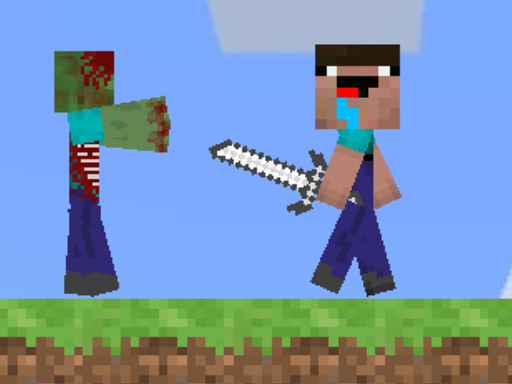
Minecraft Adventure is a 2D platformer in which your mission is to build bridges, kill zombies and parkour on different maps.
Adventure game
Minicraft Adventure is a single-player 2D platformer that challenges players to cross block terrain, eliminate roaming zombies, and complete parkour challenges across diverse maps. Armed with a sword and a pickaxe, you must carefully navigate each stage, construct essential bridges over hazardous gaps, and successfully make your way to the exit portal.
Choose Play now to load the game.
Official listing
Minecraft Adventure is a 2D platformer in which your mission is to build bridges, kill zombies and parkour on different maps.
From the game listing
WASD to move LMB to use sword RMB to use pickaxe Try to reach the portal Mobile controls are available
Open this card to load the gameplay video.
Minicraft Adventure is a single-player 2D platformer that challenges players to cross block terrain, eliminate roaming zombies, and complete parkour challenges across diverse maps. Armed with a sword and a pickaxe, you must carefully navigate each stage, construct essential bridges over hazardous gaps, and successfully make your way to the exit portal.
In Minicraft Adventure, players explore side-scrolling block environments filled with obstacles, gaps, and hostile zombies. The core gameplay merges classic platform movement with block-based environmental manipulation. You navigate the terrain using standard directional movement, running and jumping across platforms while staying alert to aggressive enemies.
To conquer each map, you must balance active combat and construction. When confronting hostile zombies along your path, swing your sword to defeat them before they can strike. Where terrain features wide chasms or impossible heights, utilize your tools to build bridges and clear routes toward the glowing portal that marks your destination.
Your main objective in every map is to survive enemy encounters, overcome parkour platforming hurdles, and reach the portal at the end of the course. To accomplish this, you must defeat blocking zombies with your sword and build bridges to traverse broken ground.
Master navigation, tool use, and combat to guide your character safely through each map to the portal.
1. Use the WASD keys to move your character across the 2D platformer map and jump between block structures.
2. Click the left mouse button (LMB) to attack approaching zombies with your sword before they can harm you.
3. Use the right mouse button (RMB) to wield your pickaxe and build bridges across dangerous gaps in the terrain.
4. Parkour across the map, navigating intricate block layouts until you reach the level exit portal.
Mobile on-screen touch controls are supported for players running the game on compatible touch devices.
WASD: Move character and jump across platforms
LMB (Left Mouse Button): Use sword to attack zombies
RMB (Right Mouse Button): Use pickaxe to interact with blocks and build bridges
The primary gameplay loop in Minicraft Adventure combines agile 2D platforming with tactical tool usage. Players must evaluate each map section carefully, determining whether an obstacle requires pure parkour jumping or the construction of custom block bridges. Because zombies patrol key platform pathways, you must time your attacks effectively to strike before getting overrun, making smooth transitions between moving, swinging the sword, and placing blocks essential for reaching the portal.
Progression in Minicraft Adventure revolves around completing distinct map layouts. Reaching the portal in one map serves as the goal to finish the stage and advance through the game's different platforming environments.
Minicraft Adventure runs at an 800 x 600 display resolution and is fully playable on desktop browsers with keyboard and mouse controls. Mobile touch controls are also available for touchscreen gameplay.
As an entry in the adventure category, Minicraft Adventure emphasizes exploration, terrain traversal, and survival mechanics. Adventure platformers engage players by presenting dynamic terrain challenges that test both reflex-driven jumping skills and problem-solving abilities, such as overcoming environmental chasms and dealing with hostile enemy encounters along the way.
Players looking for a fun minicraft adventure game or an engaging adventure game online will appreciate the blend of block-building and platforming mechanics. This platform game online delivers accessible single-player action that challenges your timing, combat readiness, and bridge-building skills across varied 2D maps.
Super Mario Bros.: Like Super Mario Bros., Minicraft Adventure centers on side-scrolling platforming and jumping across hazards, but it adds block-building tools and direct sword combat against zombies to reach the portal.
Minecraft: Like Minecraft, Minicraft Adventure incorporates iconic block themes, pickaxes, and zombie foes, but presents this aesthetic within a focused 2D level-based platformer structure rather than an open 3D sandbox.
What is the primary goal in Minicraft Adventure? The main goal is to travel across the 2D block maps, defeat hostile zombies with your sword, build bridges over obstacles, and reach the exit portal.
How do you control your character on desktop? Use WASD keys to move and jump, the left mouse button (LMB) to swing your sword at zombies, and the right mouse button (RMB) to use your pickaxe for building bridges.
Can Minicraft Adventure be played on mobile devices? Yes, Minicraft Adventure provides dedicated mobile control support, allowing players to navigate maps and use tools directly on touchscreen devices.
Tell us if the game does not load, the information is wrong or the content needs review.
Report a problemExplore popular games by category, shared tags and site-wide activity.






















