About Minecraft touch
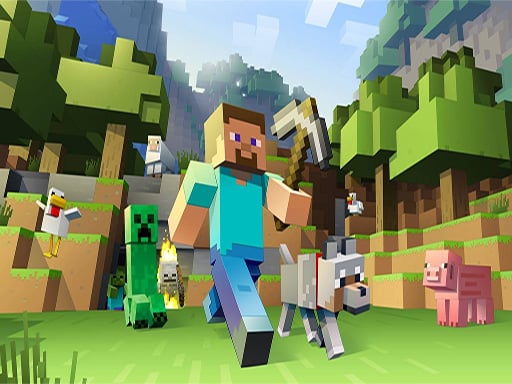
Minecraft touch presents a 3D block-building sandbox where players can explore open environments, harvest resources, and construct custom creations. Inspired by classic voxel exploration, the game offers a casual playground for crafting shelters, shaping terrain, and venturing across virtual landscapes directly in a web browser.
In Minecraft touch, players enter an interactive 3D voxel world centered on creative building and open-ended exploration. The described setting allows adventurers to manipulate environmental blocks, gather raw materials from the surrounding terrain, and construct anything from basic starting shelters to grand architectural designs.
The core gameplay loop revolves around freely interacting with the environment, excavating underground passages, and fashioning tools or protective gear. Whether focusing on peaceful construction with abundant materials or testing resource management in survival situations, the sandbox framework invites open experimentation at a relaxed pace.
Your goal
The primary goal is self-directed creation and exploration. Players aim to gather useful items, construct sturdy bases, navigate surrounding terrain safely, and customize their virtual world according to their own creative vision without a rigid linear finish line.
How to play Minecraft touch
Getting started in a browser sandbox involves basic orientation, resource harvesting, and steady expansion.
1. Survey your immediate surroundings upon spawning to identify nearby terrain, trees, and useful geological landmarks.
2. Harvest fundamental raw materials such as wood and stone by interacting with nearby environmental blocks.
3. Use collected materials to craft foundational tools, equipment, or protective gear needed for deeper exploration.
4. Build an enclosed shelter or architectural base to organize your inventory and establish a safe haven.
5. Venture further across the map or dig underground to uncover rarer resources and expand your building projects.
Controls and device support
Specific key mappings were not supplied in the official listing. Browser-based 3D sandbox games typically utilize standard keyboard navigation such as WASD or arrow keys for movement, alongside mouse clicks or touch screen gestures for looking around, mining blocks, and placing items.
- Controls: See in-game controls
- Device support: Desktop + mobile
- Game frame: 1024 x 768
What makes the challenge interesting
The core appeal of Minecraft touch lies in spatial freedom and imaginative engineering. Players balance the time invested in gathering raw components against the architectural complexity of their projects. In creative scenarios, the emphasis shifts entirely toward visual design and structural layout, allowing players to experiment with geometry and colors unhindered. When approaching resource-driven play, spatial awareness becomes critical: mining too deep without a clear escape route or proper equipment can leave a builder disoriented, while thoughtful preparation ensures seamless base expansion.
Tips for Minecraft touch
- Gather plenty of basic wood and stone early on before starting large construction projects. Running out of structural blocks halfway through a build disrupts your creative rhythm.
- Establish a distinct visual landmark near your primary shelter. In open sandbox landscapes, wandering too far without navigational reference points makes finding your base difficult.
- Organize your crafting materials into designated storage areas or distinct piles to keep track of valuable components as your inventory grows.
- When excavating downward, dig in stepped staircases rather than straight drops to avoid becoming trapped in deep shafts without climbing materials.
Playing on different devices
Configured for a default 1024 x 768 presentation, the game runs directly within standard web browsers. On desktop setups, a physical mouse offers precise block placement and fluid camera panning. On touch-enabled devices, ensure your browser window is unobstructed to allow responsive tapping across the display interface.
The skills behind the game
Positioned within the 3D and Adventure categories, this title shares core characteristics with casual voxel sandboxes. Unlike linear action games that enforce rigid pathways, 3D exploration games emphasize freedom of movement, spatial creativity, and player-driven objectives. The cartoon aesthetic and casual pacing make it an approachable gateway for builders who enjoy constructing architectural landmarks or exploring open virtual terrain.
Who will enjoy this game
Players searching for minecraft touch and casual voxel building experiences often seek accessible web games that deliver quick crafting and structural design. These sandbox titles serve as relaxing creative outlets where players can practice spatial planning, test architecture ideas, or enjoy exploratory wandering without complex setup requirements.
Games with a similar feel
Minecraft: Minecraft established the global benchmark for block-building sandboxes with deep survival systems and expansive procedural worlds. Minecraft touch draws directly on that aesthetic, focusing on accessible browser-friendly building and exploration. While the full standalone release offers extensive cross-platform networking, this web adaptation provides a lightweight option for quick creative tinkering.
Frequently asked questions
What is the main goal in Minecraft touch? The game focuses on open-ended sandbox play, where you explore 3D environments, collect raw blocks, craft gear, and build custom structures at your own pace.
Is Minecraft touch suitable for quick casual gaming sessions? Yes, its browser-based sandbox format allows players to jump directly into world exploration and structural crafting without lengthy setup or complicated installation processes.
Can you choose between creative building and survival activities? The description highlights both creative construction with extensive resources and survival-style resource gathering and tool crafting, allowing players to tailor their playtime.
Something not right?
Tell us if the game does not load, the information is wrong or the content needs review.
Report a problem ›