About Gummy Letter Pop
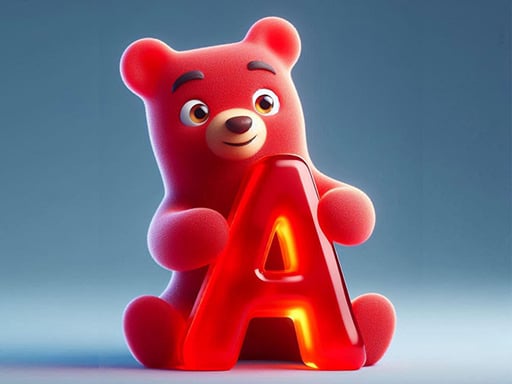
Gummy Letter Pop is a casual reaction and typing game where teddy gummy bears float down from the sky carrying letters in their hands. Your main task is to identify each letter quickly and either type it on your keyboard or click it with your mouse before the bear touches the ground. The simple setup offers an accessible way to practice keyboard familiarity, hand-eye coordination, and visual recognition in an upbeat setting.
In Gummy Letter Pop, players are greeted by colorful teddy gummy bears drifting downward from the sky. Each falling character holds a specific alphabet letter, turning the screen into a dynamic visual stream of prompt targets. As the bears descend toward the bottom edge, you must spot the letter each one carries and input the matching character to pop them out of the air.
The gameplay loop centers on quick observation and steady input execution. Successfully popping bears before they land awards points that build toward your personal best score. Because input can be delivered through either physical keyboard keystrokes or direct screen taps and mouse clicks, players can choose the interaction style that feels most natural. Whether you are helping young learners build early letter recognition or testing your own typing reflexes during quick casual breaks, the experience delivers straightforward, continuous practice with zero complicated setup.
Your goal
Your central objective in Gummy Letter Pop is to earn the highest score possible by clearing falling teddy bears before they reach the ground. Every bear you pop in midair by typing or clicking its held letter adds to your score tally. Reaching a personal best requires steady visual scanning, quick letter identification, and clean reaction speed to keep up with the steady cascade of descending bears across the playfield.
How to play Gummy Letter Pop
1. Scan the screen to spot teddy gummy bears descending with letters in their grasp.
2. Identify the letter on the bear closest to the bottom of the display area.
3. Press the corresponding key on your keyboard or click the letter directly with your mouse.
4. Confirm the bear pops and awards points before touching the bottom boundary.
5. Shift your focus to the next lowest descending bear to keep your scoring streak alive.
Controls and device support
On desktop computers, use the keyboard to type the matching letters or use the mouse to click directly on the falling bears. On mobile phones and tablets, tap the on-screen letters or use keyboard input.
- Controls: Keyboard
- Device support: Desktop + mobile
- Game frame: 720 x 1280
Rules to keep in mind
- Bears must have their corresponding letters entered or clicked before they touch the ground to award points.
- Players may clear targets using either direct mouse clicks or physical keyboard keystrokes.
What makes the challenge interesting
The primary appeal of Gummy Letter Pop lies in training visual reaction speed and keyboard literacy without cumbersome menus or complex rules. Players constantly navigate an observational tradeoff: focusing entirely on a single bear can cause you to overlook others that are closer to the ground, while scanning too broadly might lead to mistyped or misclicked inputs. Developing a scanning rhythm that sweeps from the bottom upward allows you to prioritize urgent targets first. This makes the game equally engaging for young players practicing basic alphabet association and for older players wanting a lighthearted dexterity warm-up that sharpens typing precision.
Tips for Gummy Letter Pop
- Prioritize the lowest falling bear first. Clearing targets closest to the ground gives you more breathing room to handle bears higher up on the screen.
- Keep your fingers resting near the home row on a physical keyboard. This minimizes travel time between keystrokes and helps you react instantly when letters appear.
- Scan across the screen rather than staring at one column. Tunnel vision often results in missing bears dropping on the opposite side of the screen.
- Choose one input method per session. Switching back and forth between mouse clicks and keyboard typing can disrupt your physical rhythm and slow down your inputs.
Stages and progression
While Gummy Letter Pop does not outline predetermined stage unlocks or formal difficulty tiers in its supplied details, players can build their own structured practice sessions. Start your initial rounds focusing strictly on clean, deliberate letter entry without rushing. Once you feel comfortable identifying letters instantly, set personal target scores and challenge yourself to maintain a continuous, unhesitating typing tempo. Structuring your attempts around consistent rhythm improvement helps turn casual play sessions into effective typing and letter-recognition drills.
Playing on different devices
Gummy Letter Pop accommodates both desktop and touch-enabled setups with dedicated input pathways. On desktop computers, players can either press the matching keys on a standard keyboard or click targets directly with a mouse. On mobile phones and tablets, the game supports direct screen taps as well as virtual keyboard entry. Using a physical desktop keyboard is generally ideal for practicing touch-typing skills, whereas direct tapping on a mobile touchscreen offers a more tactile, intuitive interface for younger players.
The skills behind the game
Categorized under puzzles and alphabet-focused clicker games, Gummy Letter Pop merges fundamental educational mechanics with arcade reaction play. The inclusion of letter-bearing gummy bears creates an approachable bridge between casual clicking and early literacy training. Rather than solving intricate logic puzzles, the puzzle element here focuses on rapid cognitive sorting—evaluating descending visual cues and translating them into prompt motor responses. This hybrid appeal makes the title suitable both as a playful practice tool for children learning letters and as a casual reflex test for general audiences.
Who will enjoy this game
Players searching for gummy letter pop or a lighthearted puzzle game online often seek interactive experiences that combine simple mechanics with immediate feedback. The title provides a welcoming environment for practicing keyboard dexterity without high-stress penalties. Whether approached as an introductory letter recognition exercise or a casual score-attack session, the straightforward design lets players jump in instantly for five-minute warm-ups or extended practice runs, delivering accessible entertainment across varied age groups and skill levels.
Games with a similar feel
Cookie Clicker: Cookie Clicker established the incremental clicker genre through automated production chains, passive resource accumulation, and complex upgrade trees. In contrast, Gummy Letter Pop emphasizes real-time reflex typing and visual letter tracking where every score increase requires direct player intervention. While both titles share simple clicking controls, Cookie Clicker suits fans of long-term economic expansion, whereas Gummy Letter Pop appeals to players looking for active, real-time arcade typing practice.
Frequently asked questions
How do you score points in Gummy Letter Pop? You score points by identifying the letter held by each falling gummy bear and inputting that letter—either via keyboard keystroke or mouse click—before the bear touches the bottom edge of the screen.
Can I play Gummy Letter Pop using only a keyboard? Yes. Gummy Letter Pop supports keyboard inputs on desktop computers and mobile devices. Typing the displayed letters directly pops the corresponding bears, making it a great way to practice keyboard familiarity and typing dexterity.
Is Gummy Letter Pop suitable for young children learning letters? Yes. The colorful teddy gummy bears and clear single-letter prompts make Gummy Letter Pop well-suited for young learners. It offers a gentle, engaging environment to practice alphabet recognition, visual scanning, and basic keyboard or touchscreen input skills.
Something not right?
Tell us if the game does not load, the information is wrong or the content needs review.
Report a problem ›