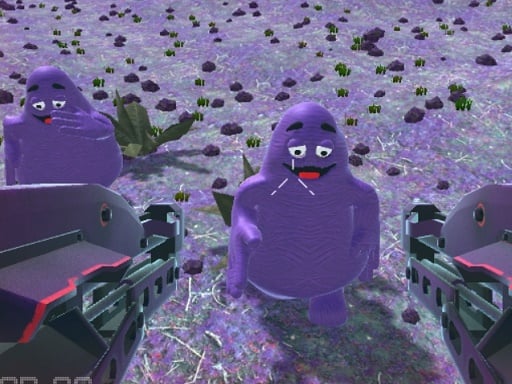
About Grimace Dead Island Shooting
Grimace Dead Island Shooting casts players as an agile survivor facing off against encroaching hordes of bizarre Grimace creatures on a desolate island setting. Armed with twin firearms in dual-wielding fashion, you must aim swiftly and fire continuously to hold back relentless enemy waves. Success demands consistent accuracy, fast visual tracking, and steady target prioritization as the encounters intensify across successive stages.
Set within a hostile, post-apocalyptic environment overrun by menacing Grimace monstrosities, Grimace Dead Island Shooting delivers focused wave-based shooting action directly in the browser. Players control a survivor equipped with dual guns, holding one weapon in each hand to repel oncoming threats across open island terrain.
The core gameplay loop centers on scanning the screen for approaching targets, aligning your crosshairs, and firing rapidly before enemies close the distance. Each wave presents an increasing volume of adversaries, requiring players to maintain high accuracy and react promptly to emerging threats from various angles. The responsive presentation and straightforward shooting loop create an accessible target-elimination experience suitable for quick action sessions.
Your goal
The primary objective is to survive consecutive waves of attacking Grimace enemies by neutralizing every approaching threat with accurate gunfire. Players aim to maintain defensive control, prevent creatures from overwhelming their position, and push their endurance across escalating rounds of hostile pressure.
How to play Grimace Dead Island Shooting
1. Observe the surrounding island terrain to locate incoming Grimace enemies as each wave begins.
2. Move your aiming cursor directly over the nearest approaching target.
3. Click the mouse button or tap the screen to discharge your dual-wielded weapons.
4. Continue firing until the targeted enemy is eliminated before shifting focus to subsequent threats.
5. Eliminate all hostile creatures in the active assault to advance to the next, more demanding wave.
Controls and device support
Mouse click or tap to shoot.
- Controls: Mouse or touch
- Device support: Desktop + mobile
- Game frame: 800 x 600
Rules to keep in mind
- Hostile Grimace enemies advance toward the player in organized waves and must be eliminated to survive.
- Players attack using dual firearms, discharging shots via mouse clicks or touch taps.
- The overall combat challenge intensifies progressively as players clear consecutive enemy waves.
What makes the challenge interesting
Grimace Dead Island Shooting emphasizes fast target acquisition, spatial awareness, and consistent trigger discipline. Because enemies approach steadily across the screen, players face a constant tradeoff between dispatching close-range immediate dangers and picking off distant targets before a swarm accumulates. Dual-wielding firepower provides strong offensive output, but maintaining precise point-and-click accuracy remains essential to prevent enemies from breaking through defensive perimeters during later, denser waves.
Tips for Grimace Dead Island Shooting
- Prioritize targets based on proximity by eliminating the closest Grimace enemies first, preventing sudden breaches of your defensive space.
- Maintain a steady clicking cadence rather than erratic bursts, ensuring each shot lands squarely on an incoming target to maximize efficiency.
- Scan the perimeter frequently between shots to spot newly spawning creatures early, avoiding tunnel vision on a single lane.
- Center your mouse cursor in active engagement zones between targets to minimize the physical transit time needed for subsequent aim adjustments.
Stages and progression
The game structures its challenge around progressive waves of grotesque Grimace enemies. As players clear each group, subsequent waves intensify the pressure by sending larger numbers of adversaries into the combat zone. Advancing through these escalating encounters pushes your visual reaction speed and sustained target-tracking endurance over extended play sessions.
Playing on different devices
Built on WebGL and Unity3D technology with an 800x600 canvas layout, the game runs smoothly across modern desktop web browsers and touch-enabled mobile devices. Desktop players benefit from the tactile precision and swift tracking speed of a standard optical mouse, while mobile and tablet users can tap directly on targets for intuitive, direct-touch engagements.
The skills behind the game
Grimace Dead Island Shooting represents the accessible target-defense branch of 3D action titles. Rather than requiring complex tactical loadout management or intricate navigation systems, wave shooters emphasize rapid reaction times, reliable hand-eye coordination, and consistent target prioritization. Players who enjoy classic arcade gallery mechanics will appreciate the immediate focus on clearing screens of incoming adversaries while honing precision aiming skills.
Who will enjoy this game
Players looking for an engaging shooting game online will find a fast-paced survival challenge in Grimace Dead Island Shooting. The title caters to casual gamers seeking quick reflex practice, offering immediate pick-up-and-play sessions without demanding extensive installation or setup. Whether practicing mouse precision or testing reaction speed across intensifying waves, this grimace dead island shooting game provides a straightforward target-elimination experience in any compatible browser.
Frequently asked questions
What is the main goal in Grimace Dead Island Shooting? The main goal is to survive escalating waves of hostile Grimace creatures by aiming and shooting accurately with dual firearms.
How do you control your weapons in the game? You control your weapons by pointing at targets and using mouse clicks on desktop or tapping directly on the screen on mobile devices.
Does the difficulty increase as you defeat enemies? Yes, the challenge steadily intensifies across successive waves, requiring greater accuracy and faster reflexes to keep up with attacking foes.
Something not right?
Tell us if the game does not load, the information is wrong or the content needs review.
Report a problem ›