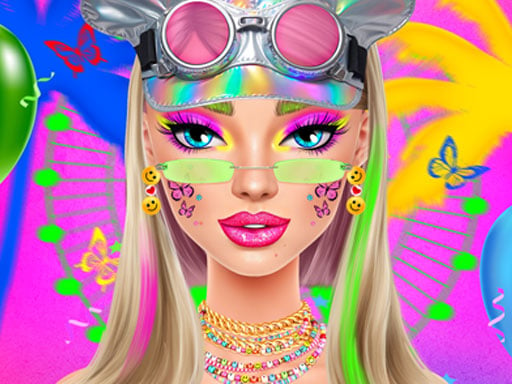
About Festival Vibes Makeup
Festival Vibes Makeup invites players to step into the role of a festival stylist and design vibrant summer beauty looks for Ellie. The game centers on creating distinct aesthetic themes, including glowing neon palettes, intricate boho-Aztec accents, and edgy grunge tones. Using an assortment of eyeshadows, mascaras, bold lipsticks, and sparkling glitter eyebrows, you can experiment with expressive cosmetic combinations tailored for warm-weather music and art celebrations.
Festival Vibes Makeup is a single-player makeover title centered on creative facial styling and expressive summer festival fashion. Players assist Ellie as she prepares for festival season, working through cosmetic stations to craft unique visual statements across several artistic styles.
The core gameplay loop revolves around selecting, mixing, and applying different makeup products. You can customize key facial features using varied eyeshadow palettes, lash-enhancing mascaras, vibrant lip colors, and decorative glitter eyebrows. Whether assembling a glowing neon aesthetic, a detailed boho-Aztec pattern, or a darker grunge-inspired presentation, each choice allows you to test color harmonies and refine your beauty styling approach at a relaxed pace.
Your goal
The primary objective in Festival Vibes Makeup is to design cohesive, polished festival looks for Ellie by mixing and matching cosmetics across neon, boho-Aztec, and grunge themes. Players aim to complement each aesthetic with balanced combinations of eyeshadows, mascaras, lipsticks, and glitter eyebrows.
How to play Festival Vibes Makeup
1. Choose a styling direction from the featured summer themes, such as neon, boho-Aztec, or grunge.
2. Use your mouse to navigate the on-screen beauty tools and cosmetic trays.
3. Apply eyeshadows and mascaras to define the eyes according to your selected aesthetic.
4. Accentuate the brows using decorative glitter eyebrow options for a festive touch.
5. Select a coordinating lipstick shade to complete Ellie's full festival makeover.
Controls and device support
Use your mouse to click on cosmetics, cosmetic shades, and tools to apply makeup to Ellie's face.
- Controls: Mouse or touch
- Device support: Browser
- Game frame: 1024 x 768
What makes the challenge interesting
The creative challenge of Festival Vibes Makeup lies in color coordination and thematic consistency. Each look presents a stylistic tradeoff between subtle accents and striking focal points. Combining high-intensity neon eyeshadow with bold glitter eyebrows creates an electric, energetic appearance, while earthy boho-Aztec designs benefit from balanced ornamental patterns. Players develop a practical eye for contrast by testing how different lipstick undertones and mascara densities alter the overall tone of Ellie's summer festival appearance.
Tips for Festival Vibes Makeup
- Establish a clear focal point by choosing either the eyes or the lips for the brightest pop of color to keep the festival design balanced.
- Coordinate glitter eyebrows with the dominant eyeshadow undertone to ensure the upper eye area feels harmonious rather than cluttered.
- Explore all three distinct themes—neon, boho-Aztec, and grunge—to experiment with contrasting cosmetic styles and color palettes.
- Try pairing darker grunge lip shades with lighter mascara or eye accents to maintain facial definition without overpowering the look.
Stages and progression
Styling in the game unfolds across distinct aesthetic categories, allowing players to explore neon, boho-Aztec, and grunge makeup styles for Ellie. Rather than demanding strict level clears, the progression encourages self-directed mastery as you refine your ability to assemble contrasting color palettes, detailed eyebrow glitter, and matching lip finishes.
Playing on different devices
The game operates with mouse-driven inputs and is designed within a standard 1024 x 768 display window. A reliable desktop pointer provides accurate targeting when choosing delicate cosmetic details like mascara coats and fine eyebrow glitter.
The skills behind the game
Festival Vibes Makeup fits naturally into the makeover and fashion genre, emphasizing individual expression through cosmetic artistry. In makeover titles, the joy comes from transforming a canvas using complementary shades, textures, and decorative accents. By incorporating seasonal summer festival elements, the game encourages players to step outside everyday beauty routines and test bold, artistic styles like Aztec line work and luminous neon pigments.
Who will enjoy this game
Players looking for a relaxing festival vibes makeup game can use this title as a creative sandbox for beauty experimentation. The absence of time constraints makes it suitable for casual styling sessions where you can test unusual color pairings, practice matching eyeshadow to glitter eyebrows, and explore fashion themes without performance pressure.
Games with a similar feel
Love Nikki-Dress UP Queen: Love Nikki-Dress UP Queen centers on coordinating extensive wardrobe pieces and garments across varied fashion themes. In contrast, Festival Vibes Makeup focuses specifically on facial cosmetics, letting players experiment directly with eyeshadows, lipsticks, and glitter accents.
Project Makeover: Project Makeover involves comprehensive character styling and total appearance overhauls. Festival Vibes Makeup offers a more focused beauty experience centered entirely on summer festival cosmetics such as neon pigments, boho patterns, and grunge aesthetics.
Frequently asked questions
What makeup styles can you create in Festival Vibes Makeup? You can design looks across three primary themes: neon, boho-Aztec, and grunge, each offering unique cosmetic combinations.
What cosmetic products are available in the game? Players can mix and match various eyeshadows, mascaras, lipsticks, and specialized glitter eyebrows to customize Ellie's appearance.
How do you control the makeup tools? The game uses simple mouse controls to select colors, open product palettes, and apply cosmetics directly to the character.
Something not right?
Tell us if the game does not load, the information is wrong or the content needs review.
Report a problem ›