About Craig of the Creek Learning the Body Online
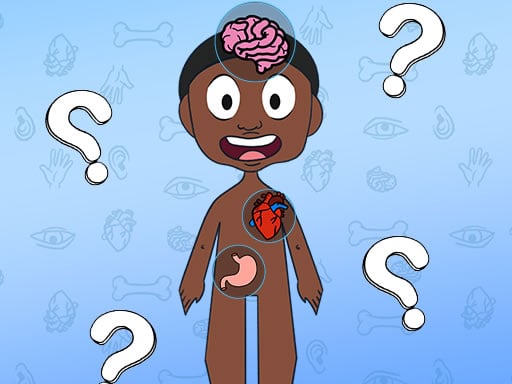
Craig of the Creek Learning the Body Online brings animated creek adventures into the classroom realm, inviting players to join Craig and his friends on a learning journey through the human body. Designed as an interactive educational experience, the title challenges young learners to explore anatomy through casual quiz activities and discovery prompts directly in their web browser.
Craig of the Creek Learning the Body Online pairs familiar Creek characters with approachable science lessons. Rather than navigating physical platforming obstacles, players follow Craig and his crew as they investigate how different parts of human anatomy work together.
The core experience revolves around educational quiz tasks and guided challenges where players identify structures, answer anatomy questions, and solve interactive prompts. Operating at a standard 800 by 600 display resolution, the game delivers focused visual exercises suited for quick study sessions and relaxed learning at home or in school environments.
Your goal
The primary objective is to solve educational challenges by correctly identifying anatomical structures and answering quiz questions alongside Craig. Players aim to reinforce their understanding of human body systems, completing each guided exercise accurately to master foundational biology concepts.
How to play Craig of the Creek Learning the Body Online
1. Launch the game in your desktop browser and allow the opening screen and character introduction to load.
2. Observe the anatomy challenge presented on screen alongside Craig and his companions.
3. Read the on-screen question, body part label, or visual prompt carefully before making a selection.
4. Use your mouse cursor to point at your chosen answer, organ, or interactive element and click to confirm.
5. Review any explanatory feedback provided after your choice, then proceed to the next learning challenge in the sequence.
Controls and device support
The game is designed for desktop mouse controls. Use your mouse pointer to interact with on-screen menus, select quiz answers, and navigate anatomy prompts.
- Controls: Mouse or touch
- Device support: Browser
- Game frame: 800 x 600
What makes the challenge interesting
The gameplay focus centers on visual comprehension, active recall, and scientific vocabulary. By framing anatomy lessons within character-led scenarios, the game encourages learners to take their time evaluating diagrams and reading terms carefully rather than rushing.
A key tradeoff involves deliberate thinking versus impulsive guessing. Taking a moment to connect anatomical names with their physical locations or functional roles leads to better retention and smoother quiz progression compared to rapid trial and error.
Tips for Craig of the Creek Learning the Body Online
- Read every quiz prompt completely before clicking an option. Rushing can cause you to mistake adjacent organs or misinterpret qualifying words in the question.
- Study surrounding visual cues on the anatomy diagram to narrow down difficult answers when uncertain about a specific structure.
- Revisit completed sections during separate sessions to strengthen your memory of body parts and reinforce key science vocabulary over time.
- Take notes on unfamiliar medical or biological terms to turn brief quiz challenges into lasting learning opportunities.
Stages and progression
Educational browser activities typically advance from broad, easily recognized concepts toward more detailed terminology as players answer consecutive prompts. In this title, players follow along with Craig's discovery narrative as new body systems and interactive tasks are introduced.
To get the most out of each session, approach the game in structured rounds. Focus on mastering major body regions first, then test your retention on more specialized quiz questions during subsequent playthroughs.
Playing on different devices
The game operates in an 800 by 600 window and is officially configured for mouse input. A standard desktop mouse or laptop trackpad provides comfortable pointing precision for selecting answers and clicking small interactive elements across the anatomy interface.
The skills behind the game
In the realm of educational browser games and quiz experiences, character-driven titles provide a friendly bridge between complex academic topics and young audiences. By anchoring anatomy concepts in relatable animated themes, learning games help demystify scientific subject matter without overwhelming beginners with dry textbook formats.
Interactive quizzes serve as effective formative practice tools. When players actively identify organs or match definitions in a low-stakes digital format, they build cognitive connections that support classroom study and general science curiosity.
Who will enjoy this game
Players looking for Craig of the Creek Learning the Body Online typically seek a wholesome, accessible browser activity that combines cartoon storytelling with foundational science lessons. It works well as a supplementary classroom exercise, a homeschooling warm-up, or a relaxed weekend challenge for curious young minds.
Whether jumping into a short five-minute review or exploring full anatomy sets, the Craig of the Creek Learning the Body Online game provides straightforward mouse-driven practice that fits neatly into quick digital learning routines.
Frequently asked questions
What kind of game is Craig of the Creek Learning the Body Online? It is an educational quiz game where players explore human anatomy and solve interactive body-learning challenges alongside characters from Craig of the Creek.
What controls do I need to play Craig of the Creek Learning the Body Online game? The game is played entirely using a mouse. You move the cursor to highlight choices and click on options or diagrams to complete challenges.
Who is this educational game designed for? The title is tailored for young learners, students, and fans of the series who want an accessible, visual introduction to human biology and anatomy basics.
Something not right?
Tell us if the game does not load, the information is wrong or the content needs review.
Report a problem ›