About Craft Theft War
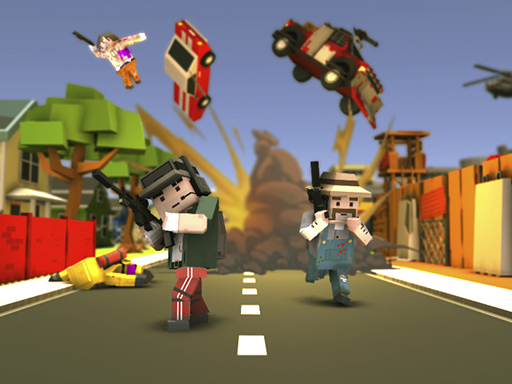
Craft Theft War is a browser-based 3D action shooter that drops players into a blocky, voxel-styled open world. Combining open-ended sandbox exploration with active combat encounters, the game puts your movement, aiming, and positioning to the test. Navigating wide environments while engaging targets requires steady coordination across keyboard movement and responsive mouse aiming.
Set in a sprawling sandbox landscape built from pixel and cube elements, Craft Theft War brings together open exploration and dynamic combat. Players navigate the environment using standard desktop action controls, maneuvering across open spaces, leaping past obstacles, and engaging in firefights. The sandbox atmosphere invites players to freely roam the terrain while remaining ready for quick skirmishes.
The core gameplay loop centers on continuous movement, situational awareness, and gunplay. As you travel through the voxel world, managing your weapon's ammunition with timely reloads and using sprints to reposition become vital habits. The accessible 3D perspective allows players to quickly scan surroundings, locate encounters, and react to active threats across the map.
Your goal
Your main objective in Craft Theft War is to survive combat encounters and explore the open-world sandbox environment. Success depends on maintaining steady aim during firefights, keeping your weapon loaded before entering danger zones, and using tactical movement such as sprinting and jumping to evade hostile pressure across the battlefield.
How to play Craft Theft War
1. Launch the game in your desktop browser and familiarize yourself with the default display window.
2. Use the WASD keys to navigate your character across the voxel sandbox environment.
3. Look around and line up your crosshair on targets using the mouse.
4. Press the Left Mouse Button to fire your weapon at opponents.
5. Hold Shift to sprint across open ground and press Space to jump over terrain obstacles.
6. Press R to reload your weapon whenever you find a quiet moment between battles.
Controls and device support
According to the game instructions, controls are mapped to standard keyboard and mouse inputs: move with WASD, aim with the Mouse, fire with Left Click, jump with Space, sprint with Shift, and reload with R.
- Controls: Mouse or touch
- Device support: Browser
- Game frame: 800 x 600
What makes the challenge interesting
Craft Theft War emphasizes the balance between rapid mobility and accurate gunplay within a 3D block-styled arena. Because firefights can erupt while roaming open sandbox spaces, players must cultivate strong spatial awareness. Moving continuously prevents you from becoming an easy stationary target, but firing while on the run can challenge your aim.
A key tactical tradeoff lies in managing your reload timing and sprint stamina. Sprinting allows you to cross exposed areas quickly, yet taking corners carelessly without a fully loaded magazine leaves you vulnerable. Developing a steady rhythm of scanning the horizon, securing cover, and reloading before engaging keeps combat smooth and controlled.
Tips for Craft Theft War
- Reload during lulls in combat by pressing R rather than waiting for an empty magazine. This prevents getting caught defenseless during an active exchange with opponents.
- Use the Shift key to sprint between sheltered areas instead of strolling across open fields. Crossing exposed terrain slowly makes you an easy mark for nearby enemies.
- Combine jumping with Space and strafing with WASD to keep your movement unpredictable when dodging incoming fire during close-range shootouts.
- Keep your mouse centered near expected enemy sightlines so you can acquire targets and fire your weapon quickly without wide, erratic cursor adjustments.
Playing on different devices
Craft Theft War is designed for desktop web browsers, rendering within an 800 by 600 window. Because the game relies on simultaneous keyboard navigation (WASD, Shift, Space, R) and mouse aiming with left-click shooting, playing on a computer with a physical keyboard and accurate mouse delivers the most reliable control experience.
The skills behind the game
As an entry in the online action and shooting category, Craft Theft War focuses on active real-time reflexes and situational control. Browser action games typically emphasize immediate accessibility, allowing players to jump straight into combat without complicated setup routines.
By adopting a voxel craft aesthetic, the game blends the visual charm of block-world sandboxes with the fast-paced pacing of war and battle shooters. This balance makes it appealing to casual players looking for quick, responsive combat sessions right from their web browser.
Who will enjoy this game
Players searching for craft theft war or looking for an action game online often want a quick, browser-friendly shooting experience that combines sandbox roaming with active combat. The game offers straightforward mechanics where players can practice core shooter fundamentals such as tracking targets with the mouse, managing magazine reloads, and timing defensive movement across open terrain.
Games with a similar feel
Minecraft: Craft Theft War shares a distinct voxel, cube-based visual aesthetic with Minecraft. However, while Minecraft focuses predominantly on open-ended block building, resource crafting, and survival exploration, Craft Theft War concentrates on direct combat, active gunplay, and fast-paced sandbox action suited for quick browser sessions.
DOOM: Like the classic shooter DOOM, Craft Theft War demands continuous movement, active aiming, and swift reflexes to handle hostile combat encounters. While DOOM is known for its intense corridor gunplay and demon battles, Craft Theft War delivers a lighter, block-styled sandbox arena with accessible browser controls.
Frequently asked questions
What are the primary controls for playing Craft Theft War? Players navigate using the WASD keys, aim with the mouse, fire using Left Click, jump with Space, sprint with Shift, and reload their weapon using R.
What kind of visual theme and setting does the game feature? Craft Theft War features an open-world sandbox environment rendered in a pixel and voxel cube aesthetic, combining blocky landscapes with active combat gameplay.
How can players improve their survival in combat encounters? Focus on keeping your weapon reloaded between battles, use sprint to cross open areas quickly, and stay in motion during firefights to avoid taking unnecessary damage.
Something not right?
Tell us if the game does not load, the information is wrong or the content needs review.
Report a problem ›