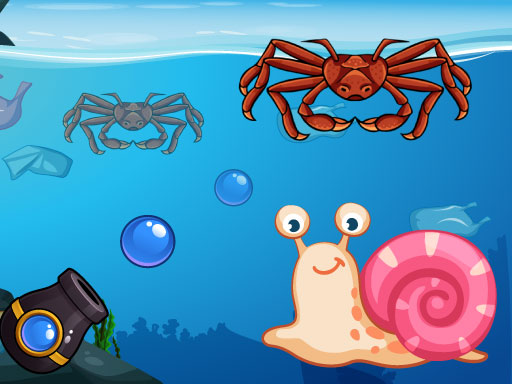
About Crab Shooter
Crab Shooter is an online shooting game where you take on the role of a crab defending its home against incoming waves of adversaries. Players are challenged to test their aim and accuracy by striking as many targets as possible within a limited amount of time. Through steady reactions and quick precision, you fend off encroaching crabs, fish, and humans to earn points and advance through stages.
In Crab Shooter, the core action revolves around defending your territory against an ongoing onslaught of hostile creatures and intruders. Instead of exploring open battlegrounds, the experience focuses directly on rapid target acquisition from a defensive position. Players encounter varying waves of opponents, including rival crabs, swimming fish, and human threats entering the area.
The general gameplay loop requires spotting incoming targets, aligning your shots, and reacting before the session's time limit expires. Successfully landing hits earns points and helps unlock new levels, giving every round a sense of urgency. The arcade atmosphere blends quick reaction tests with casual shooting mechanics suitable for fast, replayable browser sessions.
Your goal
The main objective in Crab Shooter is to shoot as many enemy targets as possible before time runs out while defending your home. By maintaining consistent aim against diverse enemy waves—such as other crabs, fish, and humans—players aim to maximize their score and successfully unlock new levels across consecutive rounds.
How to play Crab Shooter
1. Launch Crab Shooter in your browser and tap or click the screen to begin your defensive run.
2. Observe the playing area to identify appearing targets, such as encroaching crabs, fish, or humans.
3. Tap or click directly on active enemies to fire and eliminate them before they crowd your position.
4. Maintain a steady shooting rhythm to defeat as many targets as possible within the allotted time limit.
5. Clear enemy waves to build your overall point score and work toward unlocking subsequent levels.
Controls and device support
The game operates via tap-to-play controls, allowing players to tap directly on targets using mobile touchscreens or click with a mouse on desktop browsers.
- Controls: Mouse or touch
- Device support: Desktop + mobile
- Game frame: 720 x 1280
Rules to keep in mind
- Enemies must be targeted and shot to defend your home territory from the ongoing onslaught.
- Rounds operate under a limited amount of time, requiring prompt shooting actions to maximize target hits.
- Different enemy types appear throughout the waves, including other crabs, fish, and humans.
- Successfully defeating enemy waves accumulates score points and unlocks new levels.
What makes the challenge interesting
The central appeal of Crab Shooter lies in prioritizing targets under time pressure. Because you are defending against a steady stream of mixed threats, your visual tracking is tested alongside your manual precision. Striking the balance between rapid clicking and deliberate aiming ensures you do not waste valuable seconds reacting to unexpected enemy movement patterns.
Rather than relying on complex navigation, the game focuses on direct reflex challenges. Success depends on maintaining a smooth rhythm, scanning the display perimeter for newly spawned fish or humans, and acting swiftly to keep incoming waves from overwhelming your defense.
Tips for Crab Shooter
- Scan the entire play space continuously rather than fixating on one corner. This prevents surprise spawns of fish or humans from slipping past your defensive focus.
- Prioritize targets closest to your position before aiming at newly spawned threats. Eliminating nearby foes keeps the screen manageable during dense enemy waves.
- Aim for smooth, deliberate taps instead of erratic spam clicking. Controlled accuracy helps maintain a consistent rhythm throughout the limited round timer.
- Adapt your tracking speed when enemy types change. Fish and humans may present distinct visual profiles compared to stationary or slower crabs.
Stages and progression
Progression in Crab Shooter is structured around clearing waves of diverse opponents to unlock new levels and increase your total points. As you advance, adapting your target prioritization helps you handle varied enemy mixes featuring crabs, fish, and human adversaries across increasingly demanding rounds.
Playing on different devices
Built with a native portrait orientation of 720 by 1280 pixels, Crab Shooter is well-suited for mobile screens and vertical browser windows. The tap-to-play interface translates naturally to smartphone touch inputs while remaining fully responsive to mouse clicks on desktop setups.
The skills behind the game
As an entry in the arcade shooting genre, Crab Shooter highlights classic fixed-position defense and visual reaction skills. The category emphasizes clear target prioritization, short burst rounds, and approachable mechanics that reward attentive aim without requiring extensive setup or complex navigational controls.
Who will enjoy this game
Players looking for a lighthearted shooting game online can enjoy Crab Shooter as a quick reaction exercise. The crab shooter game format suits casual players seeking short, focused defense sessions where hand-eye coordination and rapid target acquisition are the primary focus.
Games with a similar feel
DOOM: Both DOOM and Crab Shooter share the broad theme of shooting oncoming enemy encounters, but they differ dramatically in execution. While DOOM is a fast-paced first-person combat series centered around 3D navigation and spatial movement, Crab Shooter offers a casual, tap-focused wave defense suited for quick browser sessions.
Frequently asked questions
What is the primary goal in Crab Shooter? The main goal is to protect your crab character's home by shooting as many enemy crabs, fish, and humans as possible within the round's limited time frame to earn points.
What types of enemies appear during gameplay? Players face waves containing multiple distinct enemy categories, including rival crabs, various fish, and human intruders attempting to breach your defenses.
How do you control aiming and shooting? The game utilizes a tap-to-play mechanism. You can tap directly on incoming targets using a touchscreen device or click them using a standard desktop mouse.
Something not right?
Tell us if the game does not load, the information is wrong or the content needs review.
Report a problem ›