Official listing
Game description
Ready to shoot some chicken in Christmas? Shoot any chicken you see on screen, the fly chicken can gain more points.
Arcade game
Christmas Chicken Shoot is a holiday-themed single-player arcade shooting game where players aim across the screen to take down feathered targets. Built in 3D WebGL, the game challenges you to maneuver your crosshair, eliminate walking and flying chickens, and carefully reload your weapon to secure the highest score possible during the festive season.
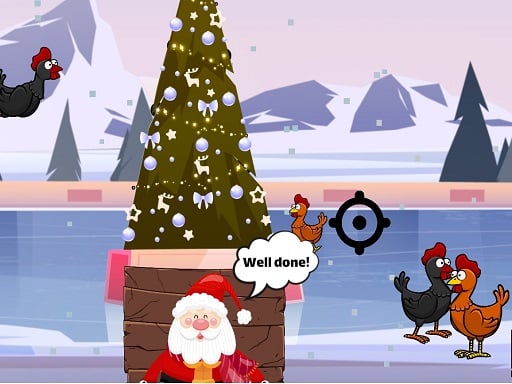
Choose Play now to load the game.
Official listing
Ready to shoot some chicken in Christmas? Shoot any chicken you see on screen, the fly chicken can gain more points.
From the game listing
ARROW - MOVE CROSSHAIR R - RELOAD SPACE - FIRE
Open this card to load the gameplay video.
Christmas Chicken Shoot is a holiday-themed single-player arcade shooting game where players aim across the screen to take down feathered targets. Built in 3D WebGL, the game challenges you to maneuver your crosshair, eliminate walking and flying chickens, and carefully reload your weapon to secure the highest score possible during the festive season.
Christmas Chicken Shoot presents a classic gallery shooting experience set against a seasonal Christmas backdrop. Players step into a 3D environment designed for single-player target practice, scanning the display area for appearing poultry. Every chicken visible on screen serves as an active target, offering immediate score rewards when struck by your fire. Moving targets, particularly chickens flying across the sky, yield even higher point values for sharp shooters who can lead their shots accurately. Operating within an 800 by 600 display resolution via WebGL, this arcade title focuses purely on rapid target acquisition, steady hand-eye coordination, and swift keyboard inputs. Without complicated menu trees, the action starts right away, challenging you to spot incoming targets, adjust crosshair alignment, and keep your ammunition ready through timely reloads.
The primary objective in Christmas Chicken Shoot is to maximize your point total by shooting as many chickens as possible while they cross the screen. While any chicken on screen awards points when hit, flying chickens provide a greater score bonus. Players must balance scanning for high-value airborne targets, adjusting their crosshair quickly, and timing weapon reloads so no target escapes unscathed.
1. Use the Arrow keys to steer your targeting crosshair across the 800x600 screen area.
2. Spot incoming targets as chickens appear across the festive 3D environment.
3. Press Space to fire your weapon whenever a chicken aligns within your reticle.
4. Prioritize flying chickens whenever possible to earn higher bonus points on successful hits.
5. Press R to reload your weapon promptly so your gun never runs dry during target rushes.
Arrow Keys: Move Crosshair
Space: Fire
R: Reload
Gameplay in Christmas Chicken Shoot revolves around quick reflexes and disciplined target tracking in a compact 3D arcade format. Because the crosshair moves using keyboard arrow keys, players must develop smooth navigational rhythm to glide between targets without overshooting. Deciding whether to pick off simple ground birds or swing towards high-scoring flying chickens introduces constant split-second tactical choices. Ammo management plays an equally vital role; hitting reload at an awkward moment leaves flying targets free to escape, meaning smart players coordinate their reloading pauses between target waves.
As an arcade shooting title, Christmas Chicken Shoot builds upon the enduring tradition of gallery-style target blasters. Classic arcade games prioritize direct controls, instant pick-up-and-play sessions, and the chase for higher point totals. By framing the shooting mechanics around lighthearted poultry targets and holiday visuals, the game offers accessible casual competition typical of the browser arcade genre.
Players looking for a festive arcade game online can jump directly into Christmas Chicken Shoot game sessions through their desktop browser. The Unity3D and WebGL build allows quick loading without standalone installations. Blending holiday cheer with classic target hunting, the Christmas chicken shoot experience provides straightforward single-player shooting entertainment focused purely on scoring points against flying and grounded targets.
Which targets yield the highest score in Christmas Chicken Shoot? Flying chickens grant more points than standard ground chickens, making them the most valuable targets to prioritize whenever they appear across your screen.
How do you reload your weapon in the game? You can reload your weapon at any time by pressing the R key on your keyboard, ensuring your ammunition is ready for the next round of targets.
What controls are used to aim and fire? Use the keyboard arrow keys to move your crosshair across the screen and press the Space key to fire shots at visible chicken targets.
Tell us if the game does not load, the information is wrong or the content needs review.
Report a problemExplore popular games by category, shared tags and site-wide activity.



















