About Barry On The Space
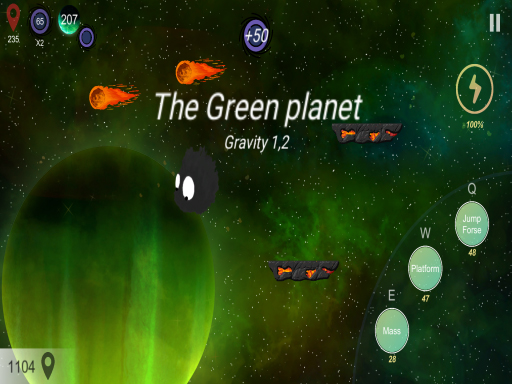
Barry On The Space is a 2D platforming adventure where players guide a small creature named Barry across planetary environments. Progression requires leaping between suspended surfaces, negotiating obstacles, and utilizing unique movement mechanics such as double jumping, spawning temporary platforms beneath Barry, and rapidly increasing mass to descend onto distant surfaces across the cosmos.
In Barry On The Space, the journey revolves around exploring cosmic environments by jumping from platform to platform across distinct levels. Players steer the protagonist across 2D stages to discover new planets and navigate space obstacles. The core experience emphasizes active path creation and aerial control rather than simple running, giving players interactive tools to adapt their jumps mid-flight.
Exploration may involve collecting scattered energy and tokens to support movement through each territory. Potential ability enhancements, such as extended jump height or platform setup tools, provide additional utility as hazards and terrain layouts shift between different planetary destinations.
Your goal
The primary goal is to guide Barry successfully through each level by hopping across platforms, overcoming environmental obstacles, and traveling to new planets. Along the path, players strive to gather available tokens and energy supplies while using Barry's specialized movement abilities to maintain steady footing without falling into empty space.
How to play Barry On The Space
1. Direct Barry across the terrain using the A and D keys or the Left and Right Arrow keys to build forward momentum.
2. Leap toward distant surfaces, pressing the Q key when mid-air to trigger a double jump and gain extra vertical reach.
3. Press the W key to generate a platform directly under Barry when facing wide gaps or missing natural footing.
4. Activate the E key to increase Barry's mass, enabling a fast downward drop to land accurately on low platforms.
5. Collect visible energy and tokens while navigating obstacles to prepare Barry for subsequent planetary challenges.
Controls and device support
Move left or right using the A and D keys or the Left and Right Arrow keys. Press Q to execute a double jump, press W to create a platform directly beneath your character, and press E to increase mass and descend rapidly.
- Controls: Keyboard
- Device support: Browser
- Game frame: 1280 x 720
Rules to keep in mind
- Progress through each level by hopping continuously between platforms until reaching the destination planet.
- Navigate around or over environmental hazards encountered along the planetary route to keep advancing.
- Utilize active key inputs (Q, W, E) to modify aerial trajectory through double jumps, platform generation, and heavy drops.
- Gather collectible items such as energy and tokens to aid your ongoing cosmic exploration journey.
What makes the challenge interesting
The defining mechanic of Barry On The Space is dynamic aerial control. Unlike traditional platformers where an airborne trajectory is largely predetermined, players have tools to actively reshape their jump arc. Activating a double jump with Q grants height recovery, while summoning a platform with W provides an immediate safety net mid-flight.
The mass-increase mechanic tied to the E key introduces an interesting pacing tradeoff. Descending rapidly cuts float time and helps players snap precisely onto narrow lower platforms, but triggering it too early or over empty voids risks falling off track. Balancing horizontal speed, mid-air platform placement, and sudden descents forms the core rhythm of exploration.
Tips for Barry On The Space
- Reserve your double jump until the peak of your initial leap. Triggering Q at maximum height yields the greatest clearance over wide planetary gaps.
- Use the W key proactively when an overshoot seems likely. Spawning an intermediate platform gives you a stable stepping stone before attempting the next jump.
- Tap E to descend quickly when drifting past a lower ledge. A common mistake is waiting to glide down naturally, which can cause you to overshoot small landing zones.
- Look out for tokens and energy pickups along alternate jump paths. Collecting these resources can facilitate smoother movement through future level challenges.
Stages and progression
Progression in Barry On The Space takes the player across a sequence of levels representing different planetary environments. As players advance, the courses introduce varied layouts and obstacles that demand deliberate timing and flexible ability usage.
To build consistency across stages, players should focus on mastering the transition between aerial mechanics. Developing a steady rhythm of jumping, placing support platforms, and controlling descent allows for more confident navigation as stage designs become more complex.
Playing on different devices
Barry On The Space is configured for desktop keyboard play within a 1280x720 display viewport. Players can comfortably position one hand on the A and D keys or arrow keys for lateral navigation while keeping adjacent fingers ready on Q, W, and E to execute special jump maneuvers without delay.
The skills behind the game
As a 2D platforming adventure set in outer space, Barry On The Space blends classic jumping mechanics with active stage manipulation. Players seeking casual platformers will appreciate the planetary theme and the creative flexibility offered by on-demand platform creation and aerial mass adjustments.
Who will enjoy this game
Players looking for an accessible adventure game online will find Barry On The Space well suited for short gaming sessions. The combination of precision jumps and unique traversal keys provides an engaging platforming experience for players interested in exploring space-themed obstacle courses directly in their browser.
Frequently asked questions
What abilities does Barry have during jumps? Barry can perform a double jump using the Q key, generate a temporary platform beneath his feet with the W key, and increase his mass using the E key to drop quickly downward.
What is the primary objective in Barry On The Space? The objective is to guide Barry across planetary platforms, overcome obstacle hazards, collect tokens and energy, and successfully reach new planets across the game's levels.
How do you control Barry's movement on desktop? Horizontal movement is handled by the A and D keys or the Left and Right Arrow keys. Action keys include Q for double jumping, W for platform creation, and E for heavy descent.
Something not right?
Tell us if the game does not load, the information is wrong or the content needs review.
Report a problem ›