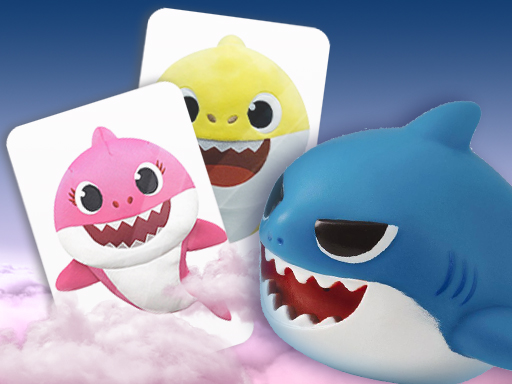
About Baby Shark
Baby Shark is an online puzzle game inspired by the globally known campfire song about a family of sharks. Combining brain-teasing match 3 and memory puzzle elements, the game lets players navigate through themed challenges using straightforward mouse controls on an 800 x 600 display canvas.
Drawing its theme from the famous children's campfire song that gained massive popularity across online video and social media since 2016, Baby Shark presents a casual puzzle experience. The underlying folklore and catchy chant about shark family members are adapted into a desktop-friendly brain game. Categorized under puzzles with match 3, 3D, and memory tags, the title focuses on accessible matching interactions. Players engage directly with the board using their mouse, identifying patterns and resolving tile arrangements. While the original song features hunting fish and animated shark characters, this web adaptation translates that recognizable theme into an interactive puzzle format designed for quick sessions in standard web browsers.
Your goal
The main objective in Baby Shark is to solve the active puzzle board by matching related elements and testing your memory across puzzle layouts. Players use their mouse to interact with tiles, clear board configurations, and exercise pattern-recognition skills to successfully complete each puzzle challenge within the 800 x 600 play area.
How to play Baby Shark
1. Load the game in your desktop browser to open the 800 x 600 puzzle board.
2. Examine the layout of items on the board to spot matching sets and memory patterns.
3. Use your mouse to click and select puzzle tiles to execute matches.
4. Continue clearing matching tiles to complete the active puzzle challenge.
Controls and device support
Mouse: Select and interact with puzzle tiles
- Controls: Mouse or touch
- Device support: Browser
- Game frame: 800 x 600
What makes the challenge interesting
Gameplay in Baby Shark centers on casual match 3 and memory puzzle mechanics set within a 3D-styled puzzle theme. Players rely on visual scanning and steady mouse control to spot corresponding items on the board. Without complex controls or elaborate keyboard combinations, the experience emphasizes quick thinking, memory recall, and pattern recognition. The lighthearted shark family theme provides a cheerful backdrop while players focus on aligning identical puzzle pieces, resolving board configurations, and clearing targets efficiently.
Tips for Baby Shark
- Scan the entire board before clicking so you can spot easy match-3 combinations or duplicate memory tiles right away.
- Keep your mouse movements deliberate and steady to avoid misclicking puzzle pieces when clearing matching sets across the play grid.
- Track the placement of recurring items across the layout to strengthen memory recall when clearing denser puzzle arrangements on screen.
The skills behind the game
As part of the browser puzzle category, Baby Shark combines brain-training memory exercises with classic match 3 mechanics. Puzzle games online are widely favored for their accessible pick-up-and-play format, offering players of all skill levels an engaging way to test logic, attention to detail, and spatial recognition without requiring intricate input schemes.
Who will enjoy this game
Players searching for a baby shark game or a casual match 3 puzzle game online will find an approachable browser experience here. Built around familiar puzzle formats, this title applies themed shark visuals to straightforward matching objectives that can be played immediately in your desktop browser using standard mouse interactions.
Games with a similar feel
Candy Crush Saga: Like Candy Crush Saga, Baby Shark utilizes match 3 puzzle concepts to engage players in clearing matching items, but Baby Shark presents a simpler web experience focused on memory and campfire song theming rather than extensive saga maps.
Bejeweled: Both Baby Shark and Bejeweled share core tile-matching mechanics that challenge visual recognition, though Bejeweled focuses on classic gem swaps and score modes, while Baby Shark incorporates memory puzzle elements and shark song presentation.
Frequently asked questions
What controls are used to play Baby Shark? Baby Shark is played using your mouse. You click on the screen to interact with puzzle tiles, align matches, and solve memory challenges.
What type of game is Baby Shark? Baby Shark is categorized as a puzzle game featuring match 3, brain, 3D, and memory gameplay elements inspired by the traditional song.
Something not right?
Tell us if the game does not load, the information is wrong or the content needs review.
Report a problem ›