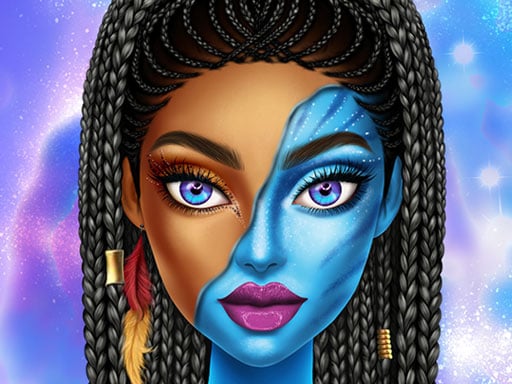
About Avatar Make Up
Avatar Make Up is a single-player beauty and styling browser game centered on creative cosmetic design. Players explore a digital vanity featuring vibrant eyeshadow palettes, varied lipstick tones, and makeover tools to craft personalized looks for an avatar using intuitive mouse clicks or mobile touch controls.
Avatar Make Up invites players into a colorful beauty workspace designed for casual cosmetic experimentation. Rather than imposing high-pressure time limits or strict scores, the experience focuses on visual creativity, letting you mix and match different cosmetic products at your own pace.
The core gameplay loop involves selecting specialized makeup categories such as eyeshadows and lipsticks, browsing available color swatches, and applying them directly onto the character's facial features. Whether crafting subtle daily aesthetics or dramatic statement designs, players can freely test distinct color combinations to bring their artistic concepts to life.
Your goal
The main objective in Avatar Make Up is to design a harmonious and stylish visual makeover. Players aim to complement facial features by testing various makeup techniques, balancing bold eyeshadow shades with flattering lipstick hues, and refining a complete aesthetic presentation from start to finish.
How to play Avatar Make Up
1. Launch Avatar Make Up in your browser on desktop or any supported mobile touchscreen device.
2. Inspect the avatar's initial appearance and examine the available cosmetic toolbars on the screen.
3. Select the eyeshadow option to browse various shades, clicking or tapping to apply color across the eyelids.
4. Choose the lipstick palette to test different hues and finishes until you find a matching tone.
5. Explore additional makeover options and adjust each cosmetic element until your finished look is complete.
Controls and device support
Play by using the mouse on desktop computers to point and click on cosmetic options, or tap directly on the screen when using mobile devices.
- Controls: Mouse or touch
- Device support: Desktop + mobile
- Game frame: 1024 x 768
What makes the challenge interesting
Avatar Make Up centers on aesthetic decision-making and color theory. The primary appeal lies in discovering how diverse cosmetic tones interact on a virtual face. Players navigate the creative balance between subtle neutral shades and vibrant, contrasting pigments. Because the controls are straightforward point-and-click actions, the engagement comes entirely from styling choices: deciding whether to emphasize intense eye makeup, highlight the lips with rich colors, or maintain an understated, balanced look across all features.
Tips for Avatar Make Up
- Establish a central focal point for your makeover before picking colors; deciding whether eyes or lips will take center stage prevents visual clutter and uncoordinated contrasts.
- Pair warm eyeshadow shades with matching warm lipsticks to maintain natural color harmony, rather than mixing clashing undertones across different features.
- Cycle through several lipstick options after applying eye makeup, as seeing the full combination often reveals adjustments that single-feature styling might hide.
- Experiment with high-contrast, artistic color schemes in dedicated creative sessions to test unique styling combinations you might not normally choose.
Playing on different devices
Avatar Make Up is designed with a standard 1024x768 canvas that functions cleanly across modern web browsers. On desktop setups, a standard mouse allows precise cursor placement when picking tiny palette swatches. On mobile smartphones and tablets, the responsive touch interface lets players tap palette selections directly with ease.
The skills behind the game
Cosmetic and fashion games provide an accessible digital playground for exploring personal styling and color coordination. In makeover titles, the emphasis shifts away from reflex-driven challenges toward visual design, aesthetic curation, and relaxing customization. Players who enjoy experimenting with virtual beauty tools find a satisfying creative outlet where diverse palettes can be tested instantly without cleanup or real-world constraints.
Who will enjoy this game
For players searching for an avatar make up game or a lighthearted dress up game, this title provides an immediate, no-download beauty sandbox. It serves casual players, fashion enthusiasts, and anyone seeking quick color experimentation during a break. The straightforward interface makes it easy to practice coordinating makeup palettes, testing how bold eye cosmetics and complementary lipstick tones create distinct facial moods.
Games with a similar feel
Love Nikki-Dress UP Queen: While Love Nikki-Dress UP Queen focuses on extensive outfit coordination and thematic wardrobe styling, Avatar Make Up concentrates its attention directly on facial cosmetics like eyeshadows and lipsticks. Players looking for quick cosmetic experimentation will appreciate the focused beauty palette of Avatar Make Up, whereas Love Nikki caters to broad costume collection.
Project Makeover: Project Makeover revolves around complete character transformations and styling narratives, whereas Avatar Make Up offers a streamlined, instant sandbox specifically dedicated to applying makeup. It provides a direct, accessible alternative for players who want to jump straight into choosing cosmetic colors without managing broader makeover storylines.
Frequently asked questions
What tools can I use in Avatar Make Up? Players can experiment with a broad cosmetic palette that includes different eyeshadow shades, various lipstick hues, and specialized makeover tools to style an avatar.
Can I play Avatar Make Up on mobile devices? Yes, Avatar Make Up supports mobile browsers with tap-based touch controls, as well as desktop computers using mouse navigation.
Are there time limits or scoring penalties in the game? The game focuses on casual creative styling without strict countdown clocks or score penalties, giving you space to freely test cosmetic combinations.
Something not right?
Tell us if the game does not load, the information is wrong or the content needs review.
Report a problem ›