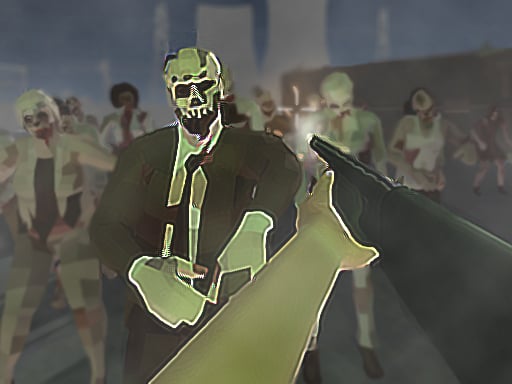
About Zombie Survival FPS : Defense Z Mart
Zombie Survival FPS : Defense Z Mart is a 3D first-person shooter set in an apocalyptic world where a widespread pandemic has unleashed hordes of undead enemies. Taking up a defensive stand inside a supermarket, your goal is to hold the line and eliminate every threat in sight. By tracking incoming targets with your crosshairs and maintaining quick reload discipline, you must prevent any monster from breaching your perimeter.
The game immerses players in an apocalyptic survival scenario where the remaining stronghold is a local supermarket. As waves of aggressive zombies approach your position, you must react quickly using a first-person perspective to acquire targets, align your shots, and eliminate hostile intruders before they overrun your defense.
The core gameplay loop centers on continuous threat tracking and weapon management. You scan the environment for encroaching enemies, fire precise rounds to stop them, and manage your reloads between encounters. The tension rises as continuous waves force you to balance rapid firing against the vulnerability of reloading during active skirmishes.
Your goal
Your primary mission is to destroy all hostile zombies you encounter and ensure none manage to slip past your supermarket outpost. Success requires quick target identification, steady mouse control, and proactive ammunition management so that your defensive barrier remains intact against relentless incoming opposition.
How to play Zombie Survival FPS : Defense Z Mart
1. Start the match and adjust your view using mouse movements to scan the supermarket surroundings for oncoming zombies.
2. Align your reticle with approaching targets and use the left mouse button to discharge your weapon.
3. Press R to reload your weapon promptly whenever there is a brief break in enemy pressure.
4. Maintain your defensive stand by eliminating every approaching zombie before they reach your position.
5. Use P to pause if you need a break, or press Esc to unlock your cursor from the game window.
Controls and device support
Move the mouse to aim your weapon reticle and left-click to shoot. Press R to reload, Esc to unlock the mouse cursor, P to pause or unpause gameplay, and M to mute or unmute audio.
- Controls: Mouse or touch
- Device support: Browser
- Game frame: 800 x 600
Rules to keep in mind
- You must destroy every zombie encountered to prevent them from pushing past your defensive position.
- Letting hostile targets slip past the supermarket defense compromises your survival stand.
What makes the challenge interesting
The core skill in this survival shooter involves target prioritization under steady pressure. Because enemies approach continuously, players must balance precision aiming with situational awareness. Firing indiscriminately can leave your weapon empty at critical moments, so learning to time your reloads during brief pauses in enemy movement is essential.
This creates an engaging rhythm of scanning, firing, and resetting your aim. Maintaining steady mouse tracking allows you to dispatch closer threats before shifting attention to distant targets, keeping your defensive perimeter secure throughout the encounter.
Tips for Zombie Survival FPS : Defense Z Mart
- Reload during lulls in combat rather than waiting for an empty magazine. Running out of ammunition while multiple zombies advance leaves you defenseless.
- Target the closest advancing threats first. Overlooking immediate enemies to shoot distant ones often allows hostile walkers to breach your perimeter.
- Keep your reticle centered at expected approach angles. Sweeping your mouse wildly can disorient your tracking and cause missed shots.
- Use the pause feature when you need a moment to regain composure rather than leaving the match running unattended.
Stages and progression
As encounters continue, the primary challenge comes from handling ongoing waves of undead attackers with consistent defensive accuracy. Building an effective practice routine involves refining your reaction time and eliminating targets systematically before they can cluster near the storefront.
To improve over repeated sessions, focus on maintaining smooth cursor control and establishing a disciplined reload cadence. Tracking your personal survival consistency across matches helps you master the defensive rhythm of each run.
The skills behind the game
As an action shooter set in an apocalyptic defense scenario, the game belongs to the first-person shooting category where aiming mechanics and fast reaction times take center stage. First-person shooters emphasize direct perspective immersion, requiring players to visually identify threats and aim down sights or reticles to eliminate oncoming targets.
The defense and survival themes add distinct pacing to the genre. Rather than navigating broad mazes, players focus on holding a single vantage point, combining classic arcade shooting reflexes with steady resource and ammunition management.
Who will enjoy this game
Players looking for a zombie survival fps defense z mart experience will find a focused browser shooter tailored for quick action sessions. The straightforward combination of mouse-driven aiming, responsive shooting, and apocalyptic wave defense provides an immediate challenge without complicated setup.
For enthusiasts searching for a shooting game online, this title offers an accessible way to practice first-person target acquisition, tracking speed, and reload discipline against persistent waves of undead enemies.
Games with a similar feel
DOOM: Like DOOM, this title challenges players to engage aggressive monster threats from a direct first-person perspective, emphasizing clear aiming and continuous shooting. However, while DOOM is celebrated for high-speed combat navigation and complex arenas, this game provides a focused defensive stand where players hold the line at a supermarket outpost against incoming waves.
Frequently asked questions
What is the primary objective in Zombie Survival FPS : Defense Z Mart? Your main objective is to defend a supermarket by shooting and destroying all approaching zombies, preventing any hostile enemies from breaking through your position.
How do you control your weapon and aim in the game? You aim your weapon by moving the mouse, fire using the left mouse button, and reload your ammunition by pressing the R key on your keyboard.
Can you pause the action during a match? Yes, pressing P pauses and unpauses the game, while Esc allows you to unlock your mouse cursor from the game screen.
Something not right?
Tell us if the game does not load, the information is wrong or the content needs review.
Report a problem ›