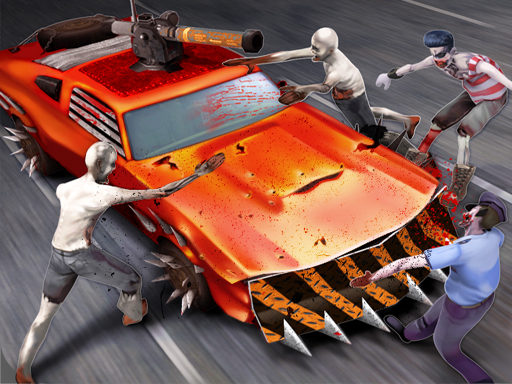
About Zombie Driver Squad 3D
Zombie Driver Squad 3D is a racing-action game where you drive through a zombie apocalypse, fire your guns, avoid other cars and obstacles, gather coins, and push as far as you can while upgrading your ride.
The game mixes driving with arcade shooting: your car moves through a zombie-filled road, zombies block the path, and traffic or obstacles can end a run if you hit them. The stated loop is to kill zombies in your way, collect as many coins as possible, and use the garage-style options to choose, personalize, and upgrade your car.
Beyond simply surviving, the description says you can change a car’s weapon or armor and buy new car models in the store. That gives each run a practical purpose: distance, coins, and zombie kills feed into improving the vehicle you bring back for the next attempt.
Your goal
Your goal is to get as far as possible through the apocalypse. Shoot zombies in your path, steer clear of other cars and obstacles, and gather coins so you can upgrade armor, change weapons, personalize the car, or buy new models.
How to play Zombie Driver Squad 3D
1. Start the game and follow the on-screen introduction, since the instructions say to use the mouse and follow the intro.
2. Choose your car before a run when the game offers the selection described in the official description.
3. Drive forward through the zombie apocalypse and use the mouse as directed by the introduction.
4. Fire your guns to kill zombies in your path while avoiding other cars and obstacles.
5. Collect as many coins as you can and travel as far as possible before the run ends.
6. After earning coins, upgrade the ride by changing weapon or armor, personalizing the car, or buying new models in the store.
Controls and device support
Mouse: Use Mouse To Play and Follow introduction
- Controls: Mouse or touch
- Device support: Browser
- Game frame: 600 x 800
Rules to keep in mind
- Kill zombies that are in your way; the description frames them as targets blocking the road.
- Avoid other cars and obstacles while driving, because the description lists them as hazards to dodge.
- Distance matters: the stated aim is to get as far as you can through the apocalypse.
- Coins are the stated resource to gather for upgrading, personalizing, and buying cars.
What makes the challenge interesting
The focus is a survival-style drive rather than a lap race: keep moving, clear zombies with gunfire, and protect the car by steering away from traffic and obstacles. Runs are built around going farther and collecting coins.
Between attempts, the description points players toward meaningful car choices: pick a model, adjust weapon or armor, personalize the vehicle, and use the store for new cars. The exact upgrade effects are not stated, so treat them as options rather than guaranteed stat boosts.
Tips for Zombie Driver Squad 3D
- Prioritize clean driving first: avoiding cars and obstacles is explicitly part of staying alive, so do not chase every zombie if it pulls you into danger.
- Use coins with a plan. The description supports weapon, armor, personalization, and new models, so spend toward the part of your run that feels weakest.
- Follow the introduction closely because the only supplied control guidance is mouse-based; let the intro show the exact prompts before pushing for distance.
- Balance shooting and spacing. Killing zombies helps clear the road, but the stated goal is distance, so keep a safe line forward whenever possible.
Stages and progression
Progression is described through the car rather than through levels: gather coins during runs, then upgrade your ride, change its weapon or armor, personalize it, and buy new car models in the store. No stage order, unlock thresholds, or upgrade values are stated.
The skills behind the game
Within Racing and Driving tags, Zombie Driver Squad 3D leans toward arcade action rather than pure circuit racing. The category supports the car focus, while the zombie, action, arcade, and hypercasual tags fit a run built around shooting, dodging, coins, and upgrades.
Who will enjoy this game
Natural phrases for this page include the exact title, “zombie driver squad 3d game,” and broader wording such as “racing game online.” These should be treated as unverified seed phrases, not measured demand, and used only where they accurately describe driving, zombies, coins, and car upgrades.
Games with a similar feel
Asphalt: Asphalt is also associated with fast arcade driving, so the shared idea is speed-focused car control. The difference is that Zombie Driver Squad 3D adds a stated zombie-apocalypse loop with guns, obstacles, coins, and car upgrades.
Frequently asked questions
What is Zombie Driver Squad 3D? It is a racing-action driving game set in a zombie apocalypse. You drive forward, fire guns at zombies, avoid other cars and obstacles, collect coins, and try to get as far as possible.
How do you play Zombie Driver Squad 3D? The supplied instructions say to use the mouse and follow the introduction. During play, drive through the apocalypse, shoot zombies in your path, dodge hazards, and gather coins for upgrades.
Can you upgrade cars in Zombie Driver Squad 3D? Yes. The description says you can choose your car, upgrade it, change its weapon or armor, personalize it, and buy new car models in the store using gathered coins.
Something not right?
Tell us if the game does not load, the information is wrong or the content needs review.
Report a problem ›