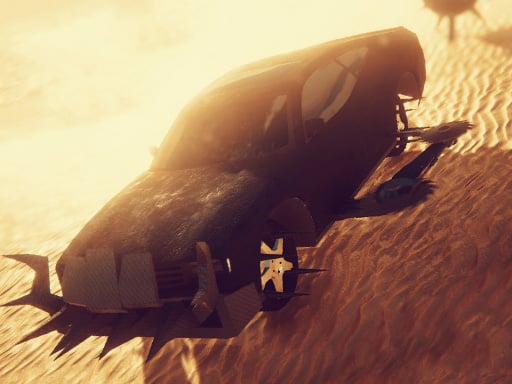
About Zombie Car Driver
Zombie Car Driver is a 3D browser driving game where players steer armored vehicles through apocalyptic tracks filled with undead obstacles. Blending fast-paced racing mechanics with vehicular combat, the game challenges drivers to eliminate zombies on the road, manage high speeds with nitrous boosts, and upgrade equipment across multiple challenging stages.
Zombie Car Driver drops players behind the wheel of customizable combat vehicles in a hostile 3D environment. As you navigate the course, your main challenge is to eliminate all zombies blocking your path while keeping your vehicle under control at high speeds. The experience combines responsive driving with tactical vehicular upgrades, allowing you to personalize your ride by altering its offensive weaponry and defensive armor.
In addition to tweaking armaments, the in-game store offers new car models to expand your garage. Mastering cornering with the handbrake and deploying nitrous acceleration when you need sudden bursts of speed allows you to sweep through enemy clusters while maintaining forward momentum across different levels.
Your goal
The primary goal is to clear out all zombies along your route and survive each level while piloting your vehicle. To make subsequent runs easier, players strive to build stronger setups by acquiring new car models and upgrading both weapons and armor to withstand hostile encounters.
How to play Zombie Car Driver
1. Accelerate and steer your vehicle across the course using standard movement controls.
2. Aim your vehicle toward zombie groups along the roadway to eliminate threats as you drive.
3. Engage the handbrake around sharp turns to execute controlled drifts and stay on track.
4. Activate your nitrous boost on open straightaways to power through heavy enemy clusters.
5. Visit the store to purchase new car models and upgrade armor or weapons between runs.
Controls and device support
Control your car on keyboard using WASD to steer and drive, Spacebar to apply the handbrake for drifting, and Left Shift to activate nitrous boost.
- Controls: See in-game controls
- Device support: Browser
- Game frame: 800 x 450
What makes the challenge interesting
The core rhythm of Zombie Car Driver revolves around balancing raw vehicle speed with deliberate trajectory management. Ramming undead targets requires maintaining enough velocity to clear obstacles while anticipating the sudden traction changes that come with collisions.
Drifting with the handbrake lets drivers swing around bends without coming to a complete stop, setting up straight angles for nitrous acceleration. Choosing when to invest in heavier armor versus deadlier weapons creates a fun tactical trade-off between enduring collision damage and eliminating threats before they compromise your route.
Tips for Zombie Car Driver
- Save nitrous bursts for straight stretches packed with obstacles to punch through without losing momentum, avoiding speed bleed from minor impacts.
- Tap the handbrake briefly before initiating tight turns to trigger a drift, which keeps your engine revving better than braking to a complete halt.
- Prioritize armor improvements early if you find yourself colliding frequently with roadside obstacles and heavy clusters during intense runs.
- Experiment with different car models from the store to find a chassis that matches your preferred balance of handling agility and raw power.
Stages and progression
Zombie Car Driver includes multiple levels and store options designed to test your mastery behind the wheel. As you complete tracks and eliminate targets, you can return to the garage to customize your machine with new weapon configurations, reinforced armor plating, or entirely new vehicle purchases.
For players looking to improve over time, a sensible approach is to focus on clean steering and consistent handbrake drifts on early tracks before pushing high-risk nitrous runs. Gradually tailoring your vehicle upgrades will make tackling subsequent stages much smoother.
The skills behind the game
Within the racing and survival genres, vehicular combat titles deliver a distinct experience where cornering precision meets obstacle clearance. Instead of purely chasing lap times on pristine asphalt, drivers must read road hazards dynamically, deciding whether to swerve around danger or crash directly through it with reinforced plating.
Handbrake drifting and boost management add mechanical depth, turning every tight turn into an opportunity to reposition your vehicle. Fans of 3D car games will appreciate how combining garage upgrades with responsive keyboard driving turns high-speed evasion into a satisfying arcade challenge.
Who will enjoy this game
Players looking for a zombie car driver game or an action-heavy racing game online will find a focused arcade loop here. The game suits quick casual practice sessions where you can jump straight into a run, test your reflexes against incoming waves, and experiment with vehicle handling.
If you enjoy drifting games with combat elements, mastering the timing between handbrake slides and boost bursts offers plenty of engaging replay value. Each session lets you refine your cornering lines while steadily beefing up your car's defenses.
Games with a similar feel
Asphalt: Like the Asphalt series, Zombie Car Driver emphasizes high-velocity arcade steering and nitrous-fueled straightaways. However, while Asphalt focuses on competitive circuit racing against rival supercars, Zombie Car Driver centers on vehicular survival and plowing through hordes of undead road hazards.
Need for Speed: Need for Speed is widely known for aggressive street handling and handbrake cornering. Zombie Car Driver shares that emphasis on drifting through tight bends, but channels vehicle customization toward offensive weapons and reinforced armor rather than traditional street tuning.
Frequently asked questions
What keyboard inputs control the vehicle in Zombie Car Driver? You can steer and accelerate your vehicle using the WASD keys, apply the handbrake with the Spacebar, and activate your nitrous speed boost using the Left Shift key.
Can I upgrade and customize my vehicle? Yes. The game features customization options that allow you to personalize your car by modifying its weapon systems or protective armor, as well as purchasing new car models in the store.
Does the game feature multiple levels? Yes, Zombie Car Driver includes multiple levels featuring various road paths filled with hostile zombies that you must clear while driving.
Something not right?
Tell us if the game does not load, the information is wrong or the content needs review.
Report a problem ›