Official listing
Game description
Zombie Attack is a action game where you have to build defense and survive wave of zombies attack, upgrade your weapons and defense to defeat variants of zombies.
Shooting game
Zombie Attack is a browser-based action game where players construct defenses and battle waves of approaching undead. Surviving requires active movement, steady marksmanship, and regular upgrades to your weaponry and fortifications. By deploying tactical explosives and reinforcing key defense points, you can withstand increasingly dangerous variants of zombies.
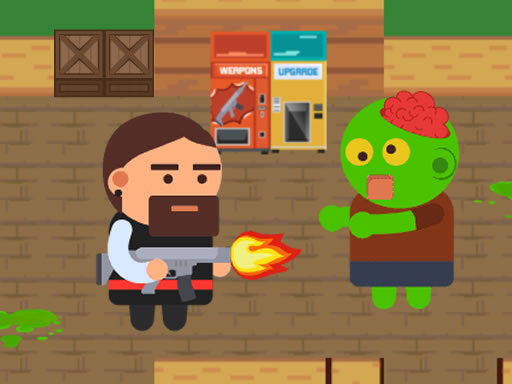
Choose Play now to load the game.
Official listing
Zombie Attack is a action game where you have to build defense and survive wave of zombies attack, upgrade your weapons and defense to defeat variants of zombies.
From the game listing
Use arrows or WASD keys to move mouse to aim and fire E to release dynamite Use joystick on mobile device
Open this card to load the gameplay video.
Zombie Attack is a browser-based action game where players construct defenses and battle waves of approaching undead. Surviving requires active movement, steady marksmanship, and regular upgrades to your weaponry and fortifications. By deploying tactical explosives and reinforcing key defense points, you can withstand increasingly dangerous variants of zombies.
In Zombie Attack, players are placed directly on the front line against relentless hordes of undead invaders. The central loop revolves around moving across the combat zone, targeting incoming threats, and holding your ground across sequential waves of attacks. Building defensive structures helps slow enemy advances and absorb incoming pressure, giving you the breathing room needed to line up precise shots.
As the battle continues, players face different zombie variants that demand evolving combat tactics. Upgrades to your arsenal and base defenses are essential to keep pace with these tougher foes. Combining firearm precision with well-timed dynamite drops creates a layered defense system capable of turning back aggressive swarms.
The core objective in Zombie Attack is to survive every incoming wave of zombie assaults while protecting your defenses. Players strive to eliminate all attacking zombie variants, invest in continuous weapon and defense upgrades, and manage crowd-control explosives effectively to prevent the undead from overwhelming their perimeter.
1. Move your character around the arena using the WASD or arrow keys on desktop, or navigate with the on-screen joystick on mobile.
2. Aim with the mouse and fire your weapon at advancing zombies to thin out the incoming horde.
3. Deploy defensive structures across the field to block or slow enemy progress.
4. Press E to release dynamite when dense clusters of undead threaten to break through your perimeter.
5. Upgrade your weapons and defensive structures between or during engagements to prepare for tougher zombie variants.
Use the arrow keys or WASD to move, aim and fire with the mouse, and press E to release dynamite. On mobile devices, navigate using the on-screen joystick.
The primary tension in Zombie Attack lies in balancing direct weapon combat with static defense management. Standing still to shoot can leave you vulnerable if enemies flank your position, so continuous movement is critical. At the same time, relying solely on primary gunfire is rarely enough against larger clusters, making positioning and explosive usage vital elements of every wave.
Resource allocation creates an engaging strategic tradeoff: players must decide whether to invest early in raw weapon damage to dispatch targets quickly or bolster physical defenses to buy extra time during chaotic rushes. Adapting to the distinct behavior of different zombie variants ensures that matches stay dynamic and require active tactical adjustments.
Progression in Zombie Attack is driven by enduring successive waves of enemy assaults and strengthening your combat capabilities. As you survive longer, the game introduces diverse zombie variants that feature different threats, requiring more durable defenses and higher weapon damage output.
A reliable progression strategy is to establish baseline defenses during initial waves and consistently funnel resources into weapon upgrades. Adapting your placement and combat rhythm between rounds helps maintain stability against escalating zombie rushes.
On desktop setups, Zombie Attack utilizes a dual-hand control layout: navigate with WASD or arrow keys with one hand while aiming and firing using the mouse with the other. The E key provides instant access to dynamite deployment.
On mobile devices, navigation is handled through a touch-screen virtual joystick. Players on touch interfaces should ensure their movement inputs remain smooth while tracking incoming targets across the screen.
Zombie Attack sits squarely in the shooting and wave-defense genres, blending active twin-stick-style combat mechanics with tactical base construction. Survival shooting games challenge players to manage spatial awareness and target prioritization under constant pressure, making quick reflexes and steady positioning essential.
By incorporating defensive construction and weapon upgrades, the game offers a dual layer of tactical planning alongside straightforward action. Players who enjoy arcade-style horde management and defensive positioning will appreciate the continuous balance between shooting precision and fortifying structural barriers.
Players looking for an accessible shooting game online often seek titles that provide immediate action alongside meaningful tactical choices. Zombie Attack fulfills this demand by offering quick-launch browser gameplay centered on defending a perimeter from hordes of undead attackers.
Whether practicing precision aiming on desktop or navigating wave assaults on a mobile device, this zombie attack game delivers an engaging survival loop. Its focus on upgrading gear and holding choke points makes it well suited for casual sessions and skill practice alike.
How do you deploy dynamite in Zombie Attack? On desktop, press the E key on your keyboard to release dynamite, creating an explosive blast to eliminate clusters of approaching zombies.
Can you upgrade your equipment and fortifications? Yes, Zombie Attack includes upgrade systems for both your weapons and your defensive barriers, helping you survive against tougher zombie variants.
What controls are used to move and shoot on desktop? Use the WASD or arrow keys to steer your character, and use the mouse to aim your crosshair and fire at approaching enemies.
Tell us if the game does not load, the information is wrong or the content needs review.
Report a problemExplore popular games by category, shared tags and site-wide activity.





















