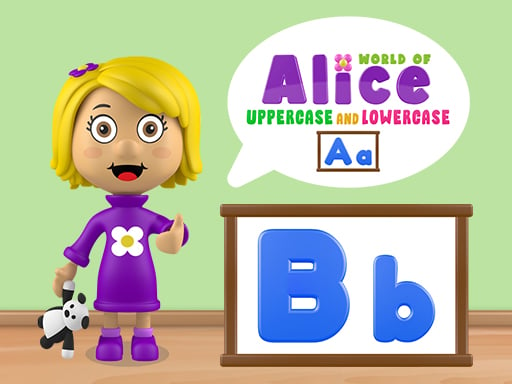
About World of Alice Uppercase and Lowercase
World of Alice Uppercase and Lowercase is an interactive educational puzzle game designed to help young learners practice alphabet fundamentals. Players examine presented letter pairs and identify the correct uppercase equivalent of a target letter. Featuring simple visual prompts and direct point-and-click interactions, it provides an accessible environment for children building early reading confidence across computers, tablets, and mobile devices.
World of Alice Uppercase and Lowercase focuses on foundational literacy by guiding children through letter recognition exercises. The activity presents letter challenges where the core objective is to identify and select the uppercase form of a given character. Designed as an educational resource for early learners, the game uses clear visual cues to make the relationship between capital and small letters intuitive and engaging.
The session loop centers on attentive observation and deliberate selection. Learners view the on-screen prompt, scan the available letter options, and click or tap the uppercase match. Because the software runs seamlessly in web browsers across cell phones, tablets, and desktop computers, it easily integrates into casual home practice or guided classroom activities.
Your goal
The primary objective is to correctly identify and select the uppercase form corresponding to each presented letter. Players aim to reinforce alphabet pairing knowledge, improve visual discrimination between upper and lower case glyphs, and develop steady confidence during letter-matching exercises.
How to play World of Alice Uppercase and Lowercase
1. Launch the game in your browser on your preferred mobile device, tablet, or desktop computer.
2. Observe the prompt on the screen to identify the target letter being presented.
3. Examine the available choices and find the letter in its matching uppercase form.
4. Click or tap directly on the uppercase letter to register your response.
5. Proceed through subsequent letter prompts to continue practicing alphabet recognition.
Controls and device support
Click or tap directly on the target letter in its uppercase form to submit your answer.
- Controls: See in-game controls
- Device support: Browser
- Game frame: 800 x 450
Rules to keep in mind
- Identify the uppercase representation of the requested letter displayed on screen.
- Select the correct uppercase character using mouse click or touchscreen tap to complete each prompt.
What makes the challenge interesting
The core skill tested in this activity is visual letter discrimination. Young learners frequently encounter confusion between letters with similar shapes, such as lowercase 'b' and 'd' or uppercase 'E' and 'F'. By focusing specifically on connecting lowercase shapes to their uppercase counterparts, the game strengthens visual memory and symbol association.
A deliberate and patient rhythm yields the best educational outcome. Rather than rushing to click any familiar symbol, taking a moment to mentally sound out the letter and trace its shape helps reinforce long-term letter retention without unnecessary stress.
Tips for World of Alice Uppercase and Lowercase
- Pronounce the displayed letter out loud before choosing an answer. Speaking the sound reinforces the mental connection between the visual glyph and its name, preventing hasty misclicks on visually similar options.
- Scan all visible options before tapping. Rushing to pick the first letter you see can lead to accidental errors when uppercase forms share vertical or rounded strokes.
- Pay special attention to letters that look distinct across cases, like 'a' and 'A' or 'g' and 'G', taking extra time to verify their matching forms.
- Keep practice sessions short and frequent. Brief daily drills maintain engagement and curiosity far better than long, exhausting study periods.
Playing on different devices
World of Alice Uppercase and Lowercase is built to run smoothly across cell phones, tablets, and desktop computers. On touchscreen devices, children can easily tap directly on the oversized letter targets, making it suitable for developing fine motor coordination. On desktop setups, standard mouse navigation allows young users to practice hand-eye coordination while clicking on their chosen answers.
The skills behind the game
Educational puzzle titles provide early learners with interactive sandboxes to master foundational academic concepts. Within this genre, alphabet games break down literacy into manageable visual challenges, allowing children to connect symbolic letters with their corresponding paired cases. Rather than presenting abstract memorization drills, puzzle activities transform recognition into direct interactive tasks.
By emphasizing clean visuals, intuitive single-input selection, and school-readiness themes, games in the logic and educational space encourage independent exploration. They serve as valuable supplementary practice for preschoolers and early elementary students gaining familiarity with printed language.
Who will enjoy this game
Parents and educators looking for a focused World of Alice Uppercase and Lowercase game often seek straightforward tools that reinforce early childhood literacy without unnecessary visual clutter. Practicing alphabet matching online helps young children bridge the gap between recognizing lowercase letters in books and identifying capital letters in everyday signage and writing.
Engaging with an educational puzzle game online allows children to learn at their own pace. Regular short drills with uppercase and lowercase pairs build symbol familiarity, preparing students for reading and handwriting exercises in classroom environments.
Frequently asked questions
What is the main learning goal in World of Alice Uppercase and Lowercase? The game helps children recognize the alphabet by asking them to identify and select the uppercase form corresponding to presented letters in an interactive format.
Can children play this game on mobile devices? Yes, the game is designed to run across cell phones, tablets, and desktop computers directly through standard web browsers with responsive touch or click input.
How do players submit their answers during the exercises? Players simply click with a mouse or tap on the touchscreen directly on the uppercase letter that corresponds to the active prompt.
Something not right?
Tell us if the game does not load, the information is wrong or the content needs review.
Report a problem ›