Official listing
Game description
World of Alice - Sizes World of Alice - Sizes is a game developed for children to teach the difference in size scale in a fun way via mobile phone, tablet or computer. With Alice learning is fun.
Puzzles game
World of Alice Sizes is an educational puzzle game designed to help young learners explore scale and proportion. Players observe various illustrated objects and sort them according to their relative dimensions. By providing an interactive sorting activity accessible across mobile phones, tablets, and desktop computers, the game offers a playful introduction to visual categorization and size comparison in an approachable digital format.
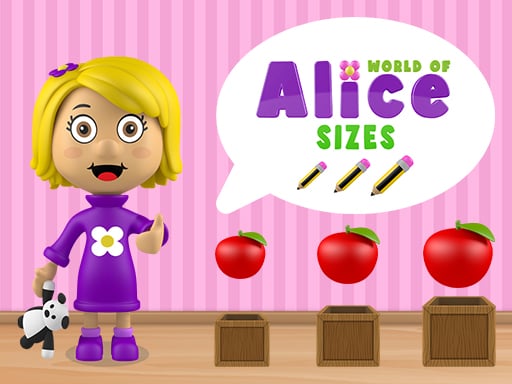
Choose Play now to load the game.
Official listing
World of Alice - Sizes World of Alice - Sizes is a game developed for children to teach the difference in size scale in a fun way via mobile phone, tablet or computer. With Alice learning is fun.
From the game listing
Drag each object to the box corresponding to its size
Open this card to load the gameplay video.
World of Alice Sizes is an educational puzzle game designed to help young learners explore scale and proportion. Players observe various illustrated objects and sort them according to their relative dimensions. By providing an interactive sorting activity accessible across mobile phones, tablets, and desktop computers, the game offers a playful introduction to visual categorization and size comparison in an approachable digital format.
In World of Alice Sizes, players are presented with a series of visual sorting challenges centered on scale. The core activity requires inspecting different items on screen and identifying which size category best fits each one. Once a player determines the scale of an item, they drag the object across the screen and drop it into its designated container.
The cartoon presentation and straightforward mechanics create a calm, welcoming environment suitable for early childhood learning and classroom practice. Because the interface is built for touchscreens and standard web browsers alike, young players can engage with the sorting exercises at their own pace without navigating complicated menus or demanding controls.
The main goal in World of Alice Sizes is to correctly categorize every featured item by moving it into the box that matches its size scale. Players aim to practice visual discernment, carefully distinguishing between smaller, medium, and larger items before placing them into their respective compartments.
1. Start the activity in your web browser on a computer, tablet, or mobile phone.
2. Observe the objects displayed on the screen alongside the available sorting boxes.
3. Compare the visual proportions of each object to determine its relative size.
4. Click or tap an item, then drag it toward the box corresponding to its size.
5. Release the item into the target container and continue sorting the remaining objects.
Drag each object to the box corresponding to its size using a mouse cursor or direct touchscreen input.
The primary focus of World of Alice Sizes is developing early visual perception and cognitive classification. Rather than testing reaction speed or mechanical agility, the exercise asks players to pause, observe outlines, and make thoughtful visual comparisons. Players learn to judge scale in relation to surrounding elements, translating visual cues into deliberate drag-and-drop actions.
A key tradeoff involves balancing speed with careful observation. Moving too quickly can lead to placing an object in the wrong container, whereas taking time to compare two adjacent items makes differences in height, width, and bulk easier to recognize.
World of Alice Sizes functions as a structured learning tool where progress is measured through consistent visual accuracy. While specific round counts or scoring metrics are not detailed, players can build their confidence through repeated practice sessions.
A sensible practice plan involves starting with guided supervision, allowing a child to discuss why an item belongs in a certain box. As familiarity with scale comparisons grows, independent play helps solidify basic sorting instincts and spatial awareness.
The game is engineered to run seamlessly across computers, tablets, and smartphones. On desktop setups, a standard mouse provides precise drag-and-drop targeting. On mobile devices and tablets, direct touch interaction offers an intuitive, tactile experience that is particularly friendly for younger children practicing fine motor skills.
Within the educational puzzle genre, sorting activities provide a foundational stepping stone for early childhood cognitive development. Games of this style combine basic pattern recognition with interactive manipulation, turning abstract concepts like relative scale into tangible visual challenges.
By emphasizing cartoon visuals and simple drag-and-drop mechanics, digital school puzzles offer a low-pressure setting where young players can experiment, practice categorizing objects, and develop hand-eye coordination without complex interface hurdles.
Parents, teachers, and caregivers searching for World of Alice Sizes or an accessible puzzle game online often seek safe, browser-based activities that support foundational preschool learning. These interactive exercises fit neatly into short home practice sessions or classroom tablet rotations.
Engaging with casual educational software allows beginners to practice essential digital skills, such as drag-and-drop navigation and visual sorting, while focusing on simple comparisons that build confidence and spatial understanding.
What is the main learning goal in World of Alice Sizes? The game aims to teach children how to recognize and differentiate between size scales by having them drag objects into corresponding classification boxes.
Can World of Alice Sizes be played on mobile devices? Yes, the game is built to operate across mobile phones, tablets, and desktop computers with support for both touch and mouse controls.
How do players sort objects into the boxes? Players click or touch an item on screen, drag it across to the box representing its matching size, and release it into place.
Tell us if the game does not load, the information is wrong or the content needs review.
Report a problemExplore popular games by category, shared tags and site-wide activity.


















