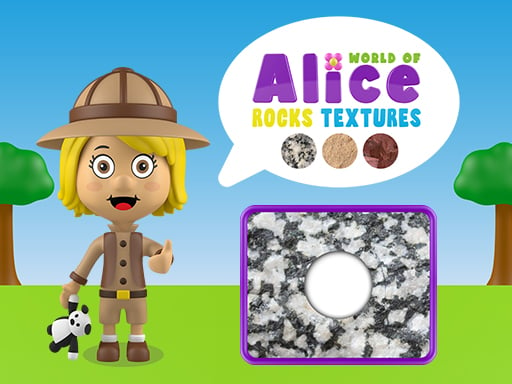
About World of Alice Rocks Textures
World of Alice Rocks Textures introduces young learners to geology concepts through tactile visual puzzles. Designed specifically as an educational resource for children, the activity asks players to inspect different rock surfaces and match each texture correctly. Whether played at home or in an early learning environment, the game combines simple drag-and-drop mechanics with foundational observational science to build early visual literacy and texture recognition skills.
World of Alice Rocks Textures provides a colorful, accessible digital learning environment centered on visual discrimination. Tailored for school-aged kids and young learners, the game presents various geological surfaces, prompting players to observe distinct physical details such as roughness, smoothness, grain patterns, and surface colors. The core loop invites players to examine a displayed sample and determine which texture corresponds to the target rock formation.
The experience relies on direct interaction, where children manipulate objects on screen by dragging items to their proper resting spots. Because the game is built to run smoothly in web browsers across desktop computers, tablets, and mobile phones, it functions as a flexible activity for casual play or classroom learning. The friendly visual format keeps the atmosphere stress-free, encouraging players to explore natural science concepts through self-paced trial and error.
Your goal
The primary objective in World of Alice Rocks Textures is to accurately identify and match each rock texture by dragging it into its designated position. Players aim to sharpen their observation skills by noticing subtle differences in rock surfaces, grain size, and stone patterns. The goal is to successfully complete each texture puzzle through attentive comparison, reinforcing natural science knowledge and fine motor coordination with every accurate placement.
How to play World of Alice Rocks Textures
1. Launch the game in your web browser on a computer, tablet, or smartphone.
2. Observe the presented rock image and inspect the available texture options shown on screen.
3. Compare surface qualities such as grain, color variations, and physical patterns across the choices.
4. Select the matching texture piece and drag it toward the corresponding rock slot.
5. Release the texture into place to complete the match and proceed through the activity.
Controls and device support
Drags the correct rock texture into place
- Controls: See in-game controls
- Device support: Browser
- Game frame: 800 x 450
What makes the challenge interesting
World of Alice Rocks Textures centers on visual literacy, pattern recognition, and tactile interaction. Rather than challenging players with fast-paced reflexes or punitive timers, the game prioritizes careful visual inspection and deliberate decision-making. Players must evaluate visual cues across various natural textures, distinguishing between rough, porous, polished, or speckled surfaces. The central cognitive tradeoff involves balancing quick visual intuition against methodical comparison. Moving too hastily can lead to misplaced textures when rocks share similar color palettes, so taking time to examine grain structure and surface depth leads to more reliable identification. This measured rhythm makes the gameplay approachable for younger learners developing foundational logic and observational skills.
Tips for World of Alice Rocks Textures
- Look closely at surface grain. Examine fine details like speckles, cracks, or crystalline flecks rather than focusing solely on overall rock color to avoid confusing different stones.
- Take time before dragging. Give your child or student a moment to scan all available texture pieces first so they can identify distinct patterns instead of guessing randomly.
- Compare light and shadow. Look at how highlights and shading fall across rough or smooth stone textures, which often reveals whether a surface is bumpy, porous, or polished.
- Practice smooth drag movements. Maintain a steady touch or mouse hold while dragging items to ensure the piece registers accurately within the target drop area.
- Use guided verbal discussion. Encourage young players to describe what they see aloud, naming attributes like bumpy or grainy, which reinforces vocabulary alongside visual matching.
Playing on different devices
World of Alice Rocks Textures is designed to run seamlessly across cell phones, tablets, and desktop computers. On touchscreen devices like smartphones and tablets, young learners can use intuitive direct finger-dragging to slide textures into place, which is particularly helpful for developing hand-eye coordination. On desktop computers, mouse control offers precise clicking and cursor movement across larger screens.
The skills behind the game
Within the puzzle and educational game genres, texture-matching titles serve a distinct role in early childhood cognitive development. While standard logic puzzles frequently rely on geometric shapes, abstract numbers, or spatial rotation, educational science puzzles connect gameplay directly to the natural world. World of Alice Rocks Textures bridges visual problem-solving with introductory geology concepts. By challenging children to recognize real-world physical attributes in an interactive format, it fosters foundational observation habits, descriptive vocabulary, and tactile confidence that support broader elementary school science learning.
Who will enjoy this game
Players searching for a casual puzzle game online often seek accessible, low-friction activities suitable for quick learning sessions or family play. World of Alice Rocks Textures game fulfills this intent by offering an engaging web-based experience that requires no downloads or complex setup. Parents, educators, and young children looking up world of alice rocks textures will discover a welcoming practice tool that turns simple digital interactions into an opportunity for scientific discovery, tactile matching, and visual discrimination practice in any standard web browser.
Frequently asked questions
What is the main goal in World of Alice Rocks Textures? The goal is to identify different rock surfaces and drag the matching rock texture into its correct slot. This helps young learners practice visual observation and discover various geological textures.
What devices can be used to play this educational puzzle? You can play the game directly in a web browser on cell phones, tablets, and desktop computers, making it accessible for classroom activities or learning at home.
Is this game suitable for young children and students? Yes, the game is specifically developed for children as an educational resource. Its straightforward drag-and-drop mechanics and intuitive visual matching make it ideal for early school learners.
Something not right?
Tell us if the game does not load, the information is wrong or the content needs review.
Report a problem ›