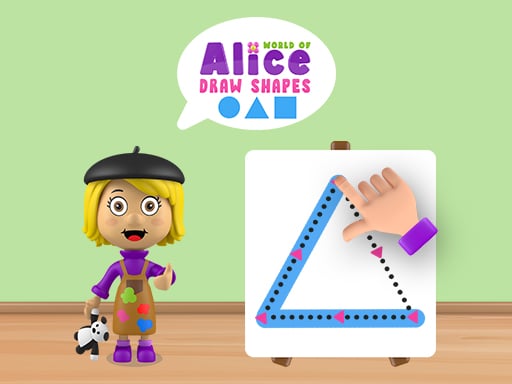
About World of Alice Draw Shapes
World of Alice Draw Shapes is an educational drawing activity created for preschool and primary school children. The game invites young learners to practice fine motor coordination by tracing geometric shapes such as circles, squares, triangles, and rectangles on a virtual board. By following clear dotted outlines, players explore basic geometry and drawing mechanics in an approachable browser setting.
Designed with a friendly cartoon aesthetic, World of Alice Draw Shapes provides a welcoming space where young learners can discover fundamental geometric figures. The core activity centers on an on-screen board presenting recognizable forms such as squares, circles, triangles, and rectangles. Players interact with these figures by tracing along guided dotted lines to complete each shape.
The interactive format encourages children to connect visual shape recognition with deliberate tracing movements. Because the game runs directly in modern web browsers across computers, tablets, and phones, it offers an easily accessible digital drawing board suited for early childhood learning at home or in school environments.
Your goal
The main objective in World of Alice Draw Shapes is to successfully trace and complete various geometric shapes presented on the board. Players aim to carefully follow the dotted guides for circles, rectangles, triangles, and squares, developing hand-eye coordination and visual recognition of standard geometric properties as they finish each drawing task.
How to play World of Alice Draw Shapes
1. Load the game in your web browser on a desktop computer, tablet, or mobile phone.
2. Observe the geometric shape and its dotted outline displayed on the drawing board.
3. Use your mouse cursor or touchscreen finger to begin tracing along the guided dotted lines.
4. Follow each path steadily until the complete outline of the geometric shape is drawn.
5. Continue exploring and drawing new shapes, such as circles, triangles, squares, and rectangles.
Controls and device support
Interact by clicking and dragging with the mouse on desktop or dragging directly on touchscreens to draw geometric shapes along the dotted lines on the board.
- Controls: See in-game controls
- Device support: Browser
- Game frame: 800 x 450
What makes the challenge interesting
The central appeal of World of Alice Draw Shapes lies in combining early childhood educational concepts with steady tracing control. Rather than challenging players with fast-paced reflexes or punitive timers, the game emphasizes deliberate movement and visual alignment. Children practice holding a continuous line while navigating straight edges, corners, and gentle curves across different geometric templates.
Navigating corners on squares and rectangles requires abrupt directional shifts, whereas circles demand smooth, continuous curving. Balancing speed and tracing accuracy gives young learners a rewarding sense of creative completion while reinforcing basic mathematical vocabulary in a playful setting.
Tips for World of Alice Draw Shapes
- Start tracing slowly from one corner or starting point to avoid drifting away from the dotted path before you establish a steady rhythm.
- Pause briefly at geometric corners when drawing rectangles, squares, or triangles so your line transitions crisply onto the next side.
- Maintain a smooth, continuous dragging motion when tracing circles to keep curved lines even rather than jagged.
- Name each shape aloud as you complete its outline to reinforce the connection between the visual form and its geometric name.
Playing on different devices
World of Alice Draw Shapes is configured for standard 800 by 450 browser viewports and supports cell phones, tablets, and desktop computers. On touchscreen devices, children can use a finger or stylus directly on the display for a tactile tracing experience. On desktop systems, a standard computer mouse or trackpad provides precise cursor guidance across the digital drawing board.
The skills behind the game
Within educational puzzle and drawing genres, interactive tracing titles serve as an introductory bridge between basic digital interaction and foundational school skills. World of Alice Draw Shapes fits comfortably among early childhood learning games by transforming core geometric identification into an active hands-on task. Rather than passively viewing diagrams, young players engage directly with lines, corners, and curves.
By emphasizing clean visual guides and intuitive pointer inputs, the game supports digital literacy and shape recognition in an approachable format suitable for home practice and preschool classroom activities.
Who will enjoy this game
Parents and educators looking for a puzzle game online or a creative coloring game online often seek accessible browser titles that reinforce early childhood learning without complex setups. World of Alice Draw Shapes answers this need by delivering focused tracing exercises centered around basic geometric figures.
Playing the game offers a low-pressure environment where young learners can build confidence handling digital inputs, recognizing shapes, and practicing line control through repeated, interactive drawing sessions.
Games with a similar feel
Cookie Clicker: While Cookie Clicker centers on repetitive clicking to accumulate resources and purchase long-term production upgrades, World of Alice Draw Shapes uses simple point-and-click or tap interactions to trace geometric outlines. Players looking for an educational drawing activity will appreciate the guided shape exercises here over the resource management loop of an incremental clicker.
Happy Color: Happy Color focuses on filling intricate numbered picture regions with predetermined color palettes, whereas World of Alice Draw Shapes centers on tracing foundational geometric lines like circles and rectangles. Young children practicing hand coordination and shape identification will find this game's direct outline tracing more suited to early geometry practice than detailed color-by-number artwork.
Frequently asked questions
What shapes can children learn to trace in this game? Players can practice drawing several common geometric shapes on the board, including circles, squares, triangles, and rectangles along dotted guidelines.
Is World of Alice Draw Shapes suitable for touchscreen tablets and phones? Yes. The game is designed to run in browsers across cell phones, tablets, and computers, allowing direct touch tracing on mobile displays or mouse dragging on desktop setups.
What age group is this educational drawing game designed for? The activity is tailored specifically for preschool and primary school aged children to make learning fundamental geometric shapes interactive and engaging.
Something not right?
Tell us if the game does not load, the information is wrong or the content needs review.
Report a problem ›