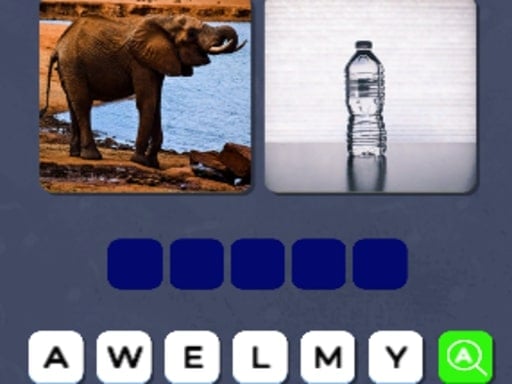
About Word Picture Guesser
Word Picture Guesser challenges players to solve visual riddles by uncovering the hidden words concealed within cryptic artwork and picture clues. Each round pairs graphic imagery with linguistic deduction, inviting you to inspect visual details, connect conceptual themes, and identify the correct vocabulary terms. Designed for quick browser-based problem solving, the game tests your lateral thinking through engaging visual puzzles that exercise your vocabulary and observational perception.
Word Picture Guesser presents a streamlined guessing environment centered on visual interpretation and language discovery. In each puzzle, players face artwork or graphic compositions that hide specific words within their design. Rather than relying solely on text definitions, the game blends visual art with verbal deduction, prompting you to analyze colors, symbols, depicted objects, and abstract associations to determine the underlying answer.
The core loop consists of studying the displayed picture, forming linguistic hypotheses, and submitting your solution using simple click or tap inputs. Because every level introduces a distinct image challenge, the experience keeps you shifting between literal observation and metaphorical thinking. The minimalist presentation ensures that your attention remains anchored on deciphering the visual clues without distracting management layers or complex submenus.
Your goal
Your objective in Word Picture Guesser is to correctly decode the visual clues in each level and reveal every concealed word. Advancing through the puzzles requires careful examination of each cryptic image, filtering through possible synonyms and related vocabulary, and deducing the precise term represented by the art.
How to play Word Picture Guesser
1. Launch Word Picture Guesser in your web browser using a desktop mouse or mobile touchscreen.
2. Examine the visual riddle displayed on screen, noting key symbols, subject matter, and visual relationships.
3. Brainstorm potential words or conceptual phrases that match the visual clues embedded in the artwork.
4. Click or tap the on-screen elements to enter your deduction and confirm your chosen word.
5. Proceed to the next level to tackle a brand-new visual riddle and continue expanding your deduction streak.
Controls and device support
Word Picture Guesser uses mouse clicks on desktop and direct screen taps on touch devices to select letters, interact with puzzle prompts, and submit your answers.
- Controls: Mouse or touch
- Device support: Desktop + mobile
- Game frame: 300 x 600
What makes the challenge interesting
The defining appeal of Word Picture Guesser lies in the dynamic interplay between visual literacy and verbal deduction. Solving each puzzle requires balancing direct literal interpretation against broader figurative reasoning. A depicted object might signify its direct name, a homophone, a compound component, or a metaphorical theme. Players must navigate this ambiguity without jumping to hasty conclusions, methodically evaluating how every visual element supports a single cohesive word.
Tips for Word Picture Guesser
- Catalog every individual item in the picture before guessing. Overlooking small background shapes or symbolic colors can cause you to fixate on the wrong conceptual category.
- Consider figurative meanings and wordplay alongside literal objects. Visual puzzles frequently rely on idioms, puns, or double meanings rather than straightforward depictions of an item.
- Say your candidate words out loud to identify phonetic matches. Listening to syllable combinations often reveals compound words or verbal associations that silent reading might miss.
- Reset your perspective if you get stuck on an initial guess. Stepping back for a few moments prevents cognitive tunnel vision and lets you spot alternative interpretations of the imagery.
Stages and progression
Progression in Word Picture Guesser advances sequentially as each level introduces a distinct visual challenge blending art and language. Because puzzle difficulty hinges on visual subtlety and vocabulary range, establishing a steady problem-solving routine helps maintain momentum. Treat each completed stage as practice in recognizing artistic conventions, building cognitive agility for progressively more cryptic imagery in later puzzles.
Playing on different devices
Word Picture Guesser is built using Unity3D and WebGL, operating smoothly inside modern desktop and mobile browsers. With a native canvas resolution of 300 by 600 pixels, the game utilizes an upright portrait orientation that suits smartphone screens and narrow desktop browser windows alike. Desktop users can navigate the interface effortlessly using standard mouse clicks, while mobile users can tap directly on the screen.
The skills behind the game
While categorized under arcade titles in supplier listings, Word Picture Guesser operates squarely as an analytical word and deduction puzzle. The arcade designation reflects its accessible, pick-up-and-play format and fast feedback loop rather than reflex-based twitch action. Within the broader guessing genre, it emphasizes mental agility, lateral association, and vocabulary recall over spatial coordination or dexterity.
Who will enjoy this game
Players looking for a word picture guesser game typically seek brain-teasing visual riddles that offer relaxing, self-paced mental stimulation. Engaging with visual word puzzles provides an enjoyable way to sharpen vocabulary retention, exercise observational skills, and unwind during short breaks. The accessibility of browser-based play makes it an appealing option for puzzle enthusiasts wanting casual linguistic practice without complex rules or lengthy setup.
Frequently asked questions
What is the primary goal of Word Picture Guesser? The main goal is to decipher cryptic artwork and visual clues in each level to unveil the hidden word represented by the imagery.
How do you control the game on different devices? You can interact with Word Picture Guesser by clicking your mouse on desktop browsers or tapping directly on touchscreen displays on mobile devices.
Can I play Word Picture Guesser online without downloading files? Yes, Word Picture Guesser runs directly in modern web browsers powered by Unity3D and WebGL technology, allowing instant play without standalone installation.
Something not right?
Tell us if the game does not load, the information is wrong or the content needs review.
Report a problem ›