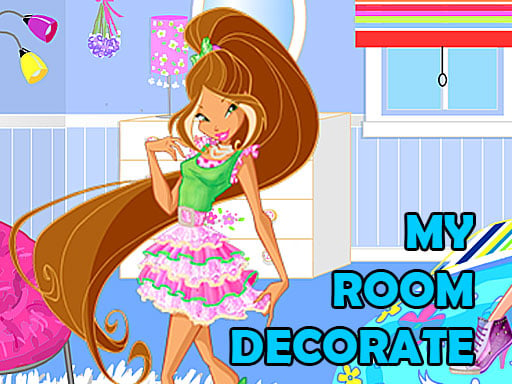
About Winx Room Decorate
Winx Room Decorate is a casual decorating game where players help fairy characters Bloom, Flora, Stella, and Tecna redesign their living quarters for the new year. Featuring pastel palettes like pink and light blue, the game lets you customize interior elements by selecting furniture, accessories, and characters directly from on-screen menus.
In Winx Room Decorate, players take on the role of an interior stylist assisting four fairy friends—Bloom, Flora, Stella, and Tecna—as they prepare their rooms for festive new year celebrations. The gameplay centers on creative selection and aesthetic coordination, giving players access to menus situated on the right side of the screen.
From these menus, you can switch between fairy characters and browse through different decor items to outfit the space. The fairies have a stated preference for soft tones like pink and light blue, offering a guiding theme for arranging furniture, wall designs, and decorative accents. With simple tap interactions, the title provides an accessible, relaxed experience tailored for fans of design and decoration games.
Your goal
The primary objective is to create a complete, festive room layout for fairy characters Bloom, Flora, Stella, or Tecna. Players accomplish this by exploring the available categories in the right-side menu, choosing complementary furniture and decorative pieces, and styling a harmonious living space that incorporates preferred pink and light blue color themes for the new year.
How to play Winx Room Decorate
1. Start the game by tapping the screen to enter the decorating interface.
2. Browse the selection menus located on the right side of the display.
3. Choose your favorite fairy character among Bloom, Flora, Stella, and Tecna to place in the room.
4. Select various furniture and decorative items to customize the room for the new year celebration.
5. Experiment with pink and light blue accents to match the characters' preferred color style.
Controls and device support
Tap screen: Select items and characters from menus
- Controls: Mouse or touch
- Device support: Desktop + mobile
- Game frame: 650 x 375
What makes the challenge interesting
Gameplay in Winx Room Decorate focuses on creative expression and menu-driven customization rather than timed challenges or high-score pressure. Players interact directly with side menus to cycle through items, test different room arrangements, and switch between featured fairy characters. Because Bloom, Flora, Stella, and Tecna favor light blue and pink palettes, coordinating these colors across furnishings forms the core aesthetic loop. The intuitive tap-to-select structure allows players to experiment freely, swapping items in and out until the space feels ready for the new year.
Tips for Winx Room Decorate
- Coordinate your design by pairing light blue and pink furnishings together to complement the fairy characters' stated favorite color palette.
- Explore all right-side menu categories before finalizing a design so you can see every available furniture and decor option.
- Try switching between Bloom, Flora, Stella, and Tecna to see which character best suits your completed festive room arrangement.
The skills behind the game
Categorized under Girls and Decoration games, Winx Room Decorate fits squarely into the casual dress-up and interior makeover genre. These HTML5 titles emphasize personal creativity, character styling, and relaxed visual customization over complex controls or fail states, making them approachable for players looking to design themed digital spaces.
Who will enjoy this game
Players searching for a winx room decorate game typically look for creative room makeover activities featuring fairy characters. In Winx Room Decorate, the focus remains on selecting furniture and coordinating pink and light blue tones, offering an inviting casual experience for fans of themed decoration and design titles.
Games with a similar feel
Homescapes: Like Homescapes, Winx Room Decorate revolves around decorating living spaces and selecting interior furnishings. However, while Homescapes ties room customization to puzzle progression and narrative renovation tasks, Winx Room Decorate offers a direct, menu-based styling experience without match-three puzzle requirements.
Frequently asked questions
Which characters can you choose in Winx Room Decorate? You can choose between four fairy characters: Bloom, Flora, Stella, and Tecna. You can select your favorite character directly from the menu located on the right side.
What colors do the characters prefer for their room? The fairy characters Bloom, Flora, Stella, and Tecna prefer pink and light blue colors when styling their rooms for the new year celebration.
How do you interact with the game? You interact with the game by tapping the screen to browse through the right-hand menus, allowing you to select room items and fairy characters.
Something not right?
Tell us if the game does not load, the information is wrong or the content needs review.
Report a problem ›