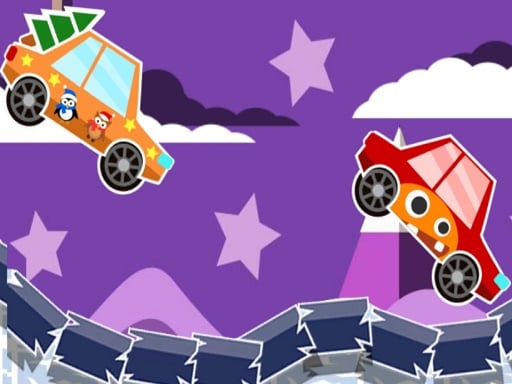
About Winter Racing 2D
Winter Racing 2D is a browser-based driving game that puts players behind the wheel on snowy courses. Competing against AI drivers, you navigate icy terrain across distinct levels where successful finishes yield coins. Those accumulated earnings allow you to purchase and unlock a lineup of new cars. The core challenge centers on controlling your vehicle smoothly through winter conditions, maintaining competitive speed, and completing each stage to progress further into the game.
Winter Racing 2D delivers a 2D racing format set against a wintry backdrop of snowy tracks. Players steer their vehicle in competition with computer-controlled AI opponents, navigating each circuit toward the finish line. The driving experience revolves around handling momentum, steering through cold-weather road layouts, and keeping pace with rival cars that share the course.
Completing a level awards coins that serve as the game's currency for vehicle progression. Players can take their accumulated rewards to the shop to buy and unlock additional cars, encouraging continued attempts across subsequent stages. Each level introduces fresh track layouts and competitive challenges, establishing a straightforward loop of racing, earning, and expanding your vehicle collection.
Your goal
Your main objective in Winter Racing 2D is to steer your car through each snowy track, race effectively against AI opponents, and successfully complete each level. Finishing stages earns coins that you can reinvest into unlocking and acquiring new cars, allowing you to tackle higher levels with upgraded vehicle options.
How to play Winter Racing 2D
1. Start the race and get ready to steer as soon as the countdown or green light signals the start.
2. Use the WASD keys or arrow keys on your keyboard to steer, accelerate, and maneuver your vehicle.
3. Navigate the snowy tracks while managing your racing line alongside computer-controlled AI drivers.
4. Cross the finish line to complete the level and collect your earned coins.
5. Visit the vehicle selection menu to purchase and unlock new cars using your accumulated coin balance.
Controls and device support
Drive and steer your car using either the WASD keys or the arrow keys on your keyboard.
- Controls: WASD + arrow keys
- Device support: Browser
- Game frame: 800 x 600
Rules to keep in mind
- Races take place against AI opponents on snowy courses across individual levels.
- Completing a level grants coin rewards based on your finish.
- Earned coins can be spent to purchase and unlock newly available cars.
What makes the challenge interesting
The core gameplay of Winter Racing 2D focuses on vehicle control and situational awareness on snow-themed circuits. Racing alongside AI opponents requires balancing aggressive forward speed with steady steering inputs. In 2D driving games, oversteering or sudden directional changes can compromise your momentum, making consistent cornering lines critical to maintaining a strong track position.
Patience and smooth key taps often yield better results than erratic steering when navigating crowded track sections. Because each completed level provides coins toward acquiring new vehicles, developing a disciplined racing rhythm directly supports your garage progression over time.
Tips for Winter Racing 2D
- Use gentle, rhythmic taps on the steering keys rather than holding them down continuously. Holding turns too long can lead to oversteering and loss of speed through snowy corners.
- Monitor the movements of AI cars ahead of you to anticipate collisions or bottleneck sections. Giving rivals a slight buffer helps prevent spinouts on tight stretches.
- Focus on clean course completion to reliably collect level-end coins. Rushing recklessly and making mistakes often delays your reward earnings more than steady driving.
- Save your coins to unlock newer vehicles in the roster. Testing different cars as you unlock them can help you find a ride that suits your driving style across later tracks.
Stages and progression
Winter Racing 2D is organized into sequential levels that present ongoing driving challenges. As you complete each stage, you earn coins that accumulate in your overall balance. These winnings provide the means to purchase and unlock additional cars from the vehicle lineup, giving players clear milestones to work toward between races.
A sound progression approach involves repeating earlier tracks if necessary to master vehicle handling, saving funds methodically, and unlocking higher-tier cars before tackling more demanding courses.
The skills behind the game
In the broader world of browser racing games, 2D top-down and side-perspective driving titles offer accessible, instant-play vehicle action. Rather than requiring complex simulation setups, 2D racers emphasize quick reflexes, responsive keyboard steering, and smart line selection around curves.
Winter Racing 2D fits cleanly into this space by combining straightforward controls with a themed winter environment and a clear coin-based vehicle unlock structure. It offers casual drivers a quick way to practice steering discipline and build a virtual car collection without steep hardware demands.
Who will enjoy this game
Players looking for a winter racing 2d game or a quick racing game online often want immediate driving action with clear progression goals. Winter Racing 2D provides that balance through short, level-based races that can be played in quick sessions between other tasks.
Whether you are practicing steady keyboard inputs or working toward unlocking every car in the shop, the game serves as an accessible casual driving title focused on clean cornering and steady track progression.
Games with a similar feel
Asphalt: Like the Asphalt series, Winter Racing 2D centers on driving cars in competitive races and expanding your vehicle collection. While Asphalt emphasizes high-speed 3D arcade spectacles and elaborate courses, Winter Racing 2D offers a lightweight 2D browser format focused on snowy track maneuvering.
Need for Speed: Similar to Need for Speed, this title challenges players to master vehicle handling and compete against rival drivers on track layouts. However, Need for Speed features deep automotive customization and open street racing, whereas Winter Racing 2D provides quick, level-based 2D winter challenges.
Frequently asked questions
What controls are used to drive in Winter Racing 2D? You can control your vehicle using either the WASD keys or the standard arrow keys on your keyboard for steering, accelerating, and maneuvering.
How do you unlock new cars in the game? You unlock and purchase new vehicles by spending coins earned from successfully finishing racing levels.
Do you race against other players or computer opponents? Winter Racing 2D features competition against computer-controlled AI racers on each snowy track.
Something not right?
Tell us if the game does not load, the information is wrong or the content needs review.
Report a problem ›