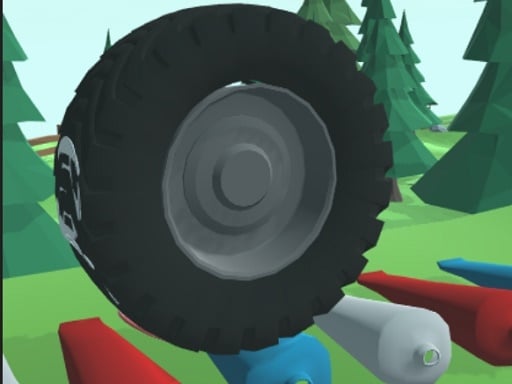
About Wheel Smash 3D
Wheel Smash 3D is a single-player hypercasual physics game where players grab, rotate, and launch a heavy wheel through a colorful polygonal forest. By generating spin and guiding the wheel along its path, you crush and smash through various objects placed across the landscape under a bright cartoon sky. The core challenge revolves around building momentum, aiming your roll accurately, and enjoying the tactile satisfaction of obstacle demolition.
Set against an open backdrop featuring stylized forest scenery and bright cartoon skies, Wheel Smash 3D invites players to take control of an oversized rolling wheel. The experience starts by interacting directly with the wheel on screen. Using your mouse or touch input, you grab the wheel and spin it to initiate forward motion, sending it hurtling along the course.
As the wheel rolls forward, it encounters an array of breakable items and obstacles scattered throughout the polygonal terrain. Smashing through these targets requires an initial rotational push and steady navigation. The visual feedback of objects breaking apart under the wheel creates a relaxing, arcade-style gameplay loop focused on continuous motion, destruction, and simple physics interactions.
Your goal
The primary goal in Wheel Smash 3D is to successfully rotate your wheel, maintain its forward drive, and smash through as many scattered objects as possible along the route. Players aim to roll and smash their way to victory by refining their rotational release, targeting clusters of obstacles cleanly, and navigating the forest environment with consistent precision.
How to play Wheel Smash 3D
1. Click or tap on the game canvas to load Wheel Smash 3D in your browser.
2. Locate the main wheel resting at the starting point of the forest track.
3. Grab the wheel with your mouse cursor or touch contact to prepare your spin.
4. Rotate and drag the wheel forward to generate momentum and initiate rolling movement.
5. Guide the rolling wheel toward scattered objects along the polygonal pathway.
6. Smash through the destructible targets and roll along the course to complete the run.
Controls and device support
The game is played using simple mouse clicks, drags, or screen taps. Click and hold on the wheel to grab it, then drag in a rotational motion to launch it along the track.
- Controls: Mouse or touch
- Device support: Desktop + mobile
- Game frame: 800 x 600
Rules to keep in mind
- Grabbing and rotating the wheel initiates its rolling movement across the course.
- Making direct contact with scattered objects allows the spinning wheel to smash through them.
- Runs take place as a single-player challenge through the designated 3D polygonal forest environment.
What makes the challenge interesting
The core appeal of Wheel Smash 3D lies in the tactile relationship between manual wheel rotation and physical impact. Because movement begins with a direct grab-and-rotate gesture, players must find an effective balance between speed and control. Spinning the wheel with a swift, fluid motion helps impart strong forward velocity, while maintaining spatial awareness ensures the wheel connects with obstacle lines.
Rather than demanding intricate button combinations, the game emphasizes satisfying sensory feedback. Watching stylized items shatter under the force of the rolling wheel rewards clean trajectory planning. The main challenge comes from coordinating your initial launch angle so that the wheel does not veer off course before crushing its targets.
Tips for Wheel Smash 3D
- Practice smooth circular drags when launching the wheel. A steady rotational motion gives the wheel clean initial speed without erratic lateral wobbling.
- Align your launch trajectory directly with the thickest clusters of objects. Aiming down the center line prevents the wheel from bypassing targets on either flank.
- Observe how different objects react upon collision. Hitting items squarely in the center ensures full crushing contact rather than glancing deflections.
- Avoid rushing your initial spin. Releasing the wheel carelessly can send it veering sideways, missing valuable targets scattered along the forest path.
Playing on different devices
Wheel Smash 3D supports both desktop and mobile web browsers via WebGL and Unity3D technology. On desktop computers, using a physical mouse provides precise cursor control when grabbing and rotating the wheel. On touchscreen devices, a direct finger swipe allows for intuitive rotational flicking, though players should ensure their screen is clear to maintain fluid drag gestures.
The skills behind the game
Classified within the hypercasual and 3D arcade categories, Wheel Smash 3D delivers immediate, accessible gameplay with minimal onboarding friction. Hypercasual titles emphasize straightforward core mechanics that players can grasp in seconds, paired with satisfying visual or physical rewards. Here, the immediate cause-and-effect of spinning a wheel and pulverizing obstacles exemplifies the pick-up-and-play nature of modern browser-based entertainment.
Who will enjoy this game
Players looking for an enjoyable session of Wheel Smash 3D will appreciate its low barrier to entry and relaxing destruction mechanics. As a lightweight 3D game playable directly in web browsers, it serves as a quick stress-relief activity or casual coordination exercise. Engaging with the rotational rolling physics provides immediate feedback, making it a great choice for quick gaming breaks on desktop or mobile.
Frequently asked questions
What is the main objective in Wheel Smash 3D? Your goal is to grab and rotate the wheel to send it rolling down the forest path, smashing through various breakable objects scattered along the way.
How do you control the wheel in the game? You use your mouse cursor or touchscreen to grab the wheel and rotate it, which launches the wheel forward into the environment.
Is Wheel Smash 3D a single-player or multiplayer game? Wheel Smash 3D is designed as a single-player browser experience focused on casual arcade destruction and solo physics challenges.
Something not right?
Tell us if the game does not load, the information is wrong or the content needs review.
Report a problem ›