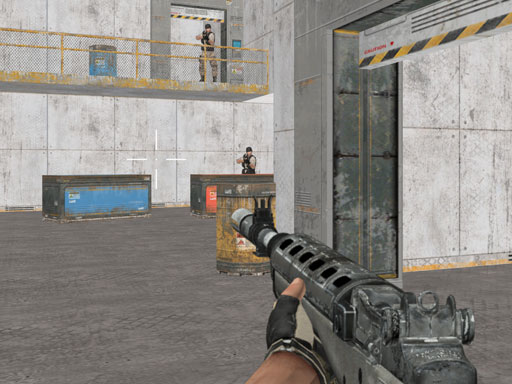
About Warfare Area 3
Warfare Area 3 is a 3D first-person shooter where players infiltrate an enemy outpost to eliminate hostile guards. Navigating through hostile territory requires steady crosshair placement, tactical movement, and quick reactions. As you clear opposition, you gather vital first aid kits to sustain your health and earn currency to invest in improved firearms and protective armor for tougher engagements.
Set within a heavily guarded hostile compound, Warfare Area 3 challenges players to systematically explore corridors and open zones while neutralizing active security forces. The core gameplay loop focuses on room clearing, threat prioritization, and resource collection in full 3D combat environments. Hostile units defend their positions, requiring you to balance forward momentum with situational caution to avoid taking overwhelming crossfire.
Surviving each skirmish depends on more than just swift shooting. Throughout the facility, players can pick up first aid kits to restore lost health during protracted gunfights. Defeating enemies provides earned funds, creating a progression loop where you return stronger by purchasing higher-tier weapons and defensive armor enhancements between combat encounters.
Your goal
The primary objective in Warfare Area 3 is to clear the entire enemy base by taking down all patrolling guards in the area. Alongside eliminating threats, players strive to maximize their operational efficiency by retrieving field health pickups and accumulating cash reserves to fully upgrade their personal armor and firearms.
How to play Warfare Area 3
1. Lock your cursor on desktop or place your thumbs on mobile controls to establish smooth camera and movement handling before entering active rooms.
2. Move through the base perimeter cautiously, checking corners and open sightlines for patrolling enemy guards.
3. Aim directly at opposing guards and fire with controlled bursts to eliminate threats while conserving your loaded magazine.
4. Scan defeated zones and corridors to collect first aid kits whenever your health level drops during combat.
5. Reload during natural breaks in combat to prevent running out of ammunition in the middle of a gunfight.
6. Spend accumulated mission earnings to upgrade your defensive armor and acquire more effective guns for upcoming zones.
Controls and device support
On desktop, navigate using W, A, S, D or the Arrow keys. Use the mouse to rotate the camera, aim, and shoot. Press L to lock the mouse pointer to the window, R to reload your weapon, and P to pause the game. On mobile touchscreens, move using the on-screen joystick, shoot using the dedicated fire button, and tap and drag across the right side of the display to look and aim.
- Controls: Keyboard
- Device support: Desktop + mobile
- Game frame: 900 x 506
Rules to keep in mind
- All enemy guards stationed across the base zone must be eliminated to fulfill the infiltration mission.
- First aid kits discovered within the environment restore player vitality during active missions.
- Earned money gained throughout missions can be allocated toward upgrades for player armor and guns.
What makes the challenge interesting
The core rhythm of Warfare Area 3 revolves around tactical positioning and calculated aggression. Because enemies contest the corridors of the military compound, charging blindly into unknown rooms exposes you to concentrated incoming fire. The most rewarding tactical approach involves slicing angles around doorways, engaging hostile targets individually, and retreating briefly to reload or collect discovered first aid kits.
A key strategic tradeoff lies between immediate survival and long-term firepower development. Taking excessive damage forces you to hunt down medical supplies rather than systematically clearing guards. By pacing your shots and conserving ammunition, you clear encounters cleanly, preserving health while steadily amassing currency to purchase superior defensive gear and more potent firearms.
Tips for Warfare Area 3
- Lock your mouse pointer immediately on desktop by pressing L to ensure uninterrupted 360-degree aiming. This prevents the cursor from drifting outside the game canvas during fast turning maneuvers.
- Reload your weapon between isolated skirmishes using the manual reload control rather than emptying the magazine completely. Entering an uncleared room with a half-spent clip leaves you vulnerable during prolonged firefights.
- Clear immediate local threats before rushing to grab visible first aid kits. Sprinting into open territory while active guards remain standing often results in taking far more damage than the kit restores.
- Invest your earned cash into armor upgrades early to bolster damage resistance before prioritizing weapon power. Greater durability gives you wider room for error when navigating tight base corners.
- Use doorway frames and structural walls as cover to break direct line of sight. Peeking out to eliminate one guard at a time reduces the risk of getting surrounded by multiple hostiles.
Stages and progression
Progression in Warfare Area 3 centers around tactical mastery and persistent equipment growth. As you explore deeper into the enemy installation and eliminate defending guards, your mission earnings accumulate steadily. Players can spend these funds to upgrade their soldier's defensive armor and acquire upgraded guns, significantly increasing combat efficiency.
To improve consistently, players should treat each run as an opportunity to refine sightline discipline, reduce unnecessary damage taken, and optimize cash accumulation. Upgrading gear allows you to clear heavily defended zones with greater confidence and resilience.
Playing on different devices
Desktop players benefit from classic mouse-and-keyboard first-person controls, offering precise aiming and rapid strafing via standard WASD keys. Pressing L locks the mouse pointer for smooth look sensitivity, while dedicated keys handle quick reloads and pausing.
Mobile users navigate through a split-touch interface featuring an on-screen movement joystick on the left and a dedicated shooting button on the right. Camera panning is handled naturally by dragging across the right portion of the display, making the shooter accessible on smartphones and tablets.
The skills behind the game
As a classic 3D action shooter, Warfare Area 3 delivers direct first-person combat centered around spatial awareness, target tracking, and reaction speed. In military action shooters, success requires players to navigate hostile interior spaces methodically, anticipate guard placements around tight corners, and maintain discipline under fire. The genre pairs tactile gunplay with situational awareness, testing how well players manage cover, sightlines, and ammo reserves.
The addition of environmental pickups and equipment upgrades adds a layer of persistent progression to standard shooter mechanics. Gathering medical supplies and reinvesting earned funds into superior guns and armor allows players to continually refine their combat loadout, creating a satisfying loop of infiltration, tactical clearing, and character enhancement.
Who will enjoy this game
Players looking for an accessible shooting game online can jump straight into Warfare Area 3 without complicated setup. The game provides immediate browser-based FPS action, offering a quick and satisfying combat loop ideal for casual shooting practice or dedicated mission clearing sessions.
Whether you are practicing your crosshair tracking or enjoying the tactical thrill of clearing an enemy fortress room by room, Warfare Area 3 game sessions provide focused gunplay with straightforward mobile and desktop controls. Its upgrade mechanics reward consistent play, making it a compelling option for fans of 3D military action.
Games with a similar feel
DOOM: Warfare Area 3 shares the classic first-person perspective, active crosshair aiming, and room-clearing focus popularized by DOOM. While DOOM emphasizes relentless demonic horde battles and high-speed arena movement, Warfare Area 3 delivers a military base infiltration focused on neutralizing guards, finding first aid kits, and spending cash to upgrade armor and guns in an accessible browser format.
Frequently asked questions
How do you restore health during missions in Warfare Area 3? You can restore lost health by picking up first aid kits scattered throughout the enemy base as you explore the facility and eliminate guards.
What upgrades can you purchase with earned money? Money accumulated from combat missions can be spent on upgrading your personal protective armor and equipping more effective firearms to handle hostile guards.
Can Warfare Area 3 be played on both desktop and mobile devices? Yes, Warfare Area 3 supports desktop browsers with mouse and keyboard inputs as well as mobile devices through touch controls including an on-screen joystick and drag-to-aim gestures.
How do you lock the mouse pointer on desktop browsers? Press the L key on your keyboard to lock your mouse pointer within the game frame, allowing smooth and uninterrupted crosshair aiming.
Something not right?
Tell us if the game does not load, the information is wrong or the content needs review.
Report a problem ›