About Up Shoot 3D
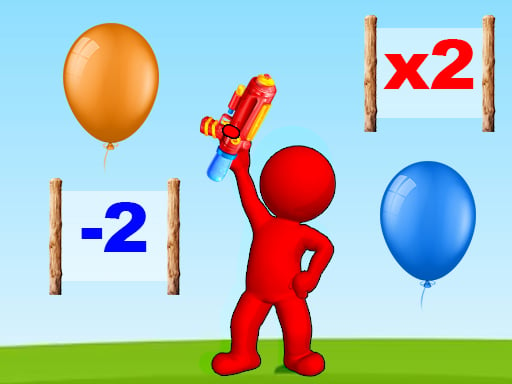
Up Shoot 3D is a casual 3D shooter where you swipe left and right to target balloons along a forward course. Your primary goal is to pop targets efficiently by steering fire into positive multiplier zones while avoiding minus areas that reduce your balloon count.
Up Shoot 3D delivers a fast-paced shooting experience rendered in a 3D perspective. Players guide their shots across horizontal lanes, reacting to approaching balloons and dynamic course modifiers. As you move forward through each stage, the playing field presents distinct zones that directly alter your firing power or balloon tally.
The core gameplay loop centers on quick route selection and continuous target clearing. Directing your shots into multiplier gates expands your bullet output, making it easier to eliminate balloon clusters quickly. Conversely, steering into negative areas drains your resources, challenging you to maintain careful lateral positioning from start to finish.
Your goal
The primary objective in Up Shoot 3D is to clear incoming balloons, complete the current stage, and unlock the next level. To finish levels quickly and secure a win, you must maximize your bullet count through multiplier zones while steering clear of minus hazards.
How to play Up Shoot 3D
1. Start the stage by tapping or clicking the screen to engage the shooting path.
2. Swipe left or right across the screen to align your aim with incoming balloon targets.
3. Steer your aim toward multiplier areas to increase your active bullet count.
4. Dodge minus areas along the lane to avoid losing balloons.
5. Pop the remaining balloons to win the stage and unlock the next level.
Controls and device support
Use mouse clicks and dragging or direct screen taps and swipes to steer your aim left and right during play.
- Controls: Mouse or touch
- Device support: Desktop + mobile
- Game frame: 350 x 600
Rules to keep in mind
- Swiping left and right directs your fire across the lane to strike target balloons.
- Hitting multiplier areas increases your total bullet count.
- Entering or hitting minus areas causes you to lose balloons.
- Completing the current balloon-clearing stage successfully unlocks the next level.
What makes the challenge interesting
Up Shoot 3D focuses on rapid spatial awareness and decisive lane management. Because your shooting direction shifts with lateral swipes, you must constantly weigh the immediate reward of hitting a balloon against the long-term benefit of passing through a bullet multiplier.
The central mechanical tradeoff revolves around path planning under pressure. Choosing a lane that offers a high multiplier allows you to clear subsequent balloon groups with ease, but hasty adjustments risk steering directly into negative zones. Success relies on reading the track ahead and maintaining steady, controlled swipes rather than erratic movements.
Tips for Up Shoot 3D
- Scan ahead for multiplier gates early so you can line up your lateral swipe well before reaching the gate, preventing rushed last-second corrections.
- Treat minus zones as high-priority obstacles; swiping wide around them protects your balloon tally even if you temporarily miss a stray target.
- Focus on boosting bullet output early in a stage, as higher shot volume makes clearing dense balloon clusters significantly faster and safer.
- Use smooth, measured swipes rather than rapid back-and-forth gestures to keep your firing path stable across target clusters.
Stages and progression
Progression in Up Shoot 3D is structured across sequential levels that unlock each time you complete a stage. As you advance through new stages, you can develop a more disciplined approach to lane selection and hazard avoidance.
To build consistency across successive levels, focus on refining your reaction timing when transitioning between positive gates and danger zones. Evaluating how early you spot upcoming modifiers helps you establish a reliable rhythm for future runs.
The skills behind the game
Shooting titles in the casual arcade space emphasize immediate accessibility, clean visual feedback, and responsive aiming controls. Rather than requiring complex tactical loadouts, games in this category challenge players to react to incoming targets and track modifiers in real time.
By incorporating runner-style modifier gates alongside standard target popping, the game blends traditional shoot 'em up precision with modern path-routing dynamics. This hybrid style appeals to players looking for quick, engaging sessions that test hand-eye coordination and rapid decision-making.
Who will enjoy this game
Players looking for an accessible shooting game online often want instant action without heavy installation barriers. Up Shoot 3D fits this play style by combining intuitive touch and mouse steering with straightforward stage progression.
Whether you are practicing quick visual scanning or simply looking for a short casual session, exploring the Up Shoot 3D game format offers an engaging way to test your reflexes against moving gates and balloon formations.
Games with a similar feel
DOOM: While DOOM is an intense first-person action experience focused on complex combat movement and arena navigation, Up Shoot 3D offers a lighter casual shooter focused on lane-based balloon popping and multiplier gates. Players seeking relaxed reflex challenges will prefer Up Shoot 3D, whereas those wanting deep combat encounters gravitate toward DOOM.
Frequently asked questions
How do you control your aim in Up Shoot 3D? You control your aim by swiping left and right across the screen, using either mouse drag gestures or direct touch inputs to guide your fire across the lane.
What happens when you hit multiplier areas in Up Shoot 3D? Targeting multiplier areas increases your active bullet count, allowing you to pop balloon groups much faster and clear the stage more efficiently.
Why should you avoid the minus areas? Steering into minus areas causes you to lose balloons, hindering your level progress and making it harder to complete the stage.
Something not right?
Tell us if the game does not load, the information is wrong or the content needs review.
Report a problem ›