About TRZ Battleship
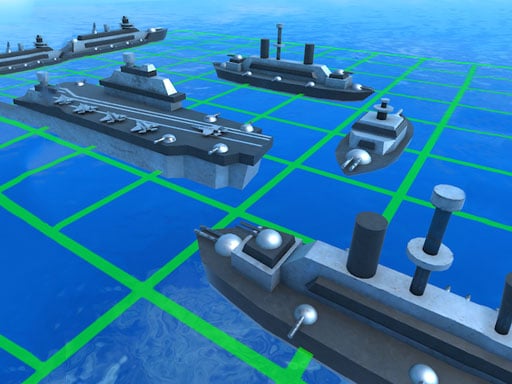
TRZ Battleship is a free classic naval strategy game where players take turns guessing hidden ship coordinates. Engage in a tactical battle of wits on desktop, mobile, or tablet as you target hidden enemy vessels. Uncover full ships with accurate strikes and destroy the opposing fleet before the rival commander annihilates your own fleet.
TRZ Battleship brings the beloved pen-and-paper naval combat concept into a digital puzzle format. Each match pits you against an opponent in a turn-based guessing duel across a coordinate grid. Players must strategically choose target spots to seek out hidden enemy ships while keeping their own formation safe from discovery. Every successful strike brings you closer to exposing a full vessel, as completely damaged ships become visible on the board. The tension builds with every salvo as both sides race to locate remaining targets. With cross-platform support across desktop, mobile, and tablet browsers, TRZ Battleship offers accessible, brain-teasing tactical gameplay anytime.
Your goal
The core objective in TRZ Battleship is to locate and completely destroy all enemy battleships before your opponent sinks your entire fleet. You must make calculated coordinate guesses across the board to hit every part of each enemy vessel. Revealing and eliminating all opposing ships before your own defenses collapse secures the strategic victory.
How to play TRZ Battleship
1. Launch TRZ Battleship directly in your browser on desktop, tablet, or mobile devices to begin a match.
2. Use your mouse or touch screen tap controls to select target squares on the opponent's grid during your turn.
3. Observe whether your coordinate guess results in a hit or a miss on an enemy battleship.
4. Continue targeting adjacent spaces around confirmed hits to damage all parts of the hidden vessel until it becomes visible.
5. Eliminate every vessel in the enemy fleet before the opponent discovers and annihilates all of your ships.
Controls and device support
- Controls: Mouse or touch
- Device support: Desktop + mobile
- Game frame: 1080 x 1920
Rules to keep in mind
- Players take alternating turns targeting coordinates to guess the positions of hidden enemy ships.
- An enemy ship becomes fully visible only after every individual part of that vessel has been successfully hit.
- A player wins by sinking all enemy vessels before the opponent destroys their complete fleet.
What makes the challenge interesting
TRZ Battleship focuses on tactical deduction, probability estimation, and board awareness. Success relies on interpreting shot results effectively to systematically dismantle opposing ship formations. Rather than guessing randomly, strategic players analyze the board layout and track potential vessel orientations after landing an initial hit. Because ships occupy multiple connected spaces, following up on successful strikes is crucial for revealing the entire craft. At the same time, players must remain conscious of pacing, as the opponent takes alternating turns to locate your hidden armada.
Tips for TRZ Battleship
- When you score a hit on an unknown vessel, probe adjacent orthogonal squares to quickly determine the ship's alignment and full footprint.
- Spread early coordinate guesses across different sectors of the grid to maximize your chances of locating multi-tile ships efficiently.
- Track fully revealed vessels carefully so you avoid wasting turns targeting areas where no additional ships could logically fit.
The skills behind the game
Classified under strategy, puzzle, and boys' games, TRZ Battleship blends turn-based logic puzzles with classic naval warfare themes. It appeals to players who enjoy thoughtful decision-making over rapid reflex action, emphasizing spatial reasoning and probability analysis. Browser-based strategy titles in this genre offer quick, engaging brain workouts suitable for players of all ages across mobile and desktop platforms.
Who will enjoy this game
Players searching for TRZ Battleship or the TRZ Battleship game will find an accessible, HTML5-powered adaptation of classic grid-based naval combat. The title provides straightforward mouse and touch controls, allowing casual gamers and strategy enthusiasts to jump directly into tactical fleet duels without complicated setups or lengthy installations across supported modern web browsers.
Frequently asked questions
What is the main goal in TRZ Battleship? The goal is to locate and hit all sections of the opponent's battleships to sink their entire fleet before they destroy yours.
How do you know when an enemy ship is fully destroyed? In TRZ Battleship, once you successfully hit every part of a specific ship, that entire vessel becomes fully visible on the board.
What devices can run TRZ Battleship? TRZ Battleship is an HTML5 browser game playable across desktop computers, tablets, and mobile smartphones using standard mouse clicks or touch screen taps.
Something not right?
Tell us if the game does not load, the information is wrong or the content needs review.
Report a problem ›