Official listing
Game description
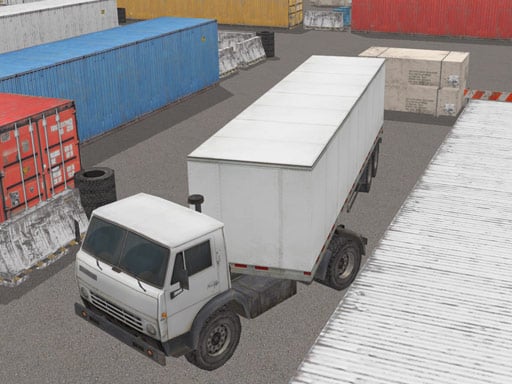
3D truck driving simulation game Truck Space 2. Drive a large truck with a trailer and park it into marked parking spot. Watch for the road signs to know where and in which direction to park the trailer.
Racing game
Truck Space 2 is a 3D truck driving simulation game where you take the wheel of a large truck hauling a trailer. Your objective is to navigate tight driving spaces, read road signs for alignment cues, and maneuver the vehicle safely into a marked parking spot.
Choose Play now to load the game.
Official listing
3D truck driving simulation game Truck Space 2. Drive a large truck with a trailer and park it into marked parking spot. Watch for the road signs to know where and in which direction to park the trailer.
From the game listing
Desktop Arrow keys or W A S D to drive the truck Mouse to zoom and rotate the camera Mobile Use on-screen buttons to drive touch the screen and slide to rotate the camera
Open this card to load the gameplay video.
Truck Space 2 is a 3D truck driving simulation game where you take the wheel of a large truck hauling a trailer. Your objective is to navigate tight driving spaces, read road signs for alignment cues, and maneuver the vehicle safely into a marked parking spot.
In Truck Space 2, players manage the realistic spatial challenges of operating an articulated heavy vehicle. Steering a long truck with an attached trailer requires much wider turns and careful positioning than driving a standard car.
Throughout each parking task, you must observe posted road signs to determine the exact location and facing direction required for the trailer. Camera controls allow you to inspect angles around the rig, helping you align the vehicle cleanly within the designated boundaries.
The core goal in Truck Space 2 is to guide your heavy truck and trailer into the highlighted parking spot according to the orientation indicated by road signs. Players strive to complete the parking maneuver smoothly without misaligning the trailer or losing track of required entry angles.
1. Start the vehicle and use your driving controls to steer the truck forward through the available course.
2. Scan the environment for road signs indicating where the designated parking zone is located and how the trailer must face.
3. Rotate and adjust your camera viewpoint to monitor blind spots and check the clearance of your trailer.
4. Position the truck carefully, compensating for the trailer's turning radius as you approach the target bay.
5. Guide the entire rig into the marked parking spot until the trailer is properly situated in the correct orientation.
On desktop, drive the truck using the Arrow keys or W, A, S, D, and use the mouse to zoom and rotate the camera. On mobile devices, steer using on-screen buttons and touch or slide across the screen to adjust camera angles.
The primary appeal of Truck Space 2 lies in managing articulated vehicle physics and spatial awareness. Hauling a trailer introduces an extra pivot point, meaning steering inputs produce delayed reactions in the rear section. Drivers cannot simply turn directly toward a bay; they must swing wide on entry to ensure the trailer tracks along the desired path.
Active camera management is essential to the rhythm of play. Rotating the view allows you to verify wheel alignment and watch out for overhangs before committing to a tight reverse or forward docking maneuver.
Desktop players can drive using either standard Arrow keys or WASD, with seamless mouse controls for smooth camera rotation and zoom. Mobile users can steer via dedicated on-screen interface buttons while using intuitive swipe gestures directly on the display to reposition their viewing angle.
Truck Space 2 sits at the intersection of vehicle simulation and precision parking games. While listed under racing, the core experience prioritizes careful spatial control, measured steering, and deliberate navigation over high-speed competition. Players who appreciate the technical challenge of maneuvering oversized vehicles will find the focus on trailer articulation and directional parking engaging.
Players looking for an accessible car parking game or truck driving experience can use Truck Space 2 for quick, focused driving practice in their web browser. Navigating tight layouts and aligning a long trailer offers a relaxing yet technical challenge suitable for casual simulation fans.
Euro Truck Simulator 2: Like Euro Truck Simulator 2, Truck Space 2 focuses on the handling dynamics of driving heavy commercial trucks with attached trailers. However, while Euro Truck Simulator 2 emphasizes long-distance highway deliveries across vast road networks, Truck Space 2 centers strictly on close-quarters parking maneuvers, making it ideal for quick precision practice sessions in a web browser.
What is the primary objective in Truck Space 2? The main goal is to drive a large truck with an attached trailer through the course and park it inside the marked parking spot, matching the direction indicated by road signs.
How do you control the camera in Truck Space 2? On desktop, you can rotate and zoom the camera using your mouse. On mobile, touch and slide your finger across the screen to change viewing angles.
Why are road signs important in Truck Space 2? Road signs provide critical guidance on where the parking spot is located and which direction the trailer must face when completing the parking maneuver.
Tell us if the game does not load, the information is wrong or the content needs review.
Report a problemExplore popular games by category, shared tags and site-wide activity.





















