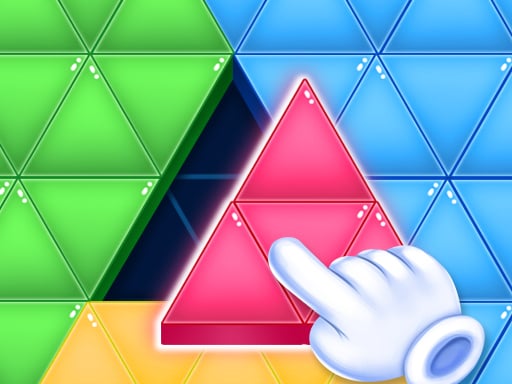
About Tri Puzzle
Tri Puzzle is an interactive browser-based puzzle challenge designed especially for kids and young learners. In this colorful puzzle game, players take on engaging layout tasks where the primary goal is to pick up scattered blocks and place them into their accurate target slots. It delivers an accessible, educational experience focused on spatial awareness and simple mouse navigation.
Tri Puzzle provides a friendly and educational puzzle experience built using lightweight HTML5 technology. Aimed at children and puzzle fans alike, the game centers around sorting and positioning geometric pieces across various on-screen challenges. Players must examine the shapes presented on the board, determine where each piece belongs, and drag them carefully into their intended spots.
Because the game emphasizes straightforward drag-and-drop mechanics, it serves as an approachable introduction to spatial reasoning and problem-solving. The bright interface and direct control scheme allow players to focus on recognizing shapes, matching boundaries, and completing each visual puzzle at their own comfortable pace without unnecessary complications.
Your goal
The main objective in Tri Puzzle is to successfully complete each puzzle layout by fitting every individual block into its correct position on the board. Players accomplish this by picking up each loose piece, dragging it across the screen, and aligning it properly within the target space until the entire puzzle structure is fully assembled and solved.
How to play Tri Puzzle
1. Look at the available puzzle blocks and identify the target empty slots on the playing field.
2. Click and hold the left mouse button over a block to select and pick it up.
3. Drag the cursor across the screen to move the selected block toward the matching open slot.
4. Release the mouse button to drop the block into its correct target position.
5. Repeat the process for all remaining pieces until the puzzle is completely filled.
Controls and device support
Left Mouse Button (Click & Drag): Click and drag to pick up, move, and position puzzle blocks
- Controls: Mouse or touch
- Device support: Browser
- Game frame: 800 x 600
Rules to keep in mind
- Blocks must be placed precisely into their correct corresponding positions on the board to complete the challenge.
- Players use mouse drag-and-drop actions to relocate pieces from the tray into the target spaces.
What makes the challenge interesting
Gameplay in Tri Puzzle revolves entirely around visual observation, shape matching, and precise piece placement. Each puzzle presents a clean layout where pieces must be moved into designated positions. Success depends on recognizing outline contours and understanding how distinct blocks fit together into a cohesive structure.
With intuitive drag-and-drop mouse handling, players can experiment with different placements without complex button combinations. This makes the game ideal for younger players developing motor skills and spatial coordination, while offering a relaxing, bite-sized challenge for casual puzzle fans.
Tips for Tri Puzzle
- Examine the overall puzzle boundary first to figure out where the corner and edge pieces naturally fit into the frame.
- Compare the specific geometric contours of each loose block against open spaces before dragging to ensure an accurate fit.
- Move larger or distinctive shapes into position early so the remaining smaller gaps become easier to identify and fill.
The skills behind the game
Tri Puzzle sits firmly in the online puzzle and educational games category, which focuses on cognitive engagement, pattern recognition, and logical problem-solving. Browser puzzle games offer lightweight, accessible challenges suitable for young learners and casual players. By emphasizing tactile drag-and-drop mechanics and shape sorting, games like this provide an entertaining format to practice visual alignment and patience.
Who will enjoy this game
When searching for a friendly tri puzzle game or an engaging puzzle game online, players often look for titles that combine clean visuals with intuitive mechanics. Tri puzzle titles emphasize spatial reasoning through piece manipulation, making them great picks for children and educational playtime. The browser-based format ensures quick loading and effortless accessibility across desktop environments.
Frequently asked questions
How do you control and place pieces in Tri Puzzle? Players interact with Tri Puzzle using the left mouse button. Simply click on any block, hold the button down to drag it across the board, and release it over the correct position.
Is Tri Puzzle suitable for kids and young learners? Yes, Tri Puzzle is specifically designed as a fun, educational puzzle game for kids, focusing on straightforward drag-and-drop actions, shape matching, and developing basic spatial awareness.
Something not right?
Tell us if the game does not load, the information is wrong or the content needs review.
Report a problem ›