Official listing
Game description
A ball game! Bounce your ball and earn high scores.
Hypercasual game
Tower Jumper is a 3D single-player arcade title centered on rhythmic bouncing and steady positioning. Built as a quick-entry hypercasual ball game, the experience challenges you to guide a descending or leaping sphere by swiping across the screen. Your primary ambition is to sustain momentum, navigate the descending layout safely, and accumulate high scores through consistent, controlled movement.
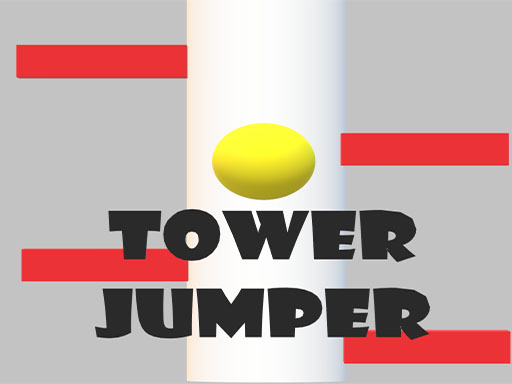
Choose Play now to load the game.
Official listing
A ball game! Bounce your ball and earn high scores.
From the game listing
You can control it by swiping the screen
Open this card to load the gameplay video.
Tower Jumper is a 3D single-player arcade title centered on rhythmic bouncing and steady positioning. Built as a quick-entry hypercasual ball game, the experience challenges you to guide a descending or leaping sphere by swiping across the screen. Your primary ambition is to sustain momentum, navigate the descending layout safely, and accumulate high scores through consistent, controlled movement.
Tower Jumper drops players straight into an immediate 3D action loop where a lively ball continuously bounces. Rather than overwhelming you with complex storylines or lengthy setup screens, the game focuses entirely on spatial awareness and rapid directional adjustments. The central loop revolves around monitoring each bounce and using swipe gestures to guide the ball toward safe contact points, keeping the run alive while working toward higher score tallies.
The 3D environment emphasizes vertical movement, turning every drop into an exercise in timing. Because the core action relies on swiping to steer, players must balance broad sweeping adjustments with small, delicate corrections. This creates a focused, immediate arcade feel typical of the hypercasual genre, where individual sessions can be started instantly and repeated easily as you refine your technique.
The primary objective in Tower Jumper is to bounce your ball through the course to earn high scores. Achieving an impressive run requires staying attentive to the sphere's bouncing cadence, anticipating where it will touch down next, and steering it away from hazards or misaligned drops through continuous swiping. Your overarching goal is to string together a clean sequence of jumps to maximize your point total before a mistake cuts the run short.
1. Launch Tower Jumper in your browser window and observe the starting position of your ball in the 3D play area.
2. Watch the natural bouncing tempo of the ball as it prepares for its initial descent or jump.
3. Swipe across the screen to adjust the orientation of the course or direct the lateral position of your sphere.
4. Guide the bouncing ball steadily downward, aligning each landing cleanly to preserve your active run.
5. Maintain your focus over successive bounces to accumulate points and establish a new personal high score.
The official instructions indicate that you control the game by swiping the screen. On touch devices, drag your finger horizontally to rotate or steer. On desktop browsers lacking touch capability, click and drag your mouse pointer across the screen to replicate the required swipe motion.
The defining skill in Tower Jumper is dynamic spatial management under constant motion. Because the ball bounces automatically in three dimensions, you cannot simply pause mid-air to evaluate your surroundings. Success hinges on reading the landing surface ahead of time and executing measured swipe inputs so the ball contacts safe terrain. Moving your hand too aggressively can cause over-rotation, while reacting too late leaves the sphere stranded off-target.
This creates an engaging risk-versus-reward tension common to score-chasing jump titles. Quick, decisive swipes allow you to react to narrow openings, but maintaining control demands a smooth, repeatable rhythm. Players who take brief pauses to absorb the tower's layout between bounces generally build more reliable runs than those who swipe haphazardly under pressure.
Because Tower Jumper specifies swiping as its sole control mechanism, the interface is inherently friendly to mobile phones and tablets. Running the game on a touchscreen allows direct thumb or index-finger drags with immediate physical feedback. On desktop setups, the title renders in a wide 1360 x 768 canvas, requiring players to substitute finger swipes with steady left-click mouse drags. Ensure your mouse sensitivity allows smooth horizontal movement without lifting the peripheral.
Tower Jumper fits squarely into the hypercasual genre, characterized by instant pick-up-and-play accessibility, minimal tutorial overhead, and streamlined input schemes. By combining ball physics with jumping mechanics, it delivers an intuitive gameplay loop that can be enjoyed in short bursts without requiring long-term commitments or complex control memorization.
Titles in this category rely heavily on clean visual clarity and direct physical interaction. With its 3D presentation and simple swipe mechanics, the game appeals to fans of casual reflex games who appreciate straightforward physics-based hurdles and quick resets following an unsuccessful attempt.
Players looking for a quick tower jumper session typically seek casual arcade mechanics that test reaction time without demanding deep strategy guides. The game serves as a lightweight reflex exercise where you can test your hand-eye coordination during brief work breaks or study pauses.
Searching for a tower jumper game usually points toward accessible 3D vertical drop challenges. Because the controls require only swiping to navigate, anyone can jump in immediately, making it a reliable choice for casual browser practice and competitive solo score improvement.
What is the primary objective in Tower Jumper? Your goal is to bounce your ball through the 3D tower environment to build up high scores. You stay alive by swiping the screen to ensure each landing hits safe ground.
How do you steer or control the ball in Tower Jumper? You control the action by swiping across the screen. On touchscreens, drag your finger across the display, while on desktop browsers you click and drag with your mouse.
Does Tower Jumper feature multiplayer modes? No. Tower Jumper is designated as a 1-player experience centered on personal skill, reflex practice, and individual high-score chasing.
Can I play Tower Jumper on both desktop and mobile devices? Yes. While designed around touch-style swiping, the game runs inside standard web browsers across both mobile screens and desktop computers using mouse drag inputs.
Tell us if the game does not load, the information is wrong or the content needs review.
Report a problemExplore popular games by category, shared tags and site-wide activity.




















