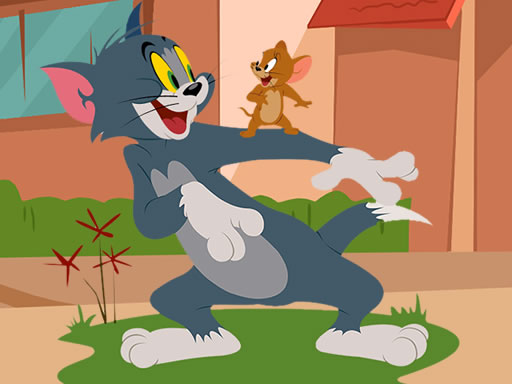
About Tom and Jerry Jigsaw Puzzle
Tom and Jerry Jigsaw Puzzle is a free browser-based jigsaw game set in a lively cartoon world. Players complete a series of 12 distinct pictures by piecing together scattered fragments. With three available modes per image—Easy with 25 pieces, Medium with 49 pieces, and Hard with 100 pieces—the game offers flexible puzzle-solving challenges for players of all skill levels.
Tom and Jerry Jigsaw Puzzle provides an accessible jigsaw experience tailored for casual entertainment and pattern-matching practice. The title features a collection of 12 cartoon-themed images that must be completed one by one, requiring players to clear the active picture before unlocking the next illustration in line.
Before assembling a chosen picture, players select their preferred difficulty setting: 25 pieces for Easy, 49 pieces for Medium, or 100 pieces for Hard. Built with responsive HTML5 technology, the game runs smoothly in modern web browsers on desktop computers and mobile devices, supporting standard mouse manipulation as well as direct touchscreen input.
Your goal
The main objective in Tom and Jerry Jigsaw Puzzle is to solve all 12 jigsaw pictures to finish the complete cartoon gallery. You start with the first puzzle and connect all pieces on your chosen difficulty level. Assembling each image successfully unlocks the next stage in sequence until every puzzle is completed.
How to play Tom and Jerry Jigsaw Puzzle
1. Select the first unlocked cartoon jigsaw puzzle from the main screen to begin.
2. Choose your preferred piece count from Easy (25 pieces), Medium (49 pieces), or Hard (100 pieces).
3. Use your mouse or touch the screen to pick up and drag jigsaw pieces into position.
4. Fit every piece into the correct spot until the complete cartoon picture is assembled.
5. Proceed to the newly unlocked next image and repeat the process across all 12 puzzles.
Controls and device support
Mouse: Click and drag puzzle pieces to move and place them
Touch screen: Tap and drag puzzle pieces across the screen
- Controls: Mouse or touch
- Device support: Desktop + mobile
- Game frame: 1280 x 720
Rules to keep in mind
- Puzzles must be played in order, starting from the first image to unlock subsequent pictures.
- Each illustration supports three separate piece configurations: Easy (25 pieces), Medium (49 pieces), and Hard (100 pieces).
- A picture is completed only when all interlocking pieces are placed in their correct locations.
What makes the challenge interesting
Gameplay in Tom and Jerry Jigsaw Puzzle centers on spatial reasoning, shape analysis, and visual assembly. After selecting a difficulty, the cartoon image is split into 25, 49, or 100 interlocking tiles scattered across the board. Players examine border edges, color themes, and character contours to determine where each part belongs. Because new pictures unlock sequentially, players can progressively challenge themselves by stepping up to higher piece counts on each stage.
Tips for Tom and Jerry Jigsaw Puzzle
- Find and connect straight-edged border pieces first to establish the outer frame before filling in inner details.
- Sort loose pieces by distinct colors or recognizable character features to quickly locate matching puzzle segments.
- Try the 25-piece Easy mode first to memorize the scene before tackling the 49-piece or 100-piece modes.
Stages and progression
Progression in Tom and Jerry Jigsaw Puzzle follows a sequential 12-stage unlock path. Players must solve the active image to open access to the next cartoon scene, with the flexibility to replay any unlocked picture across Easy, Medium, or Hard modes.
Playing on different devices
Tom and Jerry Jigsaw Puzzle is formatted at a 1280 x 720 resolution using HTML5. It runs directly inside web browsers on desktop systems via mouse dragging and on mobile devices through standard touchscreen gestures.
The skills behind the game
Within the online puzzles genre, Tom and Jerry Jigsaw Puzzle emphasizes patience, visual sorting, and pattern recognition. Jigsaw titles deliver an accessible format suitable for casual gamers and kids, allowing players to practice spatial coordination while assembling colorful cartoon scenes across scalable piece counts.
Who will enjoy this game
Players searching for a tom and jerry jigsaw puzzle or a relaxed puzzle game online can access this title instantly in their web browser. Featuring 12 unlockable cartoon images across multiple difficulty levels, it provides a straightforward jigsaw puzzle online experience across desktop and mobile devices.
Frequently asked questions
How many puzzles are included in Tom and Jerry Jigsaw Puzzle? The game features 12 sequential cartoon jigsaw puzzles that unlock one after another as you complete each image.
What difficulty settings can I choose from? Each image can be played in three modes: Easy with 25 pieces, Medium with 49 pieces, and Hard with 100 pieces.
How do you control and move puzzle pieces? You can use a mouse on desktop browsers or touch the screen directly on mobile devices to drag and position pieces.
Something not right?
Tell us if the game does not load, the information is wrong or the content needs review.
Report a problem ›