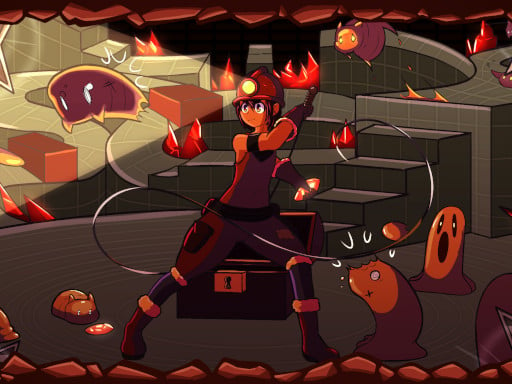
About Tiny Explorer
Tiny Explorer is a retro arcade platformer that sends a miniature adventurer into an ancient temple in search of legendary treasure. Across 27 distinct levels, players must run, jump over hazardous terrain, and wield a handy whip to overcome obstacles. Featuring classic pixel aesthetics and a dedicated speedrun mode, the game challenges your reaction speed and movement precision in tight subterranean corridors.
Tiny Explorer delivers a classic platforming experience set against the backdrop of dangerous ancient ruins. Players guide a brave explorer through brick-lined corridors, cavernous gaps, and mysterious chambers designed to test platforming fundamentals. The core journey revolves around reaching the end of each room safely while hunting for epic temple treasures.
Every stage presents a focused layout where careful positioning and timely actions are essential. Equipped with standard movement abilities and a versatile whip, the explorer must navigate traps and reach level exits across 27 crafted stages. Beyond simply surviving the temple's gauntlet, players can push their routing efficiency in the built-in speedrun mode.
Your goal
The primary objective in Tiny Explorer is to successfully guide the adventurer through all 27 temple levels to claim the ancient treasure. In standard play, focus on clean navigation, avoiding hazards, and mastering the whip. For players seeking an extra challenge, the speedrun mode offers an opportunity to refine stage paths and complete chambers with minimal hesitation.
How to play Tiny Explorer
1. Start the stage and survey the visible platforms, hazards, and pathways leading through the ancient temple chamber.
2. Use horizontal movement keys to position your explorer and maintain steady footing across uneven surfaces.
3. Press the jump button to leap across platform gaps, ascend vertical structures, and clear floor hazards.
4. Activate your whip action to interact with the environment or handle immediate obstacles blocking your path.
5. Reach the room's objective point to clear the level and advance toward the next stage of the temple.
6. Revisit completed stages or jump into speedrun mode to test your reflexes and aim for faster run times.
Controls and device support
On desktop browsers, move left and right using A/D or the Left/Right Arrow keys. Jump using W, I, or the Up Arrow key. Use your whip by pressing Space, U, C, or O. On mobile devices, gameplay is handled via on-screen touch controls.
- Controls: Keyboard
- Device support: Desktop + mobile
- Game frame: 800 x 600
Rules to keep in mind
- The main campaign consists of 27 distinct temple stages that must be tackled to uncover the grand treasure.
- The explorer can walk horizontally, leap upward across gaps, and strike with a whip during exploration.
- A separate speedrun mode is available for players aiming to test their stage completion speed and execution.
What makes the challenge interesting
The rhythm of Tiny Explorer centers on spatial awareness, controlled momentum, and precise jump timing. Because retro platformers demand disciplined movement, rushing into unfamiliar rooms often leads to misjudged gaps or mistimed leaps. Players must balance patience during tricky vertical ascents with fluid forward momentum during horizontal runs.
Integrating the whip action seamlessly into your jumping patterns is a vital skill. Choosing whether to pause before a leap or execute an action mid-stride represents the core tactical tradeoff in every temple chamber. Speedrun mode magnifies these micro-decisions, rewarding players who commit to tight movement lines without second-guessing their footing.
Tips for Tiny Explorer
- Observe platform edges carefully before jumping. Rushing forward without checking landing space is a common mistake that leads to missed ledges.
- Familiarize yourself with the whip's effective reach. Triggering your whip too early or too late can leave your explorer exposed at close range.
- Choose the keyboard layout that feels most natural. The game provides multiple key bindings (WASD, Arrow keys, or alternate action keys) to suit different hand positions.
- Use the main campaign to memorize stage layouts before attempting speedrun mode. Knowing upcoming obstacles beforehand prevents fatal hesitations during timed runs.
- Keep your jumps deliberate rather than holding down directional buttons continuously. Tapping movement keys lightly gives you tighter control when landing on narrow platforms.
Stages and progression
Progression in Tiny Explorer is structured across a gauntlet of 27 temple levels. Each stage introduces fresh spatial arrangements and tricky platforming layouts that require steady execution. As you advance through the ancient ruins, rooms demand sharper reflexes and tighter coordination between running, jumping, and whipping.
Once comfortable with the standard 27-level journey, the dedicated speedrun mode offers an ongoing mastery goal. Players can practice repeating levels, shaving seconds off their completion routes by perfecting their jump trajectories and minimizing idle time between platform transitions.
Playing on different devices
Tiny Explorer is fully playable on desktop and mobile browser setups. Desktop users benefit from versatile keyboard bindings, offering choices between standard WASD/Space layouts, Arrow key configurations, and alternate keys like U, I, C, or O. This flexibility allows comfortable two-handed setups on any keyboard style.
On mobile devices, the game provides dedicated on-screen touch controls. When playing on touchscreens, maintaining steady thumb placement ensures clean directional shifts and reliable jump activation during fast-paced platforming sequences.
The skills behind the game
Tiny Explorer fits naturally into the retro arcade and 2D platforming traditions. Pixel-art platformers emphasize spatial navigation, timing, and direct character control within self-contained environmental challenges. The game pairs classic dungeon-delving themes with responsive jump mechanics, giving enthusiasts of old-school arcade games a focused, retro-inspired experience.
By combining concise level structures with clear hazard-avoidance goals, the title provides quick pick-up-and-play sessions. Fans of pixel platformers will appreciate how the game's compact 800 by 600 playfield keeps the action immediate and readable.
Who will enjoy this game
Players looking for a classic platform game online will find an accessible yet challenging experience in the Tiny Explorer game. Browser platformers offer an ideal venue for casual practice, allowing you to warm up hand-eye coordination and spatial judgment without requiring lengthy downloads or setup.
Whether you want a quick arcade game online during a short break or wish to master all 27 temple chambers in speedrun mode, Tiny Explorer serves both casual exploration and competitive personal-best practice.
Frequently asked questions
How many levels are in Tiny Explorer? Tiny Explorer features 27 ancient temple levels in its main quest, alongside a dedicated speedrun mode designed for testing player completion speed.
What actions can the explorer perform in the game? The explorer can run left and right, jump to clear terrain gaps, and use a whip to interact with obstacles and enemies throughout the ruins.
Can I play Tiny Explorer on both desktop and mobile devices? Yes, Tiny Explorer supports desktop browser play using keyboard controls (Arrow keys or WASD) as well as mobile play via built-in touch controls.
What is the best way to practice for speedrun mode? Complete the 27 levels in standard mode first to learn the layout of each chamber, then focus on fluid movement and uninterrupted jumping lines in speedrun mode.
Something not right?
Tell us if the game does not load, the information is wrong or the content needs review.
Report a problem ›