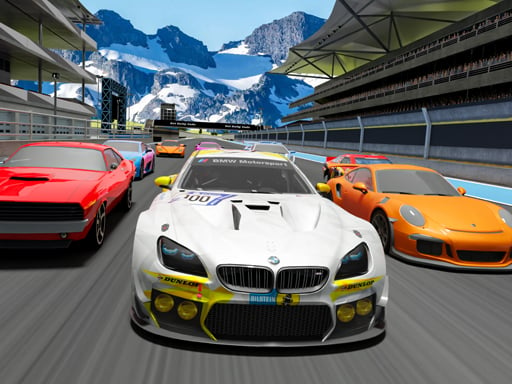
About The Racing Crew
The Racing Crew puts players in the cockpit for high-velocity 3D driving where rapid steering and sudden obstacle avoidance determine who stays ahead. Drivers must keep acceleration high, fine-tune their vehicles, and navigate fast-paced tracks alongside unpredictable rival cars. Balancing sheer throttle with defensive lane positioning makes every corner a dynamic test of reaction time and track awareness.
In The Racing Crew, speed and constant environmental surprises define the core racing loop. Competitors guide their supercars across vibrant 3D courses filled with varied hazards and aggressive rival drivers who challenge every passing lane. Success requires staying at top acceleration while maintaining clear lines of sight to respond instantly to whatever appears around the next bend.
Rather than relying purely on long straightaways, the game emphasizes dynamic handling and reactive navigation. Drivers can adjust their camera perspective with the mouse while managing steering through arrow keys, allowing them to survey incoming traffic and tight turns with greater precision as the intensity ramps up.
Your goal
The primary goal is to maintain maximum speed across unpredictable tracks while avoiding course obstacles and rival collisions. Players strive to outmaneuver opposing drivers, fine-tune their vehicle setups for optimal performance, and successfully navigate varied track layouts without losing momentum through crashes or sudden track hazards.
How to play The Racing Crew
1. Launch into the race and use the Arrow Keys to steer your car along the track.
2. Click and drag the mouse across the screen to adjust your camera angle and keep incoming bends in view.
3. Maintain forward acceleration while watching ahead for sudden track obstacles and hazards.
4. Steer clear of rival cars vying for the same racing lines to avoid disruptive collisions.
5. Fine-tune your ride between runs to adapt your handling and speed to evolving race challenges.
Controls and device support
Use the Arrow Keys on your keyboard to steer and control the car, and drag the mouse across the play area to freely adjust your camera perspective.
- Controls: Keyboard
- Device support: Desktop + mobile
- Game frame: 960 x 600
What makes the challenge interesting
The central skill in The Racing Crew is high-speed hazard recognition paired with swift steering adjustments. Unlike traditional track racers that emphasize memorized braking points, this experience challenges drivers to react to sudden obstacle placements and unpredictable rival movements in real time. Maintaining high velocity requires balancing assertive throttle with defensive spacing, ensuring you never box yourself in behind slower opponents or incoming barriers.
Tips for The Racing Crew
- Scan as far ahead down the road as possible. Early visual pickup gives you the split second needed to dodge sudden barriers rather than swerving into a collision.
- Give rival cars a wide berth when overtaking. Manic opponents can veer unpredictably, so passing on open side lanes prevents momentum-killing side swipes.
- Use camera adjustments during straight segments. Dragging your view while cruising helps spot upcoming bends without sacrificing steering stability during critical turns.
- Apply smooth, measured taps on the arrow keys rather than holding them down continuously to maintain vehicle stability through high-speed drifting sections.
Stages and progression
Progression revolves around mastering vehicle tuning and adapting to an expanding variety of unexpected track hazards. As players spend more time on the road, fine-tuning vehicle attributes allows for better control at extreme speeds. Players can build consistency by establishing a steady driving rhythm, learning to anticipate rival behavior, and refining steering sensitivity across increasingly wild and varied race environments.
Playing on different devices
The Racing Crew runs within a desktop-ready 960 by 600 viewport that pairs keyboard steering with mouse camera navigation. Players benefit from using a physical keyboard for responsive arrow key inputs while keeping their dominant hand on the mouse to reposition the viewpoint as needed during open stretches of road.
The skills behind the game
As part of the 3D racing and drifting simulator space, The Racing Crew appeals to players who enjoy arcade driving with immediate accessibility. Fast-paced obstacle avoidance combined with vehicle tuning captures the core appeal of the genre, offering short, thrilling sessions focused on reflexes, spatial awareness, and supercar handling.
Who will enjoy this game
Players searching for an engaging racing game online or a fast-paced drifting game will find that The Racing Crew emphasizes spontaneous driving reactions over rigid simulation physics. It serves as a great casual practice tool for sharpening keyboard steering accuracy, tracking moving hazards, and enjoying quick supercar driving sessions directly in a web browser.
Games with a similar feel
Asphalt: Like Asphalt, The Racing Crew delivers high-octane arcade driving with high speeds and vibrant racing action. While Asphalt centers around heavy mobile progression and licensed supercars, The Racing Crew offers instant browser access focused on rapid hazard avoidance and direct mouse-and-keyboard vehicle handling.
Need for Speed: Sharing the spirit of aggressive road racing found in Need for Speed, this game challenges drivers to manage vehicle handling among rival competitors. However, The Racing Crew focuses on quick browser-based obstacle dodging and camera control rather than extensive open-world street racing narratives.
Frequently asked questions
How do you control the vehicle and camera in The Racing Crew? Steer and drive your vehicle using the keyboard Arrow Keys. To rotate or adjust your camera view for a better perspective on upcoming turns, click and drag the mouse across the game window.
What is the main challenge during each race? Drivers must keep vehicle speed high while actively dodging sudden obstacles and staying clear of erratic rival vehicles that compete for track space.
Can I upgrade or customize my car? The game includes options to fine-tune your ride, helping players adjust their car setup to handle the high speeds and varied obstacles encountered across races.
Something not right?
Tell us if the game does not load, the information is wrong or the content needs review.
Report a problem ›