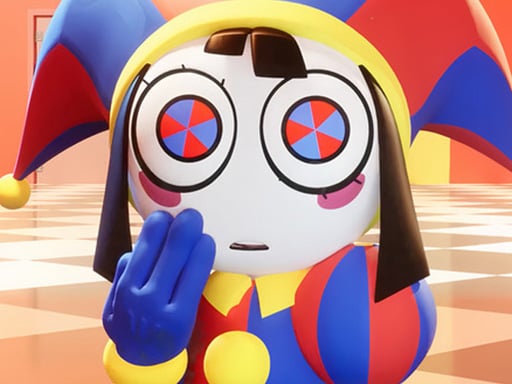
About The Digital Circus Paint Pomni
The Digital Circus Paint Pomni is an interactive coloring activity set within a stylized circus world. Players explore creative digital pages featuring character illustrations, selecting palettes and filling in outlines at their own pace. Designed for straightforward creative play across desktop and mobile browsers, the title offers a relaxed drawing environment where you can experiment with varied color combinations across different page designs.
Taking inspiration from the animated digital circus setting, this title centers on artistic customization and character illustration. Players interact with drawing sheets depicting the featured character in a variety of poses and scenes. The visual workspace invites you to take your time, evaluate different sections of an illustration, and apply creative palettes to bring the line art to life.
The core loop revolves around selecting an illustration from the available coloring options and applying your chosen shades across the canvas. Because there are no rapid reflexes or competitive timers required, the experience remains approachable for artists seeking a calm, self-directed painting session directly inside a web browser.
Your goal
The main goal is to complete your chosen coloring pages by applying expressive color schemes to character line drawings. Players aim to explore artistic combinations, test different aesthetic palettes, and produce clean, visually satisfying digital circus artwork without the pressure of time limits or performance scoring.
How to play The Digital Circus Paint Pomni
1. Browse the available illustration sheets and pick the coloring page you want to customize.
2. Click on desktop or tap on touch devices to select your desired color from the palette.
3. Apply the selected tone to specific line art regions across the character and background.
4. Review your finished artwork and switch to another page to start a new creative project.
Controls and device support
On PC, use mouse clicks to select colors and canvas areas. On mobile phones and tablets, tap the screen with your finger to make selections.
- Controls: Mouse or touch
- Device support: Desktop + mobile
- Game frame: 800 x 600
What makes the challenge interesting
This creative drawing title focuses on visual balance, color experimentation, and relaxed decision-making rather than mechanical dexterity. The primary challenge involves coordinating foreground character elements with background scenery to achieve a cohesive visual tone. Players often weigh bold, high-contrast character accents against softer background shades to make the central figure stand out. Because the pace is entirely self-guided, the satisfaction comes from thoughtfully filling each segment and watching a line drawing transform into a fully realized illustration.
Tips for The Digital Circus Paint Pomni
- Establish a consistent color palette before painting large sections. Sticking to a defined set of three to four primary tones helps keep the character design unified rather than visually cluttered.
- Work from larger background areas toward smaller foreground accents. Filling major zones first gives you clear context for choosing matching highlight tones on smaller character details.
- Use high contrast between character clothing and the surrounding scenery. Pairing bright outfit elements with neutral backdrops ensures the main figure remains the clear focal point of your canvas.
- Take time to review the entire composition before moving on. Stepping back allows you to spot uncolored segments or clash points that you might want to adjust.
Playing on different devices
The game adapts naturally across different screen formats, running at a native 800 by 600 canvas dimension. Desktop players benefit from the precise targeting of a standard computer mouse when filling intricate sections. Mobile and tablet players can use direct touch taps, offering an intuitive, portable coloring experience suited for quick creative sessions on handheld screens.
The skills behind the game
Categorized under drawing and creative activities, this title aligns with the broader family of digital coloring books. These games replace traditional paper and colored pencils with responsive digital tools, enabling mess-free artistic expression. Fans of character art and creative media appreciate these spaces because they remove the intimidation of drafting outlines from scratch, letting players focus entirely on tonal balance, shading concepts, and aesthetic presentation in a welcoming casual environment.
Who will enjoy this game
Players looking for a relaxing coloring game online can use this title for casual artistic practice. Engaging with digital coloring pages is an enjoyable way to unwind, experiment with new palette ideas, and sharpen visual coordination. The game suits anyone interested in character illustration who wants a lightweight, browser-accessible canvas that requires no account setup or specialized art hardware.
Games with a similar feel
Happy Color: Happy Color provides guided digital coloring through structured numbered regions, directing players toward specific pre-assigned palette selections. In contrast, The Digital Circus Paint Pomni allows players to choose their favorite coloring sheet and freely select colors for character artwork, making it ideal for those who prefer open-ended creativity over strict paint-by-number templates.
Frequently asked questions
What kind of game is The Digital Circus Paint Pomni? It is a browser-based creative coloring game where players select palettes and apply shades to character line art set within an animated circus theme.
Can I play this coloring game on a mobile phone? Yes. The game supports touchscreen controls, allowing players on smartphones and tablets to select colors and fill in artwork using simple finger taps.
Are there time limits or scoring penalties while painting? No timers or penalty mechanics are documented. The game is designed as an open, self-paced drawing experience focused on relaxed visual creativity.
Something not right?
Tell us if the game does not load, the information is wrong or the content needs review.
Report a problem ›