About Tetris 24
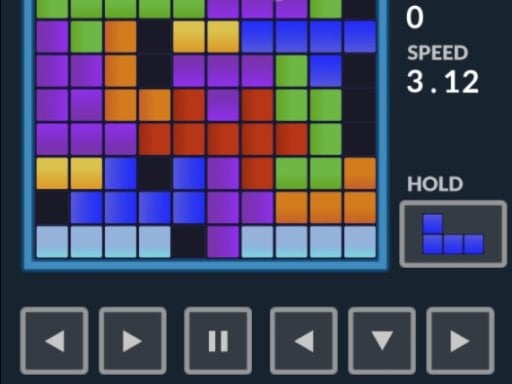
Tetris 24 brings familiar line-clearing block action to browser screens on both desktop and mobile devices. Players guide incoming brick shapes across the vertical board, rotating and positioning each piece to fill complete horizontal lines across the grid. Every completed line clears blocks from the field, challenging your spatial awareness, quick adjustments, and sustained placement rhythm during every puzzle session.
Tetris 24 offers a classic arcade puzzle loop centered around continuous spatial organization on a vertical grid. As varied geometric brick shapes enter the playfield, your goal is to evaluate open gaps, shift pieces horizontally, and rotate them into tight formations before they settle into place. Completing full rows across the board breaks those bricks, freeing up room for future placements.
The session balance relies on managing open space against the threat of an escalating stack. Because pieces can be moved, rotated, dropped, or swapped into reserve, players must constantly balance immediate line clears against preparing clean foundations for upcoming pieces. Both touch dragging and standard keyboard layouts allow you to find a comfortable control method.
Your goal
The primary objective in Tetris 24 is to arrange falling bricks into solid, gap-free horizontal lines to break blocks and keep the playfield clear. Players aim to maintain an orderly board for as long as possible by preventing the block stack from reaching the top of the grid, refining their rotation choices and piece placement speed over time.
How to play Tetris 24
1. Start the match with Enter or on-screen prompts and observe the incoming brick piece at the top of the grid.
2. Move the piece left or right across the columns using the arrow keys, A/D keys, or touch dragging.
3. Rotate the brick clockwise with Up Arrow, W, or X, or counter-clockwise with Z to fit designated spaces.
4. Use Ctrl to hold or swap pieces when an incoming shape does not match your immediate board layout.
5. Drop the block instantly with Space or guide it steadily downward with S into your target row.
6. Complete solid horizontal lines across the grid to break bricks and maintain open board space.
Controls and device support
Supported inputs include keyboard and mouse on PC, as well as touch dragging on mobile screens. Keyboard commands include Left/Right arrows or A/D for movement, Up/W/X for clockwise rotation, Z for counter-clockwise rotation, Space for instant drop, S for slow drop, Ctrl for hold/swap, P to pause, and Enter to start or return.
- Controls: Keyboard
- Device support: Desktop + mobile
- Game frame: 720 x 1280
Rules to keep in mind
- Completing a continuous horizontal row of bricks across the grid breaks that line and clears space.
- Bricks can be shifted horizontally, rotated in both directions, and dropped onto the surface below.
- The hold and swap action allows you to store an active piece and retrieve a previously reserved block.
- Leaving gaps under placed bricks creates overhangs that block lower lines from clearing until uncovered.
What makes the challenge interesting
The core appeal of Tetris 24 lies in geometry management under steady time pressure. Each piece demands rapid visual analysis: players must read the contours of the current stack, identify suitable slots, and execute rotations cleanly before committing to a drop. A major tradeoff occurs between cautious, flat stacking and aggressive play where single columns are preserved for multi-line clears. Misplacements immediately restrict future options, turning recovery into an engaging test of composure.
Tips for Tetris 24
- Aim to keep the top surface of your stack relatively flat. Avoid building tall spikes or jagged edges, which limit the variety of pieces that can fit cleanly without leaving empty holes.
- Use the hold feature actively whenever an awkward piece appears. Swapping out a difficult shape prevents messy compromises and lets you place a more suitable brick immediately.
- Practice rotating blocks in both directions. Relying solely on clockwise turns takes extra keystrokes and can lead to mistimed placements when working near the top of the board.
- Reserve instant drops for confident placements where the destination is certain. Dropping blindly risks creating covered gaps that require multiple line clears to dig out and resolve.
Stages and progression
Long-term progression in Tetris 24 centers on player consistency and personal mastery. Because browser puzzle sessions test endurance, your practice plan should focus on maintaining a clean board across longer stretches of play. As you become more familiar with rotation behavior and piece profiles, you can aim to decrease hesitation during placement and execute line clears with greater fluid efficiency.
Playing on different devices
Tetris 24 accommodates both mobile and desktop play styles. On PC, dedicated keyboard bindings provide rapid access to dual-direction rotation, swapping, and quick drops. On mobile touchscreens, dragging bricks directly across the grid offers an intuitive, tactile alternative for casual puzzle sessions on the go.
The skills behind the game
As an arcade puzzle title, Tetris 24 highlights the enduring appeal of spatial arrangement and geometry-based problem solving. Block puzzle games reward deliberate planning, pattern recognition, and adaptive decision-making under continuous board changes. Whether engaging in brief casual rounds or extended endurance attempts, players enjoy the satisfying rhythm of fitting modular shapes together and keeping an evolving grid under control.
Who will enjoy this game
Players searching for an accessible puzzle game online or a dedicated Tetris 24 game session can jump directly into quick, browser-based matches without complex setup. The combination of classic line-clearing mechanics, dual-rotation support, and piece swapping makes it well-suited for everyday mental warm-ups and casual dexterity practice across both desktop and mobile platforms.
Games with a similar feel
Tetris: Tetris established the falling-block puzzle formula of rotating and arranging geometric shapes to complete horizontal lines. Tetris 24 follows this exact traditional spatial dynamic, offering familiar line clears and hold options directly in an accessible HTML5 browser format without requiring specialized software downloads.
Frequently asked questions
How do you clear lines in Tetris 24? You clear lines by arranging falling bricks to fill an entire horizontal row on the grid without empty gaps. Once completed, the row breaks and frees up playing area.
What controls are available on PC? On PC, move with Left/Right arrows or A/D, rotate clockwise with Up/W/X, rotate counter-clockwise with Z, drop with Space or S, hold/swap with Ctrl, pause with P, and start with Enter.
Can I play Tetris 24 on mobile devices? Yes, Tetris 24 is compatible with mobile browsers, allowing players to drag bricks across the screen to position and guide pieces directly on touch displays.
How does the hold and swap feature work? Pressing the hold key (Ctrl) stores your current brick in a reserve slot and gives you either your previously stored piece or the next shape in sequence.
Something not right?
Tell us if the game does not load, the information is wrong or the content needs review.
Report a problem ›