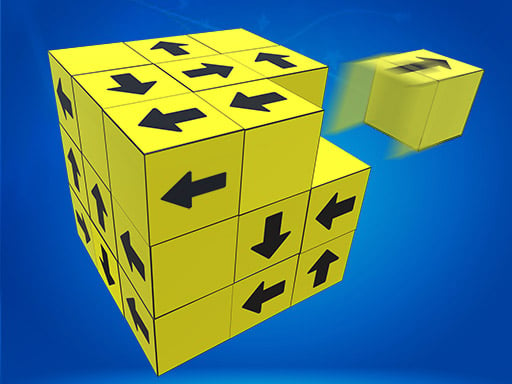
About Tap Blocks Away
Tap Blocks Away is a casual puzzle game built around straightforward tapping interactions and accessible brain-teasing gameplay. Designed as a relaxing pastime for quick breaks or extended unwinding sessions, the game tasks players with interacting with blocks on the screen to solve spatial layouts. With simple click or tap inputs, anyone can jump straight into the challenge across desktop and mobile web browsers without needing complex setup routines.
Tap Blocks Away presents an approachable puzzle environment centered around clearing block arrangements through direct player interaction. The core loop revolves around inspecting the formation of blocks presented on screen, evaluating which pieces can be manipulated or cleared, and using mouse clicks or touchscreen taps to interact with them one by one. The overall experience prioritizes relaxed problem-solving, making it an engaging option for players seeking a low-stress mental workout.
Because the game is built with lightweight HTML5 technology, it runs seamlessly within standard browser windows on both handheld devices and computers. The colorful presentation and intuitive premise create a pick-up-and-play rhythm where each solved configuration offers immediate satisfaction. Whether you are spending a few minutes testing your spatial awareness during a daily break or settling in for a longer session of casual puzzling, the smooth interactions support repeated play at your own pace.
Your goal
The primary objective in Tap Blocks Away is to clear the board by systematically tapping and removing the assembled blocks. Players aim to improve their visual analysis and spatial planning by determining the most effective sequence for interacting with each piece. Striving for clean, deliberate moves without getting stuck on obstructed blocks allows players to complete each layout smoothly and enjoyably, satisfying the goal of casual mental exercise and relaxed time-killing.
How to play Tap Blocks Away
1. Launch the game in your web browser on desktop or mobile to display the current puzzle layout.
2. Examine the formation of blocks on screen to observe their positioning and potential pathways.
3. Click with your mouse or tap with your finger on a chosen block to interact with it.
4. Continue selecting unblocked pieces one by one to steadily dismantle the structure.
5. Clear all remaining blocks from the screen to successfully finish the puzzle.
Controls and device support
Tap Blocks Away uses universal click or touch controls; simply click with a mouse on desktop or tap the screen on mobile devices to interact with puzzle elements.
- Controls: Mouse or touch
- Device support: Desktop + mobile
- Game frame: 526 x 936
What makes the challenge interesting
The defining appeal of Tap Blocks Away lies in its focus on spatial recognition and logical sequencing. Rather than testing twitch reflexes or demanding rapid physical inputs, the game rewards thoughtful observation and deliberate decision-making. Players face a core tradeoff between tapping whichever block looks easiest right away versus scanning the broader cluster to identify dependencies that could block future moves. Recognizing which outer blocks to remove first creates clear clearance paths for the central pieces trapped deeper inside. This steady rhythm of scanning, planning, and executing keeps the mind engaged without causing frustration. Because the interaction mechanics remain minimal and direct, the satisfaction comes entirely from the mental process of deconstructing complex block arrangements piece by piece.
Tips for Tap Blocks Away
- Scan the perimeter before tapping any pieces. Focus on removing uninhibited outer blocks first to open up maneuvering space for inner sections, avoiding premature moves that might lead to dead ends.
- Trace the line of clearance for every targeted block before making an input. Making hasty clicks without verifying if another piece stands in the way can slow your overall puzzle resolution.
- Rotate your focus across multiple angles of the block structure if you feel stuck. Spotting hidden or overlapping pieces from different perspectives helps reveal previously unnoticed options for progress.
- Maintain a steady, deliberate pace rather than rapid indiscriminate clicking. Thoughtful, methodical selections reduce unnecessary inputs and cultivate stronger spatial awareness throughout your play session.
Playing on different devices
Tap Blocks Away features a native portrait resolution of 526 by 936 pixels, making it particularly well-suited for handheld smartphones and tablets held in vertical orientation. On mobile touchscreens, direct finger taps offer an intuitive and responsive tactile feel for selecting individual blocks. When playing on desktop monitors or laptops, the vertical frame is easily navigated using standard mouse clicks. Since the game runs natively in modern web browsers via HTML5, no additional downloads or app installations are required on either platform.
The skills behind the game
As a casual entry within the puzzle and brain teaser genre, Tap Blocks Away highlights the enduring appeal of spatial block manipulation. Block puzzle games have long captivated players of all ages because they translate clean visual geometry into engaging cognitive challenges. By stripping away complex multi-button control schemes in favor of immediate tap-to-clear gameplay, the title provides accessible entertainment for both younger learners and adults looking to unwind. This style of puzzle game serves as a pleasant daily mental exercise, balancing simple mechanics with satisfying spatial problem-solving.
Who will enjoy this game
Players looking for a relaxing puzzle game online will find Tap Blocks Away well-suited for casual mental breaks and low-stress entertainment. The tap blocks away game format offers an inviting experience for anyone who enjoys deconstructing geometric puzzles without high-pressure countdowns. Whether you want to pass a few minutes between tasks or practice visual problem-solving during a leisure break, playing a browser-based block puzzle provides a clean, uncomplicated way to keep your mind sharp and engaged.
Frequently asked questions
How do I control the game on different devices? You can play Tap Blocks Away using standard mouse clicks on desktop computers or direct touchscreen taps on smartphones and tablets. Both input methods allow you to select and remove blocks with equal precision and ease.
What type of gameplay experience does Tap Blocks Away offer? The game provides a casual, brain-teasing puzzle experience focused on dismantling block structures. Its low-stress design makes it ideal for unwinding, killing time, and enjoying relaxing spatial problem-solving at your own preferred pace.
Do I need to install an app to play Tap Blocks Away? No installation is needed. Tap Blocks Away is built on HTML5 technology and runs directly inside any compatible modern web browser on both mobile devices and desktop computers without supplementary downloads.
Something not right?
Tell us if the game does not load, the information is wrong or the content needs review.
Report a problem ›