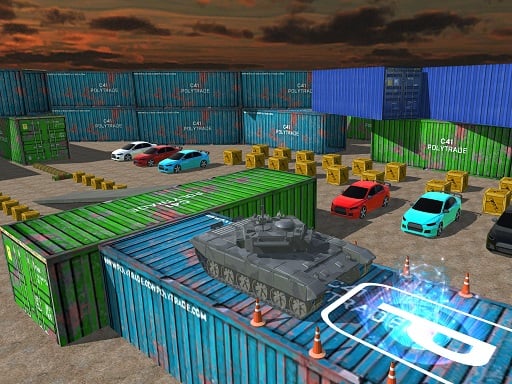
About Tank Parking 3D Sim
Tank Parking 3D Sim is an action driving game about guiding military tanks through base obstacle courses and parking them at the destination. The listing describes container parking, storage-tank battles, unlockable levels and extra tanks, with keyboard driving, camera changes, mouse look and shooting.
Tank Parking 3D Sim combines tank driving with parking challenges in an Action category listing tagged Driving, Parking, Tank, Unity3D and WebGL. The official description presents a military base setting where players complete obstacle-course “degrees,” park containers, battle storage tanks and take different army tank types to the destination. It also mentions a Tank Classic Mode built around tank parking obstacle plans, plus unlocks for new levels, army storage tanks and garage expansion. The instructions support direct play with Tab for menu, ARROWS or WASD to drive, C for camera view, mouse look and Left Mouse for shooting.
Your goal
The goal is to drive each tank through the base course, avoid obstacles such as barrels, barriers, traffic cones and equipment, then reach the destination and complete the parking or storage-tank challenge. Finishing courses is described as the way to open new levels and additional army tanks.
How to play Tank Parking 3D Sim
1. Use Tab when you need the menu, then start from the tank classic mode described as the beginning mode for parking obstacle plans.
2. Drive with the ARROWS keys or WASD keys and guide the military tank through the base toward the destination.
3. Steer around barrels, barriers, traffic cones and equipment instead of forcing the tank through tight gaps.
4. Press C to change the view camera and use the mouse to look around when you need a better angle for parking or hazards.
5. Use Left Mouse for shooting when a storage-tank battle challenge appears, then finish the course to work toward new levels and tanks.
Controls and device support
Tab: Menu
ARROWS keys or WASD keys: drive
C key: change view camera
Mouse: Look around
Left Mouse: Shooting
- Controls: WASD + arrow keys
- Device support: Browser
- Game frame: 800 x 600
Rules to keep in mind
- Avoid barrels, barriers, traffic cones and equipment while driving through the base course.
- Complete the obstacle-course military degrees and parking plans to open new levels and army storage tanks.
- Take tanks straight to the destination rather than treating the course as free roaming only.
What makes the challenge interesting
The focus is careful heavy-vehicle control: the description repeatedly returns to tank parking, obstacle plans and reaching a destination, while the instructions add camera control, mouse look and shooting. That makes the loop broader than simple parking, because a course can ask the player to maneuver precisely, watch hazards from a better view and handle storage-tank battle moments before the run is complete.
Tips for Tank Parking 3D Sim
- As general advice, slow down before tight turns near cones or equipment; heavy vehicles usually need more room than a small car.
- Use the C camera change and mouse look before committing to a narrow parking line, since the supplied controls are built for checking angles.
- When a storage-tank battle moment appears, keep the tank stable first, then use Left Mouse shooting only after you have a clear view.
- Treat each finished course as progress: the description ties completion to new levels, more tanks and a larger garage.
Stages and progression
Progression is described through completing courses to unlock new levels and army storage tanks, extending the garage and improving the tank experience. The description also says more challenge-filled levels are on the way and frames Tank Classic Mode as the starting set of parking obstacle plans.
The skills behind the game
Within Action, Driving, Parking and Tank tags, this game sits between a parking challenge and a military vehicle course. The tank theme changes the feel of ordinary parking by adding armored vehicles, base equipment, storage-tank battles and obstacle plans rather than only asking for a clean bay park.
Who will enjoy this game
Natural phrases for this page include the exact title, “tank parking 3d sim game,” “car parking game” and “action game online.” These fit the listing because it is an action driving game about parking tanks; they should be read as topic language, not as measured demand or ranking evidence.
Games with a similar feel
Car Parking Multiplayer: Car Parking Multiplayer shares the core idea of maneuvering a vehicle into a parking space. Tank Parking 3D Sim differs by using military tanks, base obstacles, storage-tank battles and shooting controls instead of focusing on ordinary vehicle parking.
Fall Guys: Fall Guys shares the broad idea of moving through hazard-filled obstacle courses with careful timing. The difference is that Tank Parking 3D Sim uses tank driving, parking objectives, camera control and Left Mouse shooting in a military base setting.
Frequently asked questions
How do you drive in Tank Parking 3D Sim? The instructions list ARROWS keys or WASD keys for driving, Tab for the menu, C to change the view camera, mouse movement to look around and Left Mouse for shooting.
What is the main goal in Tank Parking 3D Sim? Drive military tanks through base obstacle courses, avoid listed hazards, park or handle storage-tank challenges and reach the destination to complete courses and unlock more content.
Does Tank Parking 3D Sim have unlocks? Yes. The description says completing programs opens new degrees and army storage tanks, extends the garage and adds more challenge-filled levels for continued play.
Something not right?
Tell us if the game does not load, the information is wrong or the content needs review.
Report a problem ›