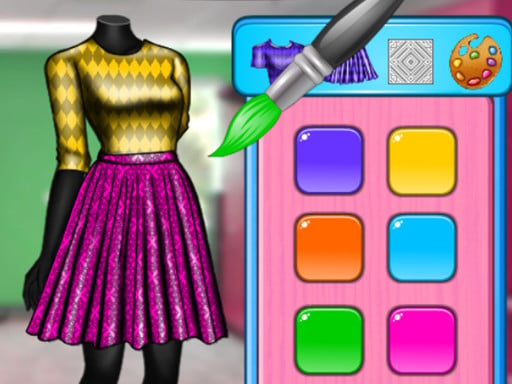
About Talent Girl Art Classes
Talent Girl Art Classes invites players to join Zoe on her very first day at art college. You step in to help her select between two dedicated courses—Fashion Design Class and Art Class—and assist her with preparing the creative activities required for each lesson. With a casual point-and-click setup, the experience centers on self-expression, design, and styling.
The game follows Zoe as she starts her journey in art college. Players can explore two main tracks: a Fashion Design Class that emphasizes outfit coordination, styling, and makeover elements, and an Art Class centered on artistic preparation, coloring, and decoration.
The presentation uses an intuitive, user-friendly interface accompanied by clear HD graphics. Designed to be accessible for both girls and boys, the core loop encourages personal creativity and imagination without high-pressure countdowns, letting players take their time assembling garments and completing craft projects.
Your goal
Your primary goal is to help Zoe successfully prepare for her college lessons by selecting an educational path—either Fashion Design or Art Class—and completing the associated decoration, dress-up, and design steps. Players aim to explore different visual combinations and refine their aesthetic choices across each activity.
How to play Talent Girl Art Classes
1. Launch the game and decide which lesson track to start with: Fashion Design Class or Art Class.
2. Use your mouse cursor or touchscreen tap to interact with the visual tools and on-screen menus.
3. Follow the preparation sequence to pick outfits, apply makeover touches, or arrange classroom supplies.
4. Experiment with different colors, garment pieces, and decorative elements to assemble a cohesive style.
5. Complete the lesson tasks to review Zoe's finished project, then switch over to try the alternative class.
Controls and device support
The game is fully controlled by mouse clicks on desktop or screen taps on mobile devices. Simply click or tap the on-screen options, tools, and garments to select, apply, and complete preparation steps.
- Controls: Mouse or touch
- Device support: Desktop + mobile
- Game frame: 504 x 800
What makes the challenge interesting
The focus of Talent Girl Art Classes rests entirely on creative expression, aesthetic balance, and accessible pacing. Rather than demanding rapid reflexes or precision timing, the gameplay encourages thoughtful visual choices across styling, decorating, and coloring.
Players navigate the creative tradeoff of coordinating harmonious colors against bold, expressive fashion statements. Because the interface is streamlined, the enjoyment comes from experimenting with Zoe's wardrobe and art projects to see how different accessories and palette combinations complement each other.
Tips for Talent Girl Art Classes
- Try both classroom tracks to experience the full variety of design and coloring activities available for Zoe.
- Pair matching accessory shades with clothing items to create a cohesive fashion look instead of clashing colors.
- Take time to preview every decorative item in the menu before finalizing a project so you do not miss stylish combinations.
- Revisit completed lessons to test alternative hairstyles, outfits, and color palettes for fresh creative results.
Stages and progression
Progression is organized around Zoe's two primary course paths: Fashion Design Class and Art Class. Players can choose either path from the main menu, prepare the character, and complete the respective creative activities.
Because the game is focused on creative discovery, personal progression comes from mastering visual coordination and experimenting with various fashion and art styles across repeated play sessions.
Playing on different devices
Rendered in a vertical 504 x 800 window format, the title is well-suited for portrait orientations on mobile browsers while remaining easily accessible via desktop mouse controls.
Mouse clicks and touch taps provide identical responsiveness, allowing players on phones, tablets, or personal computers to navigate wardrobe menus and art tools effortlessly.
The skills behind the game
Within the dress-up and makeover genre, players look for intuitive titles that allow freeform styling and aesthetic experimentation. Talent Girl Art Classes embraces these creative themes by blending wardrobe selection with artistic college preparation.
Educational and kid-friendly design elements make it an easy entry point for young players interested in fashion, coloring, and decorative crafts, emphasizing fun visuals over complex mechanics.
Who will enjoy this game
Players looking for a relaxing dress up game or an engaging coloring game online will find that Talent Girl Art Classes combines both activities into a single casual package. It offers an inviting digital canvas to practice color matching and outfit curation.
Those searching for talent girl art classes game content can enjoy quick, browser-based sessions that require no complex setup, making it ideal for casual creative breaks across mobile or desktop platforms.
Games with a similar feel
Love Nikki-Dress UP Queen: Like Love Nikki-Dress UP Queen, Talent Girl Art Classes focuses on styling characters and coordinating fashionable outfits. However, while Love Nikki features deep wardrobe collections and complex scoring battles, Talent Girl Art Classes provides a simpler, unhurried classroom-themed experience ideal for casual sessions.
Project Makeover: Both Talent Girl Art Classes and Project Makeover center on personal makeover and styling themes. Project Makeover pairs its makeovers with puzzle-based progression, whereas Talent Girl Art Classes allows immediate access to creative decoration and fashion choices without puzzle hurdles.
Frequently asked questions
What class options are available in Talent Girl Art Classes? Players can choose between two main course tracks: Fashion Design Class, which focuses on wardrobe and styling, and Art Class, which centers on creative art projects and decoration.
How do you control the actions in Talent Girl Art Classes? All interactions are handled with a simple left mouse click on desktop computers or a single screen tap on mobile devices to select items and apply tools.
Is there a time limit or score penalty in the game? No strict time limits or scoring penalties are stated in the game data, allowing you to explore different fashion and design choices at your own relaxed pace.
Something not right?
Tell us if the game does not load, the information is wrong or the content needs review.
Report a problem ›