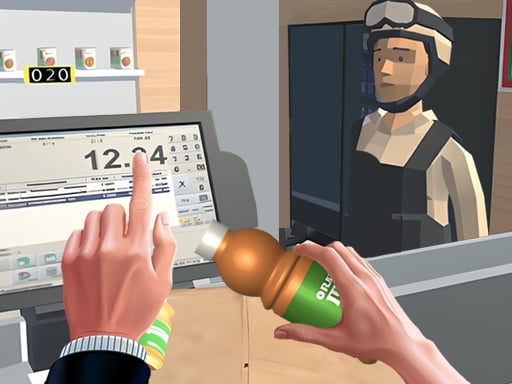
About Supermarket Manager Simulator
Supermarket Manager Simulator places you in charge of your own retail shop as an ambitious store manager. Your daily routine revolves around stocking a diverse catalog of grocery goods, placing items onto display shelves, and completing sales to customers. By consistently managing inventory and earning profits, you can work toward growing your enterprise into a thriving commercial business.
Supermarket Manager Simulator combines store management routines with straightforward business progression. As the store manager, you oversee the end-to-end retail cycle: procuring inventory, stocking shelves with items such as chips, fries, burgers, meats, fruits, and vegetables, and attending to checkout sales as shoppers visit.
The core gameplay loop centers on continuous resource flow. Goods must be kept on display so customers can purchase what they need. Selling items generates revenue, which gives you the financial capital required to restock depleted supplies and eventually fund larger store expansions. Because you handle stocking, shelving, and selling simultaneously, maintaining an organized workflow is key to preventing empty displays and keeping your retail operations running smoothly.
Your goal
The main objective in Supermarket Manager Simulator is to build a thriving grocery enterprise by keeping display shelves stocked, completing customer sales, and accumulating sufficient revenue to expand your store. Players strive to maintain an uninterrupted retail cycle by promptly replenishing diverse inventory—ranging from snacks and prepared meals to fresh fruits and meats—while efficiently accumulating funds to unlock broader floor expansions and establish a bustling retail shop.
How to play Supermarket Manager Simulator
1. Begin by reviewing your starting grocery inventory and identifying which products need to be placed onto empty shelves.
2. Move inventory items—such as chips, fries, burgers, meats, vegetables, or fruits—onto designated shelving units for customer access.
3. Assist shoppers as they select items and complete their purchases at the checkout counter to earn money.
4. Use your collected revenue to restock depleted products and maintain balanced supply across all food sections.
5. Accumulate enough capital through ongoing sales to invest in store expansions and enlarge your business.
Controls and device support
Interact with all store items, stocking actions, and upgrade menus using mouse clicks on desktop or tap gestures on mobile touchscreens.
- Controls: Mouse or touch
- Device support: Desktop + mobile
- Game frame: 1280 x 720
Rules to keep in mind
- Shelves must be stocked with products so visiting customers have items available to purchase.
- Inventory covers multiple food categories, including snack items, fast food, meats, vegetables, and fruits.
- Selling stocked goods generates incoming revenue for the business.
- Store expansions require accumulating sufficient monetary funds before they can be unlocked.
What makes the challenge interesting
The central appeal of Supermarket Manager Simulator lies in multitasking and retail logistics within a relaxed simulation framework. Players balance the physical maintenance of store displays with active cash flow management. The primary operational trade-off involves timing: spending too long restocking a single product line can leave other shelves empty, slowing down incoming customer purchases and interrupting cash flow. By coordinating the steady flow of snacks, fresh produce, meats, and hot foods from inventory onto customer-facing shelving, players experience the rhythmic satisfaction of retail management where efficient floor organization directly accelerates commercial expansion.
Tips for Supermarket Manager Simulator
- Keep high-demand grocery sections filled promptly. Avoid letting shelves sit empty, as unstocked goods prevent customer transactions and stall your revenue generation.
- Distribute your restocking efforts evenly across snack, meat, and produce sections. Neglecting certain product types can leave customer orders unfulfilled and limit overall sales diversity.
- Reserve a portion of your incoming cash for ongoing inventory replenishment. Spending all funds immediately on expansion without stock reserves can leave your shelves bare.
- Perform frequent visual checks across all shelving units between sales. Catching diminishing stock early prevents sudden shortages during busy shopping rushes and keeps your checkout line active.
Stages and progression
Progression in Supermarket Manager Simulator is tied directly to your financial performance and reinvestment cycle. Starting out with a compact shop layout, players earn money by maintaining product availability across varied grocery categories like produce, fast food, and packaged goods. As your accumulated profits increase, you reach the financial milestones needed to expand your store space. Expanding the shop allows for greater display capacity and larger product selections, steadily elevating your status from an entry-level grocery manager toward a prominent retail business tycoon.
Playing on different devices
Supermarket Manager Simulator is built around accessible point-and-click and touch interactions, operating within a standard 1280x720 canvas. Desktop users can navigate the retail floor, select goods, and manage cashier duties using standard mouse clicks. Mobile and tablet players can perform all restocking and management actions directly through screen taps. Both input methods provide responsive, one-touch control suitable for quick management decisions and comfortable casual play.
The skills behind the game
Categorized within the business simulation and hypercasual genres, Supermarket Manager Simulator focuses on the hands-on aspects of running a commercial storefront. Rather than burdening players with complex spreadsheet management, hypercasual business simulators distill enterprise management into accessible, action-oriented loops of stocking, selling, and upgrading. This format appeals to players who enjoy steady organizational progression, rewarding proactive floor maintenance, balanced inventory management, and steady financial accumulation with tangible store growth and retail expansion.
Who will enjoy this game
Supermarket Manager Simulator offers an inviting and casual environment for players exploring retail management and store simulation games. Whether you are looking for an approachable business simulation during a quick break or practicing basic organizational multitasking, the game delivers an engaging operational loop. Players who enjoy organizing shop layouts, restocking diverse grocery inventories, and watching small storefronts grow through steady reinvestment will find an enjoyable, low-friction management experience.
Frequently asked questions
What types of products can you sell in Supermarket Manager Simulator? The game features a variety of grocery items to stock and sell, including snacks like chips and fries, prepared foods like burgers, as well as fresh meats, vegetables, and fruits.
How do you expand your grocery store? You expand your supermarket by stocking shelves, completing customer sales, and accumulating sufficient revenue. Once you have saved enough money, you can invest directly into expanding your retail store space.
What devices and controls are supported? Supermarket Manager Simulator can be played across desktop browsers and mobile devices. You interact with all restocking, sales, and upgrade menus using simple mouse clicks or touchscreen taps.
Something not right?
Tell us if the game does not load, the information is wrong or the content needs review.
Report a problem ›