Official listing
Game description
Supercars Zombie Driving 2 features fastest supercars and zombie crowded city where you must find and smash all the zombies at high speed in order to win.
Racing game
Supercars Zombie Driving 2 puts you behind the wheel of high-speed supercars in an urban environment filled with zombies. Your primary mission is to navigate the streets, accelerate into the undead horde, and clear the area by smashing every target you encounter across the city.
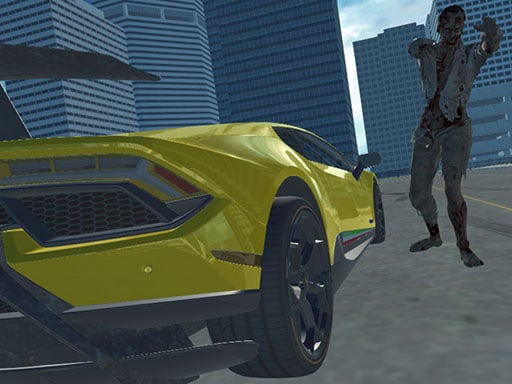
Choose Play now to load the game.
Official listing
Supercars Zombie Driving 2 features fastest supercars and zombie crowded city where you must find and smash all the zombies at high speed in order to win.
From the game listing
WASD - Drive Space - Brake C - Change camera
Open this card to load the gameplay video.
Supercars Zombie Driving 2 puts you behind the wheel of high-speed supercars in an urban environment filled with zombies. Your primary mission is to navigate the streets, accelerate into the undead horde, and clear the area by smashing every target you encounter across the city.
Supercars Zombie Driving 2 blends high-speed 3D driving simulation with action-focused vehicular combat. Players take control of powerful supercars in an open, zombie-crowded city environment. The objective centers on exploring the urban layout, tracking down roaming undead figures, and colliding with them at full throttle. Seamless camera switching lets you adjust your perspective while maneuvering tight corners or opening up the throttle along wide avenues. Built as a single-player WebGL experience, it offers direct keyboard controls for accelerating, steering, and braking through the chaotic city streets.
The main goal in Supercars Zombie Driving 2 is to seek out and eliminate all zombies wandering through the city streets. In order to achieve victory, you must maintain high velocity and steer your supercar directly into every target until the area is cleared.
1. Use the WASD keys to steer, accelerate forward, and reverse through the city avenues.
2. Patrol the urban streets to search for crowds of roaming zombies.
3. Accelerate toward targets to smash them at maximum velocity.
4. Press the Space bar to brake and regain control around sharp turns.
5. Press C to toggle your camera angle for better visibility while navigating.
6. Continue tracking and eliminating remaining zombies across the city to win the game.
WASD: Drive
Space: Brake
C: Change camera
Gameplay revolves around precision maneuvering and speed management in a dense urban setting. Finding targets requires continuously scanning street intersections and open plazas. Because your supercar moves at rapid speeds, balancing acceleration with timely braking is essential for making sharp turns without losing momentum. Switching camera angles helps you maintain awareness of obstacles and spot groups of undead scattered across side alleys. Mastering the vehicle handling allows you to sweep through city blocks systematically, delivering decisive high-speed collisions to fulfill your mission objective.
As a title in the 3D racing and vehicle simulation category, Supercars Zombie Driving 2 combines fast car mechanics with action gameplay. Instead of competing on traditional race tracks, players navigate an open city setting to track down and eliminate hazards using vehicular power.
If you are looking for a racing game online that blends driving control with vehicular combat, Supercars Zombie Driving 2 game offers fast-paced 3D action. The experience emphasizes agile supercar handling, quick camera adjustments, and swift city exploration.
Asphalt: Both games feature high-speed supercar driving in 3D settings. However, Asphalt emphasizes competitive circuit racing against opponents, whereas Supercars Zombie Driving 2 tasks you with hunting down and smashing zombies across a city.
What is the main objective in Supercars Zombie Driving 2? The objective is to explore the crowded city and smash every zombie using your supercar at high speed to win.
How do you steer and stop the car? You steer and accelerate using the WASD keys, while the Space bar is used to apply the brakes.
Tell us if the game does not load, the information is wrong or the content needs review.
Report a problemExplore popular games by category, shared tags and site-wide activity.


















