Official listing
Game description
Super Pika Bros-Flash Game
Adventure game
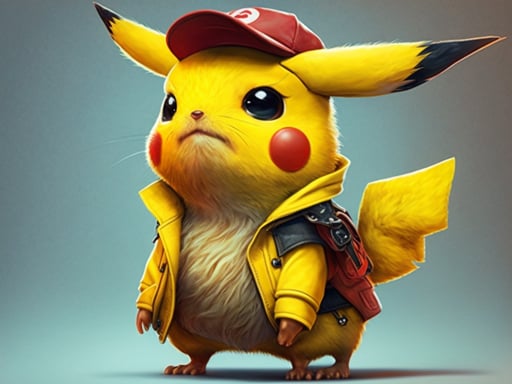
Super Pikachu is a browser-based adventure release presented in the style of classic Flash platforming experiences. Running in a standard desktop layout, the title asks players to take control through their physical keyboard to navigate on-screen environments. Designed with nostalgic charm and straightforward inputs, it offers a quick retro journey centered on direct movement, obstacle avoidance, and responsive real-time traversal across themed adventure courses.
Choose Play now to load the game.
Official listing
Super Pika Bros-Flash Game
From the game listing
Play with Keyboard
Open this card to load the gameplay video.
Super Pikachu is a browser-based adventure release presented in the style of classic Flash platforming experiences. Running in a standard desktop layout, the title asks players to take control through their physical keyboard to navigate on-screen environments. Designed with nostalgic charm and straightforward inputs, it offers a quick retro journey centered on direct movement, obstacle avoidance, and responsive real-time traversal across themed adventure courses.
Super Pikachu channels the aesthetic and format of classic web gaming, carrying the alternate project moniker Super Pika Bros in its original Flash heritage. Displayed in an authentic 800 by 600 canvas, the presentation prioritizes clean visual framing reminiscent of mid-2000s browser portals. Because the software originates from traditional web plug-in architecture, the gameplay relies on responsive input response rather than elaborate simulation.
Players guide the titular hero across adventure terrain by reacting to terrain geometry and navigational hurdles. The core experience emphasizes active spatial awareness, where players must coordinate inputs via the keyboard to explore the setting. While detailed plot elements and sub-modes are minimal in the source documentation, the primary loop revolves around entering each run, testing responsive commands, and guiding the character safely through active scenery.
The main objective in Super Pikachu is to guide the character through the adventure layout by relying on steady keyboard inputs. Players aim to complete runs without colliding with hazards or faltering on environmental obstacles. Success comes down to maintaining clear sightlines across the 800 by 600 view, refining traversal consistency, and steadily progressing toward the finish of each course.
1. Load Super Pikachu within a supported desktop web browser to initialize the active game canvas.
2. Click inside the 800 by 600 display area to ensure window focus rests on the game viewport.
3. Position hands comfortably on your physical keyboard to prepare for real-time directional commands.
4. Observe the on-screen hazards and layout before advancing across the adventure scenery.
5. Use steady, measured keyboard inputs to maneuver through terrain challenges toward completion.
The game specifies keyboard operation for desktop play. Individual key bindings are not enumerated in the developer documentation, so players should test conventional layout configurations such as Arrow Keys or WASD upon launching the game.
The central appeal of Super Pikachu rests on immediate, tactile input coordination within a lightweight browser framework. Without modern assist features or complex menu layers, player success hinges purely on reading the environment and executing prompt keystrokes. The rhythm favors measured movement over reckless rushing, demanding that players anticipate footing and keep focus centered on the moving character.
A fundamental tradeoff involves navigating obstacles with speed versus proceeding cautiously to preserve position. Because legacy Flash-style titles prioritize precise placement, pressing forward prematurely can cause unintended contact with threats. Developing a patient cadence allows players to react smoothly to unexpected terrain changes while keeping input latency to a minimum.
Super Pikachu is optimized for desktop environments featuring a physical keyboard and a screen resolution that accommodates its 800 by 600 fixed pixel dimensions. Because touchscreen virtual controls are not outlined in the documentation, touch-based mobile play is not officially supported. Players on laptops or desktop PCs will achieve the best experience by ensuring hardware keys remain responsive and unobstructed.
Within browser entertainment, adventure titles emphasize hands-on movement, exploration across segmented areas, and navigating distinct physical spaces. Rather than relying on static puzzle boards or turn-based choices, adventure games engage players through continuous real-time involvement. Super Pikachu embodies this traditional spirit by presenting an active course where character positioning dictates survival and progress.
For casual players, this style of adventure gameplay offers an approachable entry point into retro design philosophies. Sessions can be picked up instantly without lengthy onboarding tutorials, making it an enjoyable exercise in basic timing and platform awareness. By keeping the interface direct, the adventure format highlights genuine hand-eye coordination over complicated equipment menus or resource systems.
Players looking for Super Pikachu online are typically searching for lightweight, nostalgic platforming experiences that run smoothly inside modern web software. Because the title operates on keyboard commands without elaborate setup, it appeals to desktop users looking for quick retro entertainment during short breaks.
Those seeking an adventure game online often appreciate clear objectives and immediate responsiveness. Engaging with Super Pikachu allows players to test their platforming coordination against nostalgic level designs, making it a fitting option for casual reflexes practice or simple arcade fun on standard personal computers.
What devices can run Super Pikachu? Super Pikachu is intended for desktop web browsers equipped with a physical keyboard. Its fixed 800 by 600 frame makes it well suited for standard computer screens rather than mobile touch devices.
How do you control the character in Super Pikachu game? The game instructions indicate keyboard input. When launching a session, test common movement setups such as the Arrow Keys or WASD keys along with the spacebar to identify active command bindings.
Is Super Pikachu an adventure game online? Yes, Super Pikachu is structured as a browser adventure game inspired by classic Flash platformers, providing real-time traversal and hurdle navigation directly in your web client.
Tell us if the game does not load, the information is wrong or the content needs review.
Report a problemExplore popular games by category, shared tags and site-wide activity.