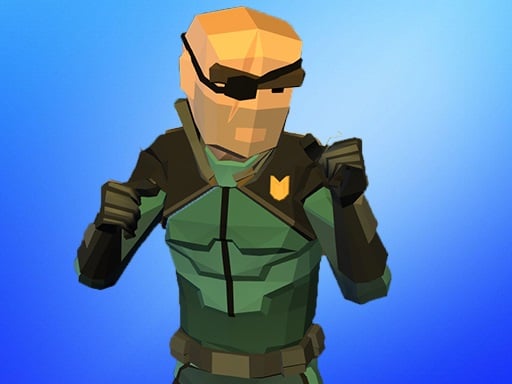
About Street Fight Space Station
Street Fight Space Station is a 3D fighting game where you step into battle as a stick fighter equipped with stylish gear and futuristic weaponry. Taking inspiration from ninja and samurai combat, the game challenges you to brawl against enemy fighters across an intense warzone arena using swords, lightsabers, and swift martial arts maneuvers.
Set in an action-packed arena, Street Fight Space Station blends the swift pace of street brawlers with a sci-fi universe setting. Players take control of an agile stick fighter ready to confront hostile adversaries in hand-to-hand and melee combat. As you progress through the brawl, you encounter opportunities to collect and improve powerful armaments, including swords and lightsabers, turning your fighter into a formidable combatant.
Built on WebGL and Unity3D technology, the game delivers real-time 3D combat directly inside your web browser. You will navigate the fighting area using arrow keys, execute jumps to avoid or initiate strikes, unleash rapid attacks with dedicated action keys, and raise your guard to block incoming damage from aggressive opponents.
Your goal
Your main goal is to defeat all hostile combatants in each encounter while preserving your fighter's health. Battle through waves of enemies, collect and improve stronger weapons such as swords and lightsabers, and master both offensive strikes and defensive timing to dominate the space station warzone and survive the ongoing brawl.
How to play Street Fight Space Station
1. Navigate your stick fighter around the combat arena using the Arrow Keys to position yourself near or away from enemies.
2. Double tap the A or D keys to sprint across the battlefield and quickly close the distance to your targets.
3. Press the Spacebar to jump over incoming strikes or gain aerial positioning during a brawl.
4. Press the Z or X keys to unleash offensive attacks against nearby opponents using your equipped weapons.
5. Hold or press the C key to defend and mitigate incoming damage from hostile enemy attacks.
Controls and device support
Arrow Keys: Move character in four directions
Spacebar: Jump into the air
Z / X: Attack with equipped weapon or strikes
C: Defend against incoming attacks
Double tap A / D: Run / sprint across the arena
- Controls: Keyboard
- Device support: Desktop + mobile
- Game frame: 800 x 600
Rules to keep in mind
- Active defense with the C key protects your fighter by mitigating or blocking direct enemy attacks.
- Acquiring and upgrading weapons such as swords and lightsabers improves your offensive capability against tougher foes.
- Mobility inputs like running and jumping allow you to reposition rapidly during chaotic multi-enemy brawls.
What makes the challenge interesting
Combat in Street Fight Space Station revolves around balancing offensive pressure with disciplined defense. Rushing in blindly can leave your fighter open to counterattacks, making the C defense key crucial when approaching dangerous groups of foes. By double tapping movement keys to run into range, landing swift strikes with Z and X, and jumping out of danger using the Spacebar, you create dynamic combos that keep adversaries off balance throughout the brawl.
Tips for Street Fight Space Station
- Use the double-tap sprint command on A or D to close gaps quickly or escape when surrounded by hostile opponents.
- Hold the C key to defend whenever an enemy starts an attack animation, then retaliate immediately with Z or X.
- Incorporate jumps using the Spacebar to disrupt enemy attack patterns and reposition behind attacking rivals.
Stages and progression
As you battle foes across the space station, the game encourages you to collect and improve powerful gear such as swords and lightsabers, transforming your stick fighter into an increasingly formidable warrior.
The skills behind the game
As an action and street fighting browser title, Street Fight Space Station combines classic beat 'em up elements with 3D WebGL visuals. It delivers rapid real-time encounters where quick reflexes, spacing, and offensive combo execution determine success against enemy waves.
Who will enjoy this game
Players looking for a fast-paced street fight space station game or an action game online will find responsive melee mechanics, weapon collection, and defensive blocking mechanics built directly into this browser-based 3D fighting experience.
Games with a similar feel
Street Fighter: Like Street Fighter, this game emphasizes timing attacks and responding to enemy actions, though Street Fight Space Station features a 3D sci-fi arena with weapon upgrades rather than traditional 2D martial arts dueling.
Mortal Kombat: Similar to Mortal Kombat, the game demands clear timing between offensive strikes and defensive blocking, but presents a stylized stick fighter universe with lightsabers and swords instead of graphic tournament bouts.
Frequently asked questions
What controls are used to attack and defend? You can attack using the Z and X keys on your keyboard, and press the C key to defend against incoming enemy strikes during combat.
What types of weapons are available in the game? Players can collect and improve powerful samurai and sci-fi weapons, including traditional swords and energy lightsabers, to battle opposing fighters.
How do you run quickly in combat? To run or sprint across the arena, double tap either the A or D key on your keyboard to gain quick momentum.
Something not right?
Tell us if the game does not load, the information is wrong or the content needs review.
Report a problem ›