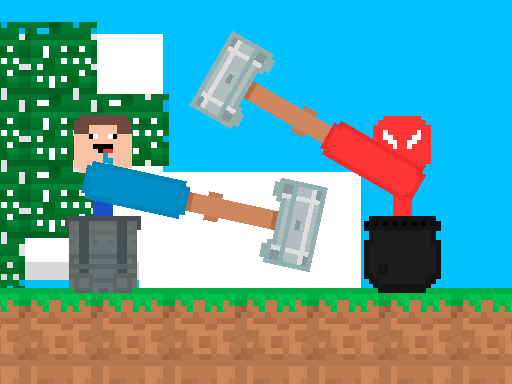
About Stickman vs Noob Hammer
Stickman vs Noob Hammer is a cooperative two-dimensional platform challenge where movement relies entirely on swinging and leveraging a hammer. Teaming up with a partner on the same screen, players must maneuver both characters across hazardous terrain, avoid dangerous obstacles, and safely reach the lucky box at the end of each stage to advance.
In Stickman vs Noob Hammer, standard walking is replaced with physics-driven hammer swinging. Players control distinct characters—a stickman figure and a voxel-styled noob companion—who must propel themselves back and forth across 2D platform environments using only their tools.
Every stage requires both teammates to travel through tricky layouts filled with obstacles. Progress is shared, meaning both players need to coordinate their movement to reach the exit lucky box together before unlocking access to subsequent levels.
Your goal
The primary objective is to maneuver both characters safely through each obstacle-laden course and touch the lucky box at the finish line. Because both participants must reach the goal together to earn the right to enter the next level, success depends on patient co-op navigation rather than rushing ahead individually.
How to play Stickman vs Noob Hammer
1. Start the game with a partner on your shared keyboard or compatible touch device.
2. Player 1 uses the WASD keys to shift weight and swing their hammer, while Player 2 controls their character with the Arrow keys.
3. Leverage the hammer head against solid ground and platforms to push or vault your character forward and backward.
4. Carefully navigate around hazards and obstacles placed along the path without losing control of your momentum.
5. Coordinate your movements so that both characters arrive at the lucky box to unlock the subsequent stage.
Controls and device support
Player 1 moves using the WASD keys, while Player 2 navigates using the Arrow keys. The game also supports mobile play through touch interactions.
- Controls: WASD + arrow keys
- Device support: Desktop + mobile
- Game frame: 800 x 600
Rules to keep in mind
- Movement must be achieved by using the hammer to push, swing, and travel back and forth across platforms.
- Both player characters must reach the lucky box at the end of the course to earn the right to advance to the next level.
- Players must actively avoid contact with environmental obstacles scattered throughout the stages.
What makes the challenge interesting
The core gameplay focuses on physics-based leverage and synchronization. Because standard locomotion is absent, players must learn how hammer placement dictates angle and momentum. A reckless push can launch a character backward or into danger, requiring careful touch and measured pacing.
Cooperative communication is equally vital. Since progress requires both characters to touch the goal, stronger navigators must wait, communicate, or assist their partner through difficult platform gaps, balancing speed against joint stability.
Tips for Stickman vs Noob Hammer
- Plant the hammer head firmly before pushing off to avoid unpredictable skids or erratic launches near stage ledges.
- Match your travel speed to your partner instead of racing forward, preventing isolated falls while waiting near the goal.
- Use small, controlled swings when approaching narrow platforms rather than sweeping power strokes that can overcorrect your trajectory.
- Survey obstacle placements across the screen before attempting difficult leaps to ensure a safe landing zone.
Stages and progression
Progression in the game is structured around clearing individual courses sequentially. Reaching the lucky box alongside your partner unlocks the right to proceed to the next stage.
To improve performance across levels, players can focus on refining their swing rhythm and coordinating clear callouts with their teammate to navigate complex obstacles with fewer resets.
Playing on different devices
On desktop computers, two players can share a single keyboard comfortably, with Player 1 assigned to WASD and Player 2 utilizing the Arrow keys.
The game also features mobile device support, allowing touchscreen users to experience the platforming action on portable screens.
The skills behind the game
As an arcade platformer, this title fits within the classic tradition of skill-based cooperative challenges. Players who enjoy collaborative physics games and obstacle navigation will find a familiar emphasis on timing and teamwork.
The game works well for casual practice sessions where two participants aim to build non-verbal coordination and test their patience navigating tricky environmental geometry together.
Who will enjoy this game
Players looking for a fun arcade game online with distinct two-player mechanics often gravitate toward unconventional locomotion titles. Stickman vs Noob Hammer provides that exact experience by turning the simple act of traversing a level into a shared physical puzzle.
Whether testing your skills alongside a friend or practicing solo coordination across split inputs, mastering the stickman vs noob hammer game requires developing a feel for steady hammer momentum rather than fast button tapping.
Games with a similar feel
Minecraft: While Minecraft offers open-ended voxel crafting and exploration across expansive 3D worlds, Stickman vs Noob Hammer adopts a noob aesthetic within a focused 2D obstacle-course platformer. Players wanting sandbox creativity should choose Minecraft, whereas those seeking a quick, physics-based co-op movement challenge will appreciate this title.
Frequently asked questions
Can I play Stickman vs Noob Hammer with a friend on one computer? Yes, local two-player support allows one participant to control their character using the WASD keys while the second participant uses the Arrow keys.
What is required to complete a level? Both players must successfully guide their characters across the terrain and touch the lucky box located at the end of the course to unlock the next stage.
Is Stickman vs Noob Hammer playable on mobile devices? Yes, the game includes support for mobile platforms alongside its primary desktop dual-keyboard control layout.
Something not right?
Tell us if the game does not load, the information is wrong or the content needs review.
Report a problem ›